Driver
Introduction / Purpose
The Driver form provides detailed records for drivers linked to transporters and used in trip and dispatch operations. The data is automatically synchronized from the Transport Management System (TMS) to ensure consistency, eliminate manual entry, and maintain compliance with driver licensing and assignment standards.
Each driver record captures key information such as name, license details, contact information, and associated transporter. Maintaining accurate driver records ensures reliable trip allocation, safety compliance, and efficient coordination of logistics activities.
How to Navigate
- From the main dashboard, click the Menu icon in the top-right corner.
- Navigate to the Transactions module.
- Under the Depot/Terminal section, select Driver.
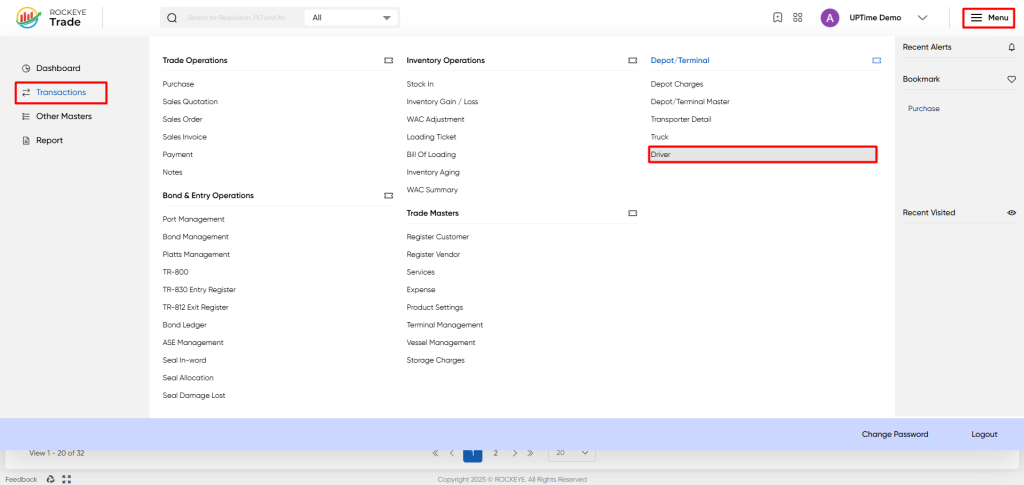
This opens the Driver List View displaying all driver records synced from TMS.
Listing
The Driver List View displays all registered drivers with essential operational and compliance details.
It includes the following components:
- Header Bar: Displays the module title (Driver) with quick-action icons for Search, Filter, and Refresh.
- Data Table: Lists all drivers synced from TMS, showing key fields such as Name, License Number, Transporter, and Status.
- Pagination Controls: Located at the bottom to navigate through multiple pages of driver records.
- The data table presents the following columns, providing detailed information for each driver:
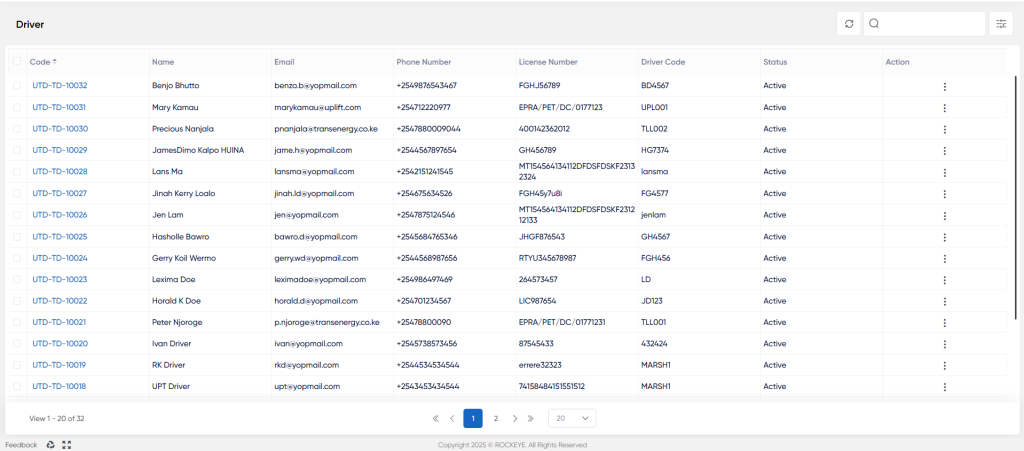
- Code*: A unique alphanumeric identifier assigned to each driver record (e.g., UTD-TD-10032). This serves as a hyperlink to view or edit the detailed driver profile.
- Name: Displays the full name of the driver as captured in the master record.
- Email: The driver’s registered email address used for communication and notifications.
- Phone Number: The contact number of the driver, including the country code (e.g., +254788009044).
- License Number: The official license or permit reference for the driver (e.g., EPRA/PET/DC/0177123).
- Driver Code: A secondary or operational reference linked to TMS for synchronization and tracking purposes.
- Status: Indicates whether the driver is currently Active or Inactive in the system. Active drivers are available for trip scheduling and dispatch operations.
- Action: Provides quick options such as View, Edit, or Deactivate, depending on user permissions.
Driver Form
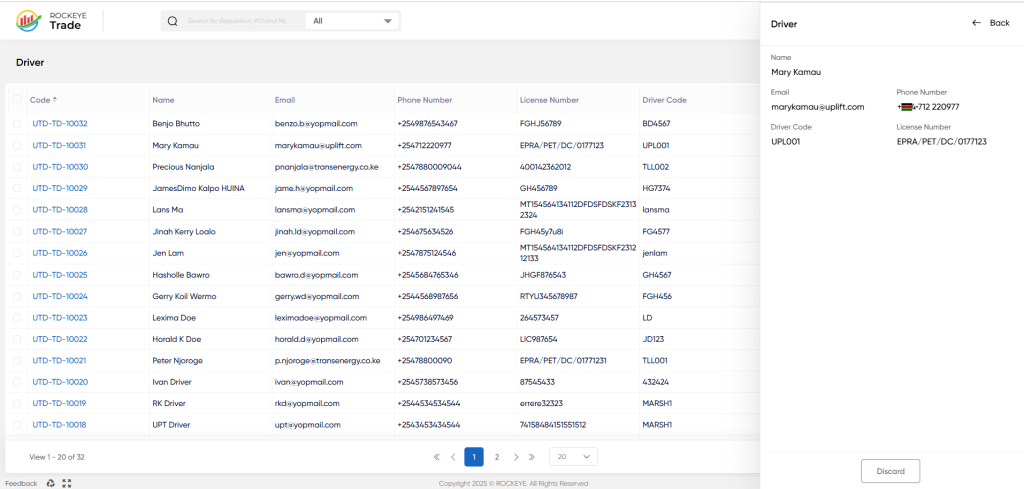
The Driver Form provides complete details for each driver record, synchronized automatically from TMS.
The form includes the following key fields and configurations:
- Driver Name*: The full legal name of the driver, as it appears on the official license.
- Driver Code: An internal or TMS-linked identifier used for cross-system synchronization.
- License Number*: The driver’s official license or permit number.
- Email: The driver’s registered email address.
- Phone Number*: The driver’s mobile number, used for communication and trip coordination.
Integration with TMS
- All driver records, license details, and transporter assignments are automatically synced from TMS.
- Any updates made in TMS—such as new driver creation, license renewal, or transporter reassignment—are automatically reflected in this module.
- Manual editing of TMS-synced fields is restricted to ensure data integrity and consistent synchronization between systems.
Refrence Video Link

