Loading Ticket
Introduction/Purpose
The Loading Ticket feature enables users to manage and record the loading of oil or white products for delivery. This process ensures accurate tracking of product quantities loaded, customer details, delivery types, and vehicle information, facilitating smooth logistics and inventory control.
How to Navigate
To access the Loading Ticket screen:
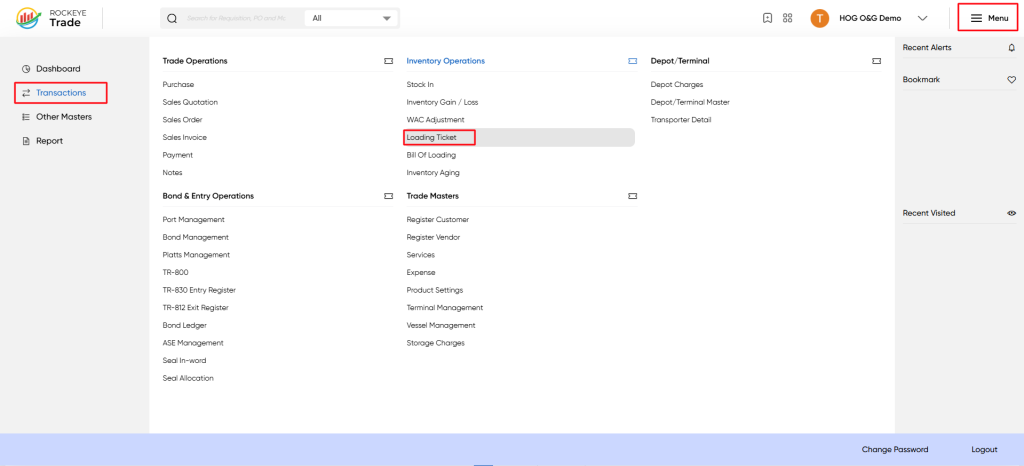
- Click the Menu icon at the top-right corner.
- Select Transactions from the left-hand menu.
- Under Inventory Operations, click Loading Ticket.
Listing
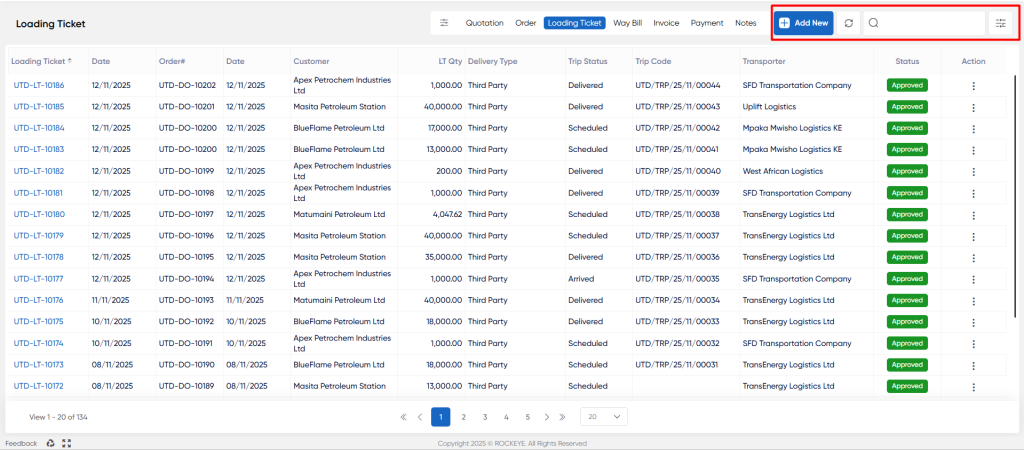
The list view displays all loading tickets with the following columns:
- Loading Ticket: Unique identifier for the loading ticket.
- Date: Date when the loading ticket was created.
- Order#: Associated sales order number.
- Order: Date Date of the sales order.
- Customer: Customer name receiving the product.
- LT Qty: Quantity loaded in liters (LT).
- Delivery Type: Type of delivery (e.g., Self, Third Party).
- Trip Status: Automatically updated from TMS to reflect the current status of the trip linked to the LT.
- Trip Code: The unique trip number for the scheduled trip linked to the LT, automatically updated from TMS.
- Transporter: Name of the transporter or logistics provider.
- Status: Approval status of the loading ticket (e.g., Approved).
- Action: Options to view, edit, or delete the record.
Additional Features:
- Add New: Create a new loading ticket.
- Refresh: Reload the list to see the latest entries.
- Search & Filter: Quickly find specific records using the search bar and filters.
Adding or Editing a Loading Ticket
To add or edit a loading ticket:
- Click Add New to create a new ticket or select an existing ticket from the list to edit.
- Fill in or update the required fields:
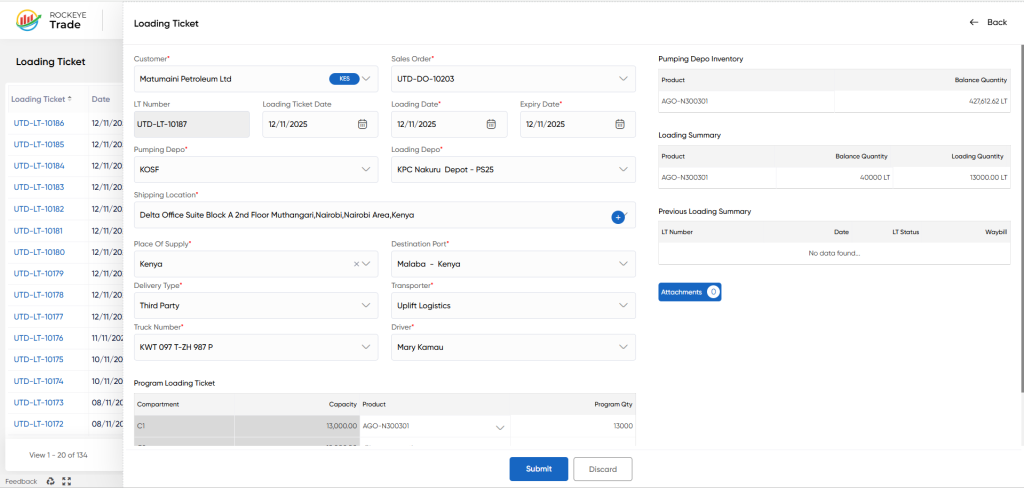
- Customer: Select the customer receiving the product.
- Sales Order: Select the associated sales order.
- LT Number: Auto-generated loading ticket number (read-only).
- Loading Ticket Date: Date when the loading ticket is created.
- Loading Date: Date when the loading occurs.
- Expiry Date: Expiry date of the loading ticket.
- Pumping Depo: Select the pumping depot.
- Loading Depo: Select the loading depot.
- Shipping Location: Specify the customer's delivery address/location
- Place Of Supply: Select the place of supply (e.g., country).
- Destination Port: Select the destination port.
- Delivery Type: Select the delivery type (e.g., Self, Third Party).
- Vehicle Number: Select the vehicle used for delivery.
Refrence Video Link

