With Holding Tax
Introduction/Purpose
Configure withholding tax (WHT) rules used in Trade transactions, including white products (e.g., AGO/Diesel, Gasoline). Each rule defines how the system calculates and presents WHT on purchases/sales and how it posts to accounting.This article explains how to add and manage Withholding Tax (WHT) master records in ROCKEYE Trade.It includes step‑by‑step instructions field definitions, examples for common oil/white‑product scenarios, accounting impact, best practices, troubleshooting and FAQs.
How To add Withholding Tax
Open Withholding Tax
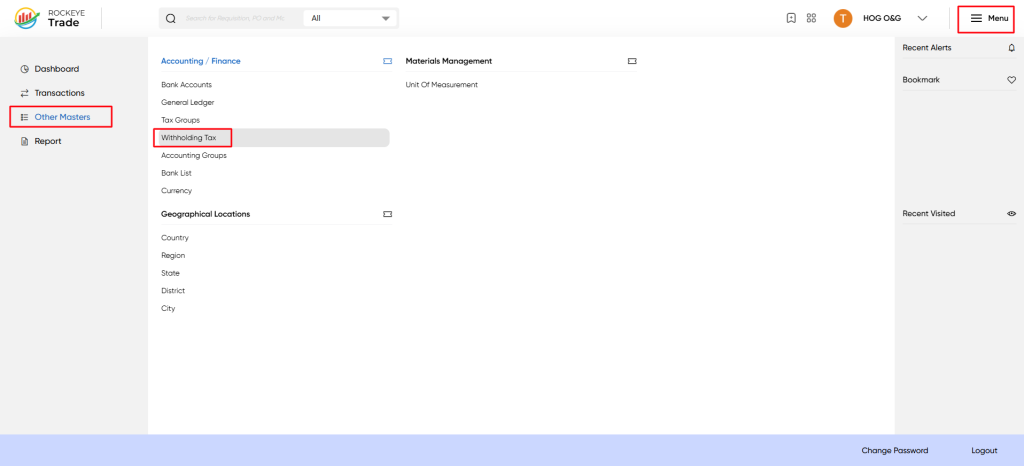
- From the main menu choose Other Masters → Accounting / Finance → Withholding Tax.
Listing
View the WHT list
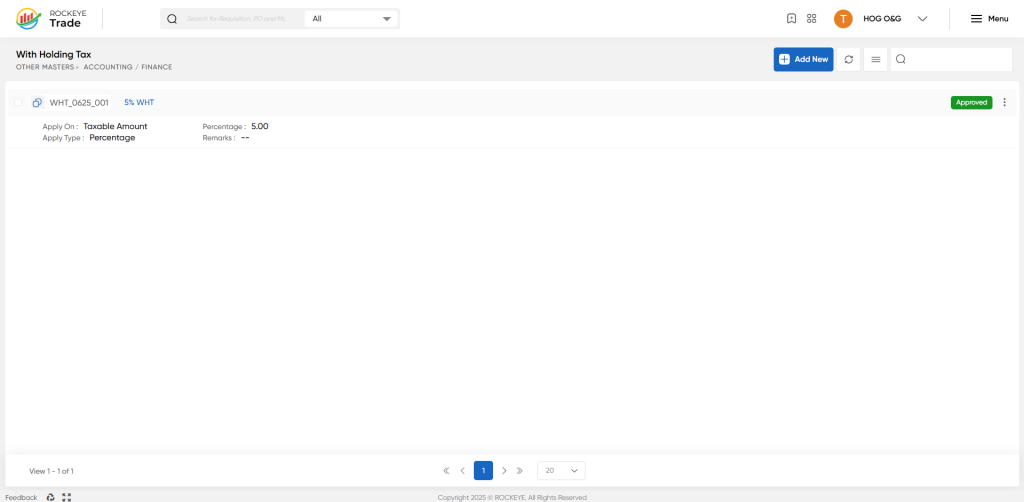
- The list displays WHT identifiers, name, Apply On, Apply Type and Percentage. Approved records show a green "Approved" label.
- Use the Search box and pagination controls to find entries.
Approval & status
- Approved (green) indicates the WHT master is active.
- Newly created records might require Finance approval before they appear in transaction dropdowns — verify approval workflow with Finance admins.
Edit / Delete
- Edit: Click the WHT name to open the right panel, update fields and Submit.
- Delete: If allowed, use row actions (three‑dot menu). If the WHT has transaction history, deletion is usually blocked — create a disabled/replacement WHT instead.
Bulk creation (CSV suggested columns)
- Prepare CSV for bulk import (if supported by your system). Suggested columns:
- name, apply_on, apply_type, percentage, remarks
- Example row:
- "5% WHT - Local","Taxable Amount","Percentage","5.00","Apply to local suppliers - white products"
How To Add Withholding Tax
Add a new WHT
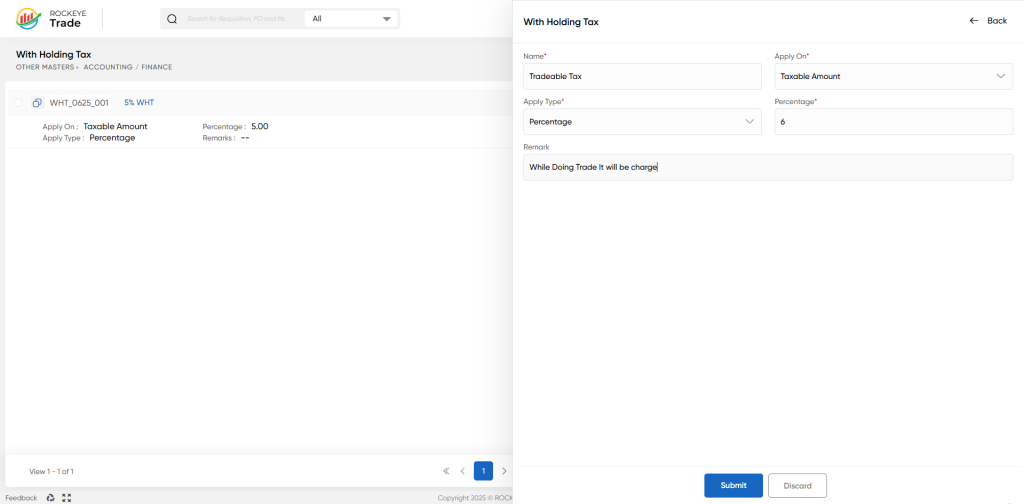
- Click Add New (blue button, top-right). A right‑panel form opens.
- Fill required fields and click Submit (or Discard to cancel).
- Name
- The unique name of the WHT master. Example: "WHT_0625_001 - 5% WHT" or "Tradeable Tax - 6%".
- Best practice: use a consistent prefix like WHT_<rate>_<region/code>.
- Apply On
- Controls the base on which WHT is calculated. Common values:
- Taxable Amount — WHT is calculated on the taxable portion of invoice lines.
- Invoice Amount — WHT is calculated on the invoice gross/net amount.
- Choose the rule that matches tax/regulatory requirements and your Finance policy.
- Controls the base on which WHT is calculated. Common values:
- Apply Type
- Percentage — WHT calculated as % of the base.
- Fixed / Amount — flat amount per invoice (if supported).
- Percentage / Amount
- Numeric value for calculation (e.g., 5.00 or 6.00 for percentages).
- Remarks
- Optional field for notes (e.g., "Apply for local supplier payments on white products").
Refrence Video Link

