Purchase
Introduction/Purpose
The Purchase module allows Oil Marketing Companies (OMCs) and Traders to record, manage, and reconcile the procurement of petroleum products. It supports marine supplies, imports, or local purchases and ensures compliance with Kenyan trading and tax regulations.
The Purchase module in ROCKEYE Trade helps manage procurement of petroleum products (e.g., PMS, AGO, Jet Fuel, Kerosene). It captures the full purchase cycle – from initiation to reconciliation – ensuring compliance, accuracy in costs, and smooth inventory posting.
How To Navigate
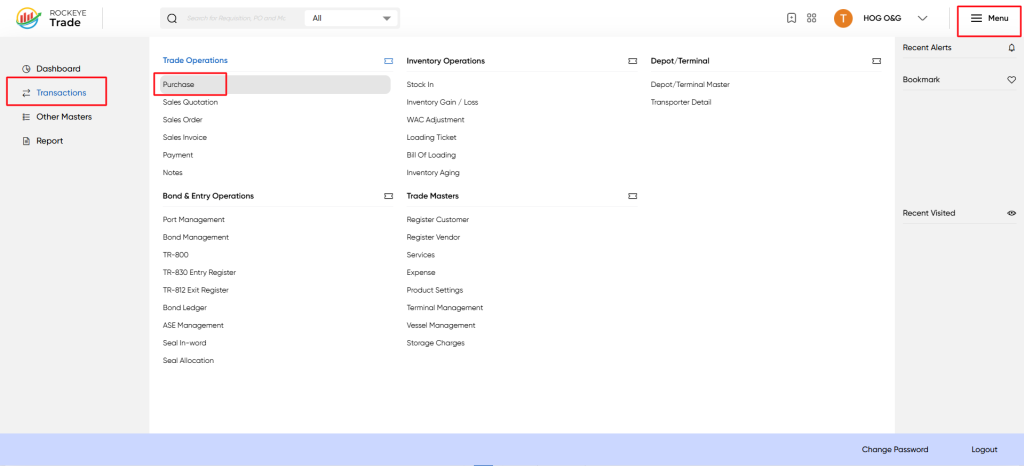
From the Menu (☰) on the top right, go to Transactions → Trade Operations → Purchase.Menu → Transactions → Trade Operations → Purchase.
Listing
The Purchase list view appears, showing all Purchase documents and their current status.
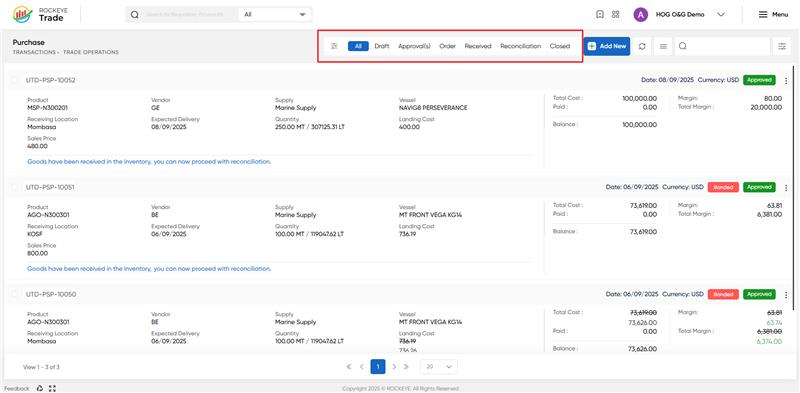
Purchases are categorized by stages: Draft → Approvals → Order → Received → Reconciliation → Closed.
All – every purchase
Draft – not yet submitted
Approval(s) – pending approver action
Order – purchase order issued to vendor
Received – goods received in inventory system
Reconciliation – matching quantities, costs, and invoices
Closed – fully reconciled and settled
Each row shows key info:
- Document No. (e.g. UTD-PSP-10023)
- Product code (e.g. MSP-N300201)
- Vendor, Supply type, Vessel
- Quantity & Landing Cost
- Total Cost, Margin, Paid, Balance
How To Add Purchase Order
When you click Add New, the system opens the purchase entry form. Key fields:
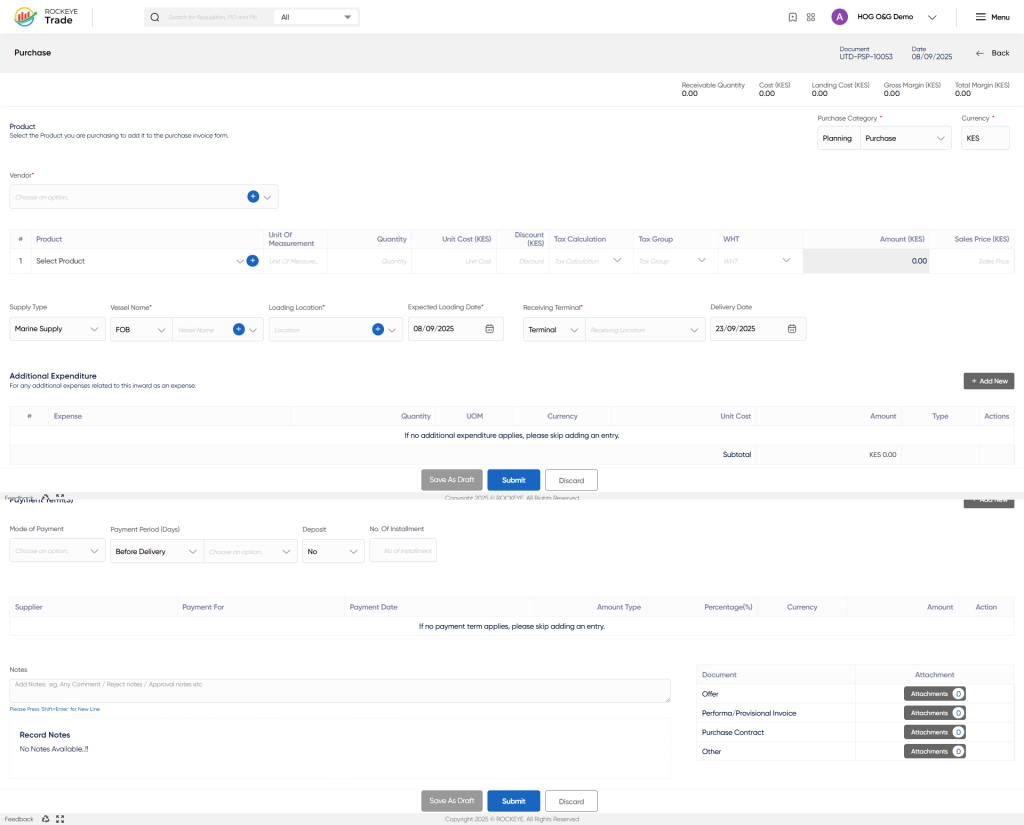
Product & Vendor Details
- Select the Product (e.g., PMS, AGO).
- Choose the Vendor (Supplier).
- Enter Unit of Measure, Density, Quantity, and Unit Cost.
- Sales Price can be defined to determine margins.
Supply & Vessel Information
- Define Supply Type (Marine Supply, Import, Local, etc.).
- Select the Vessel Name (carrying the cargo).
- Input Loading Location & Receiving Terminal (e.g., Horizon Terminal, KOT, Nakuru Depot).
- Specify Expected Loading and Delivery Dates.
Cost & Margin Calculation
- System auto-calculates:
- Landing Cost (CIF + charges).
- Gross Margin & Total Margin in both foreign and local currency.
- Exchange Rate (if transaction in USD).
Additional Expenditures
- Capture all ancillary charges linked to the cargo:
- Examples: Clearance Fees, KPC Pipeline Fees, Storage, Handling, Insurance, etc.
- Enter Quantity, Unit of Measure, Unit Cost, and currency.
- These expenses are added to the total landing cost for accurate reconciliation.
Payment Terms
- Define the Mode of Payment (Cash on Delivery, LC, Credit, etc.).
- Configure Installments if applicable.
- Add Payment Schedules for Supplier and Service Providers (e.g., vendor for cargo + KPC for clearance).
- Currency and percentage allocations can be defined.
Supporting Documents
Attach commercial and shipping documents for compliance and audit trail:
- Offer / Proforma Invoice
- Purchase Contract
- Customs Documents (if applicable)
- Vessel B/L, Certificate of Quality, etc.
Notes & Submissions
- Add internal notes (comments, remarks, approval instructions).
- Save or click Submit for processing.
- Once submitted, the purchase moves to the Approval stage.
Refrence Video Link

