Stock In
Introduction/Purpose
The Stock In feature in the Trade module allows users to record the receipt of oil or white products into inventory. This process ensures accurate tracking of product quantities, suppliers, and terminals, facilitating effective inventory management.'
How to Navigate
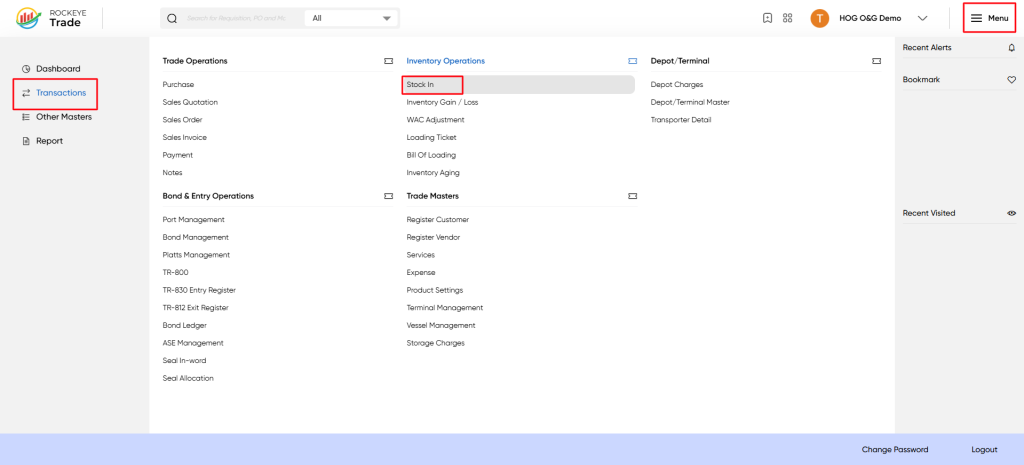
To access the Stock In screen, follow these steps:
- Click on the Menu icon on the top-right corner of the screen.
- Select Transactions from the left-hand side menu.
- Under Inventory Operations, click on Stock In.
Listing
The Stock In list displays all recorded stock receipts with the following details:
- Receipt No: Unique identifier for the stock receipt.
- Date Date: when the stock was received.
- Terminal: Terminal or depot where the stock is received.
- Product: Product code and description.
- Quantity: Quantity of product received.
- UOM: Unit of Measure (e.g., MT, LT, M³).
- Plann Ref: Reference to the purchase plan.
- Supplier: Supplier name from whom the stock is received.
- Approval Status: Status of the stock receipt (Draft/Approved).
- Action: Options to view, edit, or delete the record.
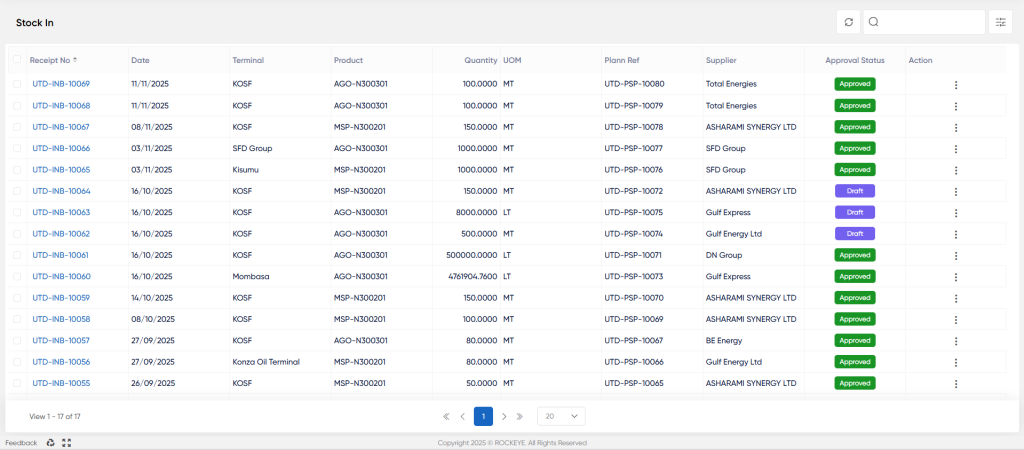
- Use the search and filter options to quickly locate specific stock receipts.
Recording & Updates
To view or add details of a stock receipt:
- Click on the Receipt No link from the Stock In list.
- The Stock In detail panel will open on the right side of the screen.
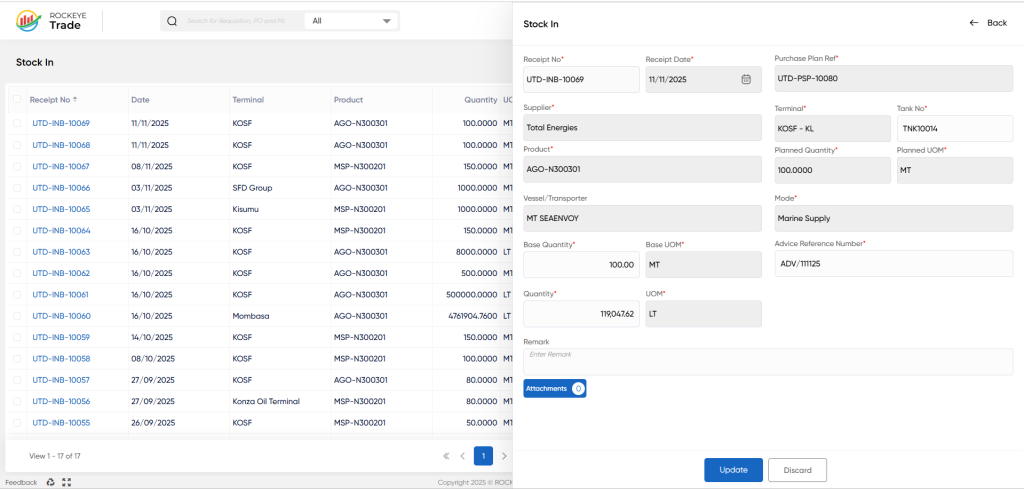
Stock In Details Fields:
- Receipt No: Auto-generated unique receipt number.
- Receipt Date: Date of stock receipt (editable for new entries).
- Purchase Plan Ref: Reference number of the associated purchase plan.
- Supplier: Name of the supplier providing the stock.
- Terminal: Terminal or depot receiving the stock.
- Tank No: Tank number where the stock is stored (optional).
- Product: Product code and description.
- Planned: Quantity Quantity planned to be received.
- Planned UOM: Unit of measure for the planned quantity.
- Vessel/Transporter: Name of the vessel or transporter delivering stock.
- Mode: Mode of delivery (e.g., Marine Supply).
- Base Quantity: Base quantity of the product received.
- Base UOM: Unit of measure for the base quantity.
- Quantity: Actual quantity received.
- UOM: Unit of measure for the actual quantity.
- Advice Reference No: Reference number for advice or delivery note (optional).
- Remarks: Additional notes or comments (optional).
Submitting Stock In"
- After verifying all details, click the Submit button to save and finalize the stock receipt.
- If you want to discard changes, click Discard.
Approval Status
- Draft: The stock receipt is saved but not yet approved.
- Approved: The stock receipt has been reviewed and approved, updating inventory records.
Refrence Video Link

