Waybill
Introduction/Purpose
This guide details the process of generating and managing Way Bills in the Rockeye Trade module, specifically for the dispatch and transportation of bulk liquid commodities such as Crude Oil, Petrol (PMS), Diesel (AGO), Kerosene, and other white products. A Way Bill, often managed under the broader "Bill of Loading" section in the system, is a crucial shipping document that accompanies a consignment of goods during transit. For oil and white products, it serves as a dispatch note, a record of goods loaded onto a specific transport vehicle (e.g., tanker truck), and includes vital details for delivery, customs, and eventual invoicing.
How To Navigate
To access the Way Bill module:
- Click on the "Menu" button located at the top right corner of the Rockeye Trade dashboard.
- From the expanded menu, under "Trade Operations," click on "Transactions."
- Under the "Transactions" sub-menu, click on "Sales," then select the "Way Bill" tab within the "Bill of Loading" page.
Listing
Upon navigating to the "Bill of Loading" page with the "Way Bill" tab selected, you will see a list of all previously created Way Bills. This view provides an overview of their status and key details:
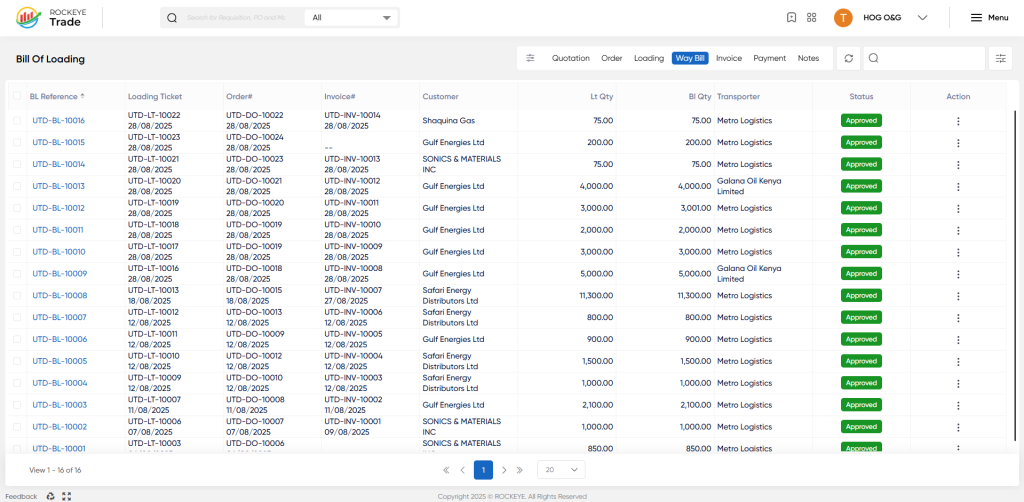
- BL Reference: The reference number for the overall Bill of Lading, which may cover one or more Way Bills, typically representing a larger consignment or a master document.
- Loading Ticket: The reference number of the specific Loading Ticket associated with this Way Bill, indicating the physical loading operation.
- Order#: The Sales Order number that authorized the sale and dispatch.
- Invoice: The Sales Invoice number linked to this shipment. A Way Bill can either be generated from an existing invoice or lead to the creation of a new one.
- Customer: The name of the customer receiving the product.
- LT Qty: The total quantity recorded on the associated Loading Ticket.
- BL Qty: The total quantity of product specified on this particular Way Bill.
- Transporter: The name of the transport company responsible for delivery.
- Status: The current processing stage of the Way Bill:
- Draft: The Way Bill is incomplete and has not yet been submitted.
- Pending: The Way Bill has been submitted and is awaiting approval.
- Approved: The Way Bill has been approved, signifying the official dispatch of goods.
- Action: Click the three-dot menu (ellipsis) for options related to the specific Way Bill:
- View: To see full details of the Way Bill.
- Edit: To modify details of a Way Bill (usually restricted to "Draft" or "Pending" statuses, depending on user roles).
- Print Way Bill: To generate a printable version of the Way Bill document.
- Create Invoice: This option allows for the direct generation of a Sales Invoice based on the approved Way Bill, simplifying the invoicing process post-dispatch.
- Activity Log: To view an audit trail of changes and actions performed on the Way Bill.
How To Add New Waybill
To create a new Way Bill for a dispatched consignment:
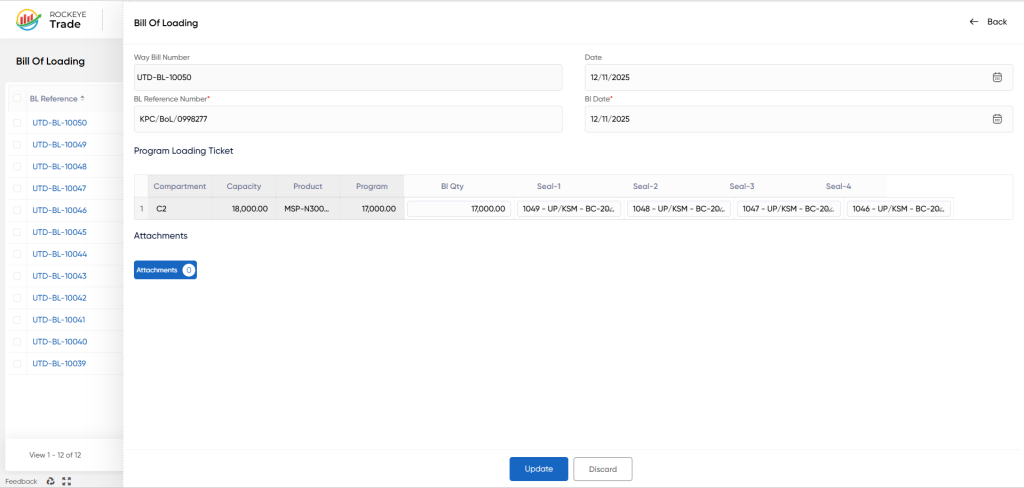
- The "Way Bill" form will appear. Fill in the following details:
- Way Bill Number: This is typically an auto-generated unique identifier for this specific dispatch document.
- Date: Use the date picker to select the date the Way Bill is being issued, which should align with the dispatch date.
- BL Reference Number: Enter or select the reference number of the overarching Bill of Lading if one exists, linking this specific Way Bill to a larger consignment.
- BL Date: Select the date corresponding to the
BL Reference Number.
- Program Loading Ticket Section (Detailed Dispatch Information):
This table is critical for detailing the actual products and quantities loaded into each compartment or vehicle. You will typically select from existing Loading Tickets.- Capacity: The carrying capacity of the compartment or vehicle.
- Product: The specific oil or white product being loaded (e.g., Crude Oil, PMS, AGO). This should correspond to the product on the associated Loading Ticket.
- Program: Refers to a specific sales program, contract, or loading instruction under which the product is being dispatched. This helps categorize and track sales against specific agreements.
- BL Qty: The actual quantity of product loaded into this compartment/vehicle as per the Way Bill. This quantity is crucial for invoicing and inventory deduction.
- Seal-1, Seal-2: Enter the unique security seal numbers applied to the compartment outlets. These seals ensure product integrity and prevent tampering during transit.
- Add Additional Information (Optional):
- Attachment: Click the "Attachment" button to upload any supporting documents, such as weighbridge tickets, loading supervisor sign-offs, or quality inspection reports.
- Review and Submit:
- Carefully review all the entered details, especially quantities and seal numbers, for accuracy. Inaccuracies can lead to discrepancies in inventory and invoicing.
- If all information is correct, click "Submit" to save the Way Bill. It will typically enter a "Draft" or "Pending" status based on system configuration and user permissions.
- If you wish to abandon the entry, click "Discard."
Upon successful submission, the Way Bill will appear in the "Way Bill" list view with its corresponding status. An "Approved" Way Bill triggers inventory deductions and often facilitates the creation of the final sales invoice.

