Storage Charges
Introduction/Purpose
The Storage Charges master is a critical component for managing the costs associated with storing white products (oil) at various terminals. This module allows you to define specific storage rules by linking a product to a terminal and setting the applicable charges and free periods.
Properly configuring these rules is essential for accurately calculating storage costs, which can then be passed on to customers or recorded for internal accounting. The system uses these pre-defined rules to automatically calculate charges based on how long a product remains in storage.
How To Navigate
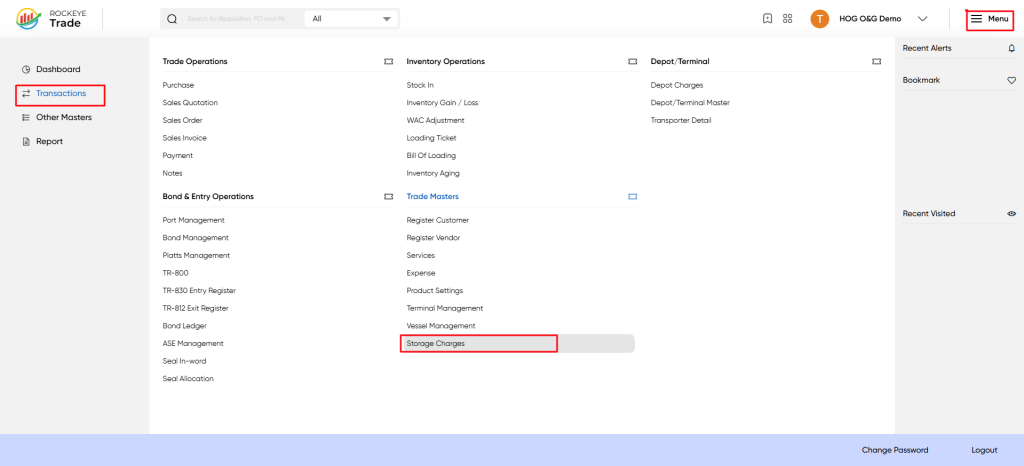
- From the main dashboard, click the ☰ Menu icon in the top-right corner.
- In the navigation panel, go to Transactions.
- Under the Trade Masters section, click on Storage Charges.
Listing
When opened, the Storage Charges List shows all configured charges.
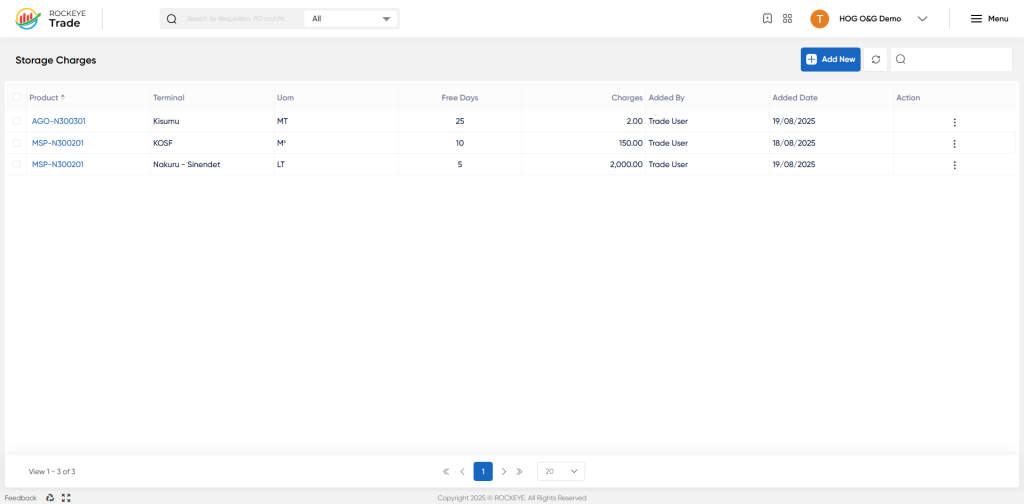
Columns on the list screen:
- Product – Product reference (e.g., AGO-N300301, MSP-N300201).
- Terminal – Terminal/depot where the product is stored (e.g., Kisumu, KOSF, Nakuru).
- UOM – Unit of measurement (e.g., MT = Metric Ton, LT = Litre, M³ = Cubic Meter).
- Free Days – Allowable storage days without charges.
- Charges – Charge applied beyond free days (per selected unit).
- Added By / Added Date – Details of the creator.
- Action – Edit, delete, or update storage charge records.
Actions available:
- Add New → Create a new storage charge entry.
- Edit/Delete → Update or discontinue a record.
- Search/Filter → Quickly locate existing charge settings.
How To Add Storage Charges
Click Add New to configure a new storage charge rule.
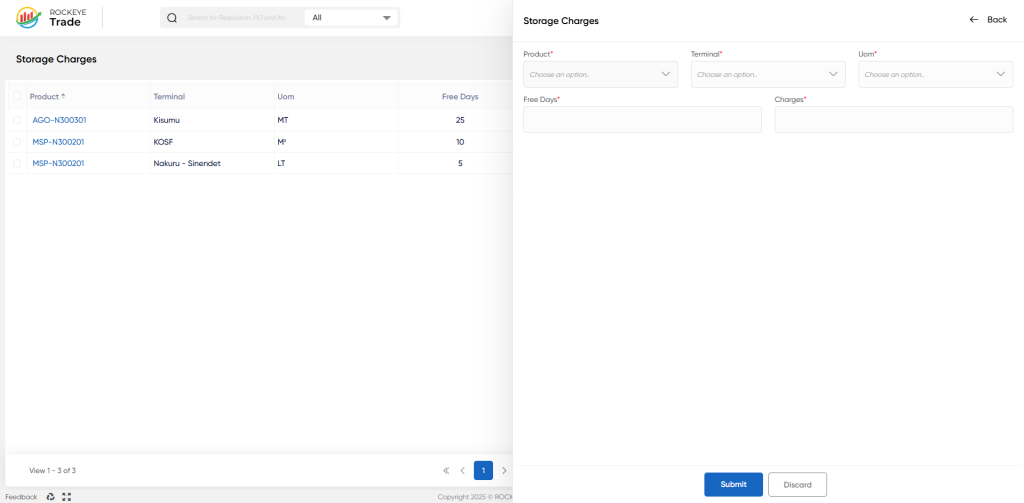
Storage Charge Details
- Product* → Select the oil product (AGO, PMS, Jet A1, Kerosene, etc.).
- Terminal* → Assign a terminal where the charge applies (e.g., Nakuru or KOSF).
- UOM (Unit of Measure)* → Define unit basis (LT, MT, M³, KL).
- Free Days* → Enter how many days storage is free of cost (e.g., 10 days).
- Charges* → Enter the charge rate applied per unit per day after free days.
Action Buttons
- Submit → Save the new entry.
- Discard → Cancel and return to the list.
Refrence Video Link

