Vessel Management
Introduction/Purpose
The Vessel Management master is a centralized registry for all marine vessels used to transport your white products (oil). Maintaining an accurate and detailed vessel master is critical for logistical planning, chartering operations, tracking shipments, and ensuring compliance.
By defining each vessel's specific attributes—such as its name, IMO number, capacity (Deadweight), and dimensions—you can easily assign them to trade transactions, manage schedules, and maintain a complete record of your shipping assets.
How To Navigate
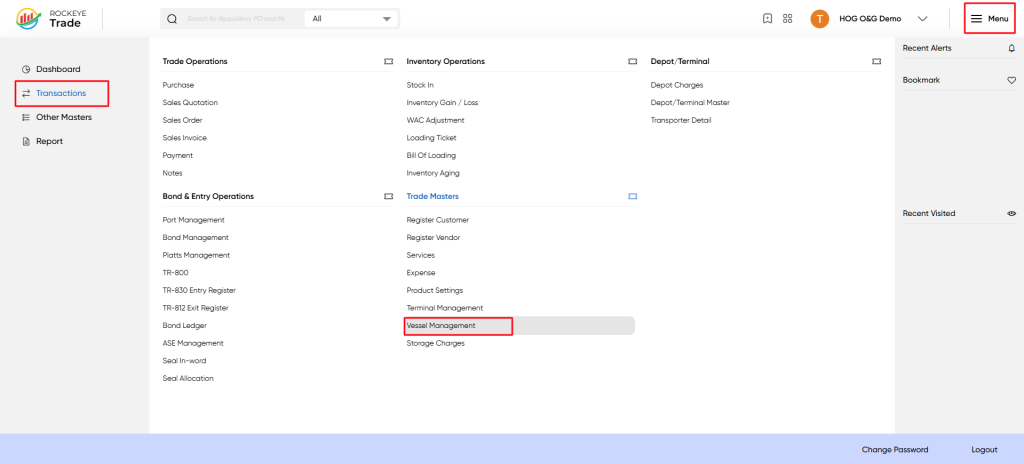
To access Vessel Management:
Menu → Transactions → Trade Masters → Vessel Management
Listing
When you open Vessel Master, the system shows the list of all registered vessels.
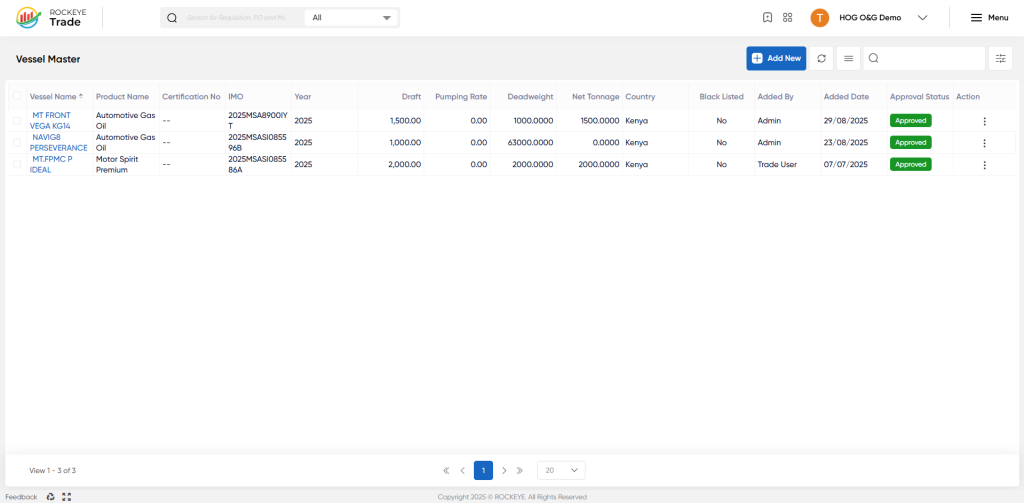
Columns on the list:
- Vessel Name – Official name of the vessel (e.g., MT FRONT VEGA KG14).
- Product Name – The product it is linked to (e.g., AGO, PMS).
- Certification No – Optional certificate reference.
- IMO – International Maritime Organization vessel number.
- Year – Year of registration/build.
- Draft – Water displacement draft (indicative loading depth).
- Pumping Rate – Pumping output capacity.
- Deadweight – Total weight-carrying capacity.
- Net Tonnage – Net volume capacity.
- Country – Country of registration/operation.
- Blacklisted – If vessel is blacklisted (Yes/No).
- Added By / Added Date – Created or updated information.
- Approval Status – Approved / Pending.
- Action – Edit or delete vessel records.
Additional Actions:
- Add New → Register a new vessel into the master.
- Search/Filter → Locate a vessel quickly.
- Edit/Delete → Modify existing vessel information.
How To Add
Click Add New to add details of a new vessel.
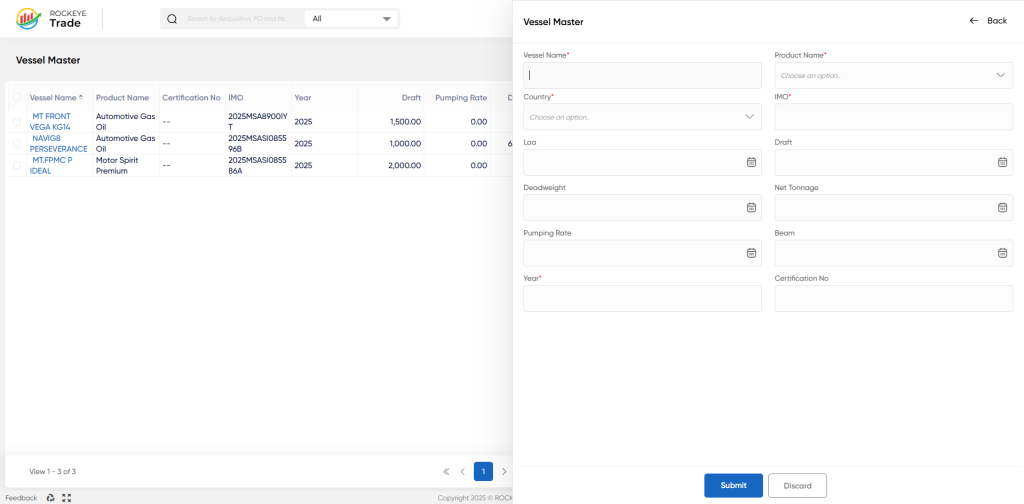
Vessel Information Fields
- Vessel Name* → Registered vessel name.
- Product Name* → Link the main white product being carried (AGO, PMS, Jet A1, etc.).
- Country* → Country of vessel registration (e.g., Kenya, UAE).
- IMO* → International Maritime Organization compliance number.
- LOA (Length Overall) → Define vessel length.
- Beam → Vessel width measurement.
- Draft → Draft measurement for loading capacity.
- Deadweight → Maximum carrying capacity (in MT).
- Net Tonnage → Net cargo tonnage.
- Pumping Rate → Loading/unloading pumping rate per hour.
- Year* → Year of manufacturing/registration.
- Certification No → Enter classification certificate number (if applicable).
Action Buttons
- Submit → Save the vessel record.
- Discard → Cancel entry operation.
Refrence Video Link

