Product Setting
Introduction/Purpose
The Product Settings master is where you define the core attributes of the physical commodities you trade, such as white products (e.g., Kerosene, Jet A-1, Automotive Gas Oil). This is a foundational step in setting up your trade module.
Creating a product in this master establishes a single source of truth for its properties, including its name, units of measurement, accounting classifications, and density for volume-to-weight conversions. Once defined, these products can be used consistently across all trade operations, from purchase and sales to inventory management.
How To Navigate
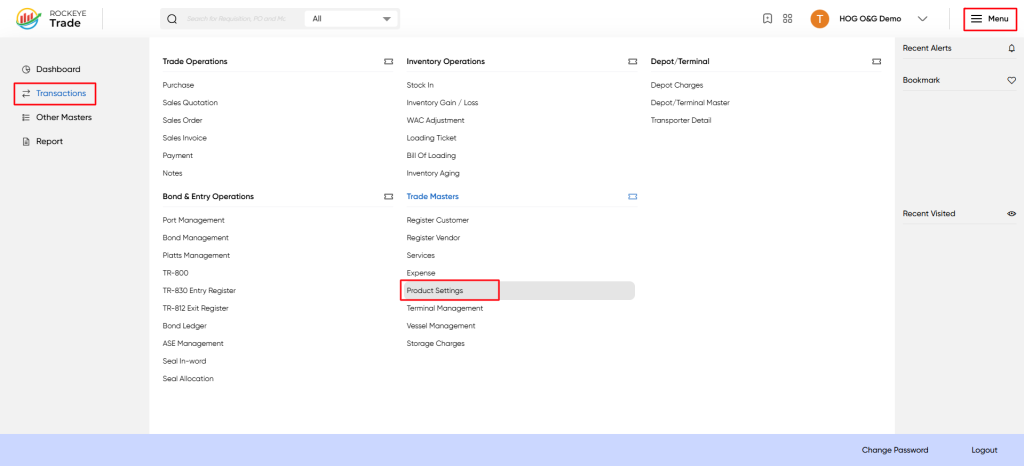
To access Product Settings:
Menu → Transactions → Trade Masters → Product Settings
Listing
When you open Product Settings, you will see a list of all configured products.
Columns Explained:
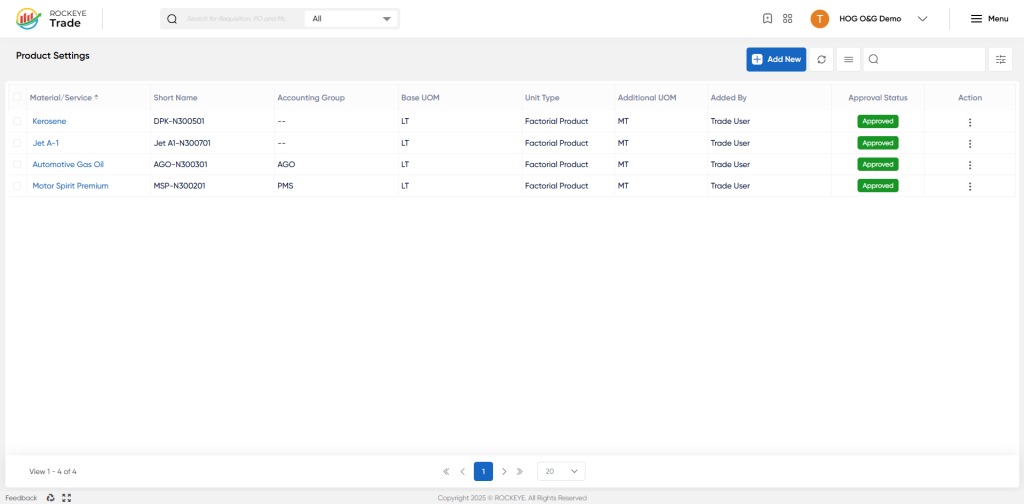
- Material/Service – Name of the product (e.g., PMS, AGO).
- Short Name – System-assigned short code (e.g., MSP-N300201).
- Accounting Group – Mapped business group (e.g., AGO, PMS).
- Base Unit of Measurement (UOM) – Primary unit (e.g., LT = Litre, MT = Metric Ton).
- Unit Type – Defines if product is Single UOM or Factorial Product (multiple UOMs linked).
- Additional UOM – Secondary unit for conversion (e.g., MT if base is LT).
- Added By – The user who created the record.
- Approval Status – Approved / Pending status of the product.
- Action – Option to edit/update records.
Available Actions:
- Add New → Configure a new product.
- Search/Filter → Quickly find existing products.
- Edit/Delete → Update or remove a product setup.
How To Add Product Setting
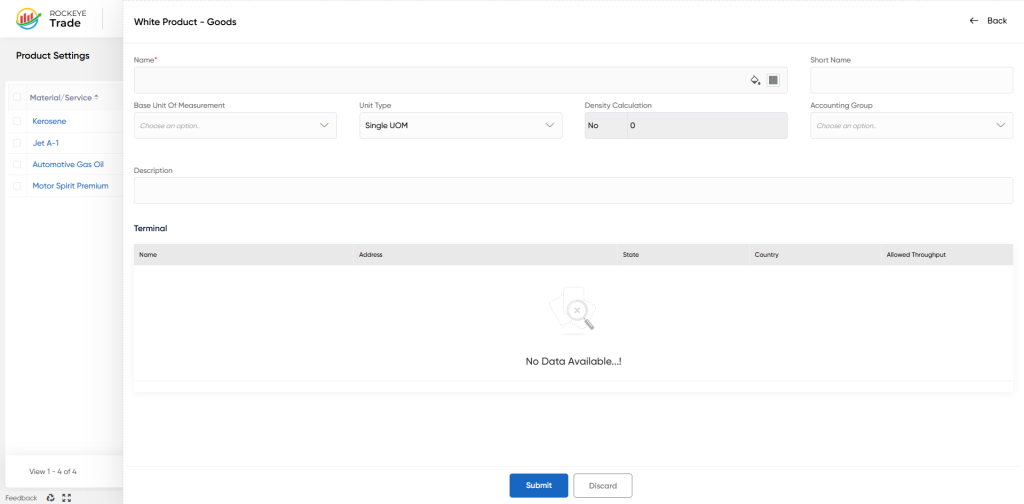
Click Add New to open the form for defining a new oil product.
Product Information
- Name* → Full product name (e.g., “Motor Spirit Premium”).
- Short Name → System-generated or user-defined code.
- Accounting Group → Link product with correct finance reporting group.
Measurement Details
- Base UOM* → Select default UOM (e.g., LT, MT, BBLS).
- Unit Type* → Choose from:
- Single UOM → If the product is only traded in one unit.
- Factorial Product → If conversion between UOMs is required (e.g., MT ↔ LT via density).
- Additional UOM → Define the secondary UOM (e.g., convert LT → MT).
- Density Calculation → Enter density factor if you want weight/volume conversion.
Description
- Provide details about the product → e.g., "Refined petroleum product used as jet fuel."
Terminal Mapping
At the bottom, you can assign products to specific terminals with throughput controls:
- Name, Address, State, Country – Identify the terminal location.
- Allowed Throughput – Fix throughput limits for control.
When all entries are completed, click Submit to save or Discard to cancel.
Refrence Video Link

