ASE Management
Introduction/Purpose
In the context of Kenya's oil and gas importation and trading, ASE stands for Adjustment of Stock Entry. It is a formal customs-related transaction used to document a change in the ownership or quantity of petroleum products (like petrol, diesel, kerosene) that are held within a customs-bonded warehouse or depot.
Think of it as an official "ledger adjustment" that is recognized by the Kenya Revenue Authority (KRA). It is performed after the initial import declaration (e.g., a TR-800 entry) has been made but before the customs duties and taxes on the product have been paid.
Why is ASE Management Critical in Kenya?
The ASE process is a cornerstone of the downstream oil trading industry in Kenya, primarily driven by these common business scenarios:
a) Inter-OMC Transfers (The Primary Use Case)
This is the most frequent reason for an ASE. An Oil Marketing Company (OMC) that imports a large cargo (the "Importer") often sells portions of that product to smaller OMCs while the fuel is still in the bonded facility (like the Kenya Pipeline Company - KPC depots, or private facilities like VTTI).
- Scenario:
- Importer A (e.g., Gulf Express) imports 10,000 MT of diesel. The entire quantity is now under their name in the customs bond ledger.
- Importer B (a smaller OMC) needs 500 MT but didn't participate in the import. They agree to buy 500 MT from Importer A.
- Instead of Importer A paying duties on all 10,000 MT and then selling to Importer B, they use an ASE.
- An ASE is created to decrease Importer A's bonded stock by 500 MT and simultaneously increase Importer B's bonded stock by 500 MT.
- Benefit: Ownership is transferred without anyone paying customs duty yet. Importer B can now clear their 500 MT from the bond and pay the duties only on that specific quantity when they are ready to sell it into the local market. This is crucial for managing cash flow and customs liability.
b) Stock Re-allocation
An importer might need to re-allocate stock between different internal accounts or for specific projects. An ASE provides the formal mechanism to do this within the customs system.
c) Documenting Operational Gains or Losses
During storage and handling, petroleum products can experience slight volume changes due to temperature (expansion/contraction) or operational factors. An ASE can be used to formally declare these gains or losses to the KRA, ensuring that the book stock in the customs system matches the physical stock in the tank.
How To Navigate
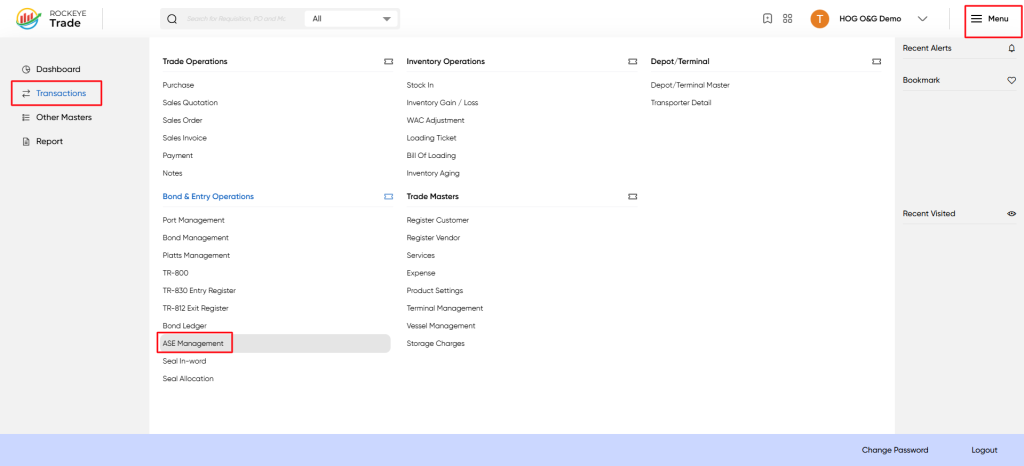
- From the main dashboard, click the Menu icon in the top-right corner to open the main navigation panel.
- In the navigation panel, click on the Transactions module.
- Under the Bond & Entry Operations section, select ASE Management.
- Linking to Original Import: The form requires linking the ASE to the source of the product by asking for:
- Importer From: The original owner of the stock.
- TR 800 Entry Number: The original customs import declaration. This proves the product is legitimately held in bond.
- Vessel / Cargo Reference: Provides a clear audit trail back to the specific shipment.
- Defining the Adjustment: The core of the transaction is captured in the Increase Quantity and Decrease Quantity fields. For an inter-OMC transfer, one ASE would be a "Decrease" for the seller, and a corresponding ASE would be an "Increase" for the buyer.
- Approval and Record-Keeping: Once submitted and approved (both internally and by KRA), the transaction appears in the ASE Management list with an "Approved" status and a unique Document. This list serves as a permanent, auditable record for all stock adjustments, which is vital for customs compliance and inventory audits.
Listing
Upon accessing ASE Management, you will be presented with a list of all existing ASE documents. This screen provides an overview of all quantity adjustments that have been processed or are pending.
- Header Bar: Contains the module title ("ASE Management") along with "Add New" button and action icons for search, filter, and more options.
- Data Table: The main area displaying a list of all ASE entries with key details in columnar format.
- Pagination Controls: Located at the bottom, allowing navigation through multiple pages of entries.(Refer to Screenshot 2 for visual guidance)
The data table presents the following columns, providing essential details for each ASE entry:
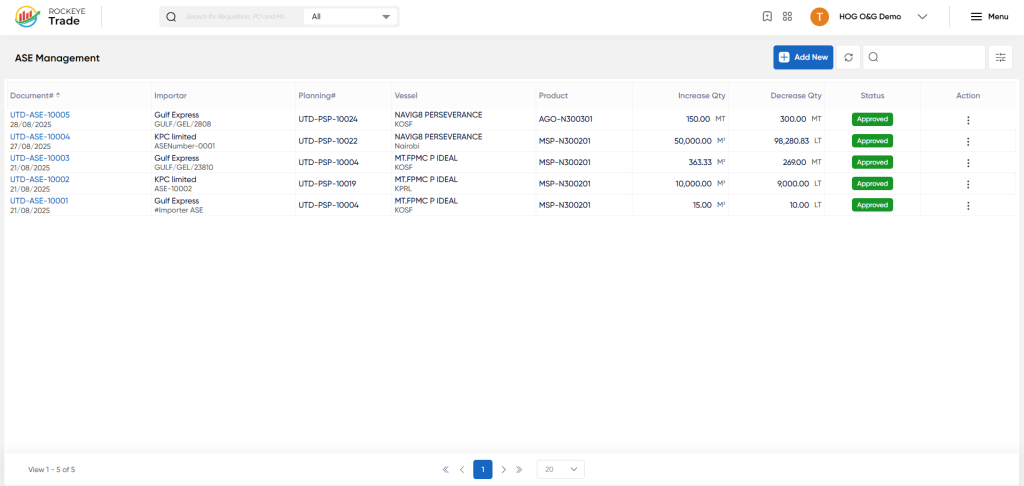
- Document : A unique identifier assigned to each ASE adjustment document (e.g., UTD-ASE-1005). This is typically a hyperlink to view detailed information about the specific ASE.
- Importer: The name of the importer associated with the bonded goods being adjusted.
- Planning: A reference number related to planning or the original entry that this ASE document is amending.
- Vessel: The name of the vessel involved in the original shipment of the bonded goods.
- Product: The product code or name of the commodity for which the adjustment is being made (e.g., AGO-N300301 for oil, MSP-N300201 for white product).
- Increase Qty: The quantity by which the product's bonded stock is increased, along with its Unit of Measure (UOM).
- Decrease Qty: The quantity by which the product's bonded stock is decreased, along with its Unit of Measure (UOM).
- Status: Indicates the current state of the ASE document (e.g., "Approved," "Draft," "Pending Approval").
- Action: An ellipsis (...) icon, typically providing options to View, Edit, or Delete the ASE entry (subject to user permissions and status).
How To Add ASE Management
To record a new adjustment to bonded stock:
- From the ASE Management list view, click the "+ Add New" button located in the top right corner of the screen.
- A side panel will open, displaying the "ASE Management" form.
- Fill in the required fields:
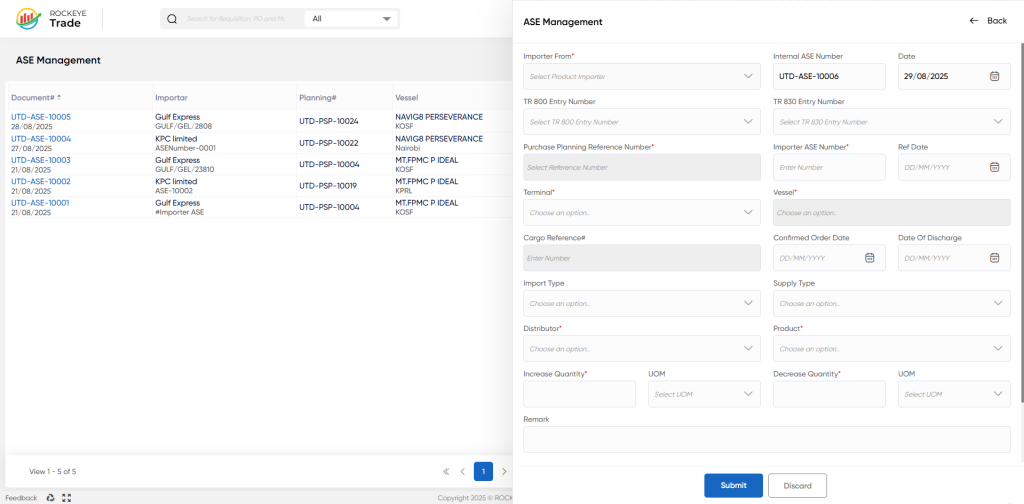
- Importer From *: Select the relevant importer from the dropdown list.
- Internal ASE Number: This field is often auto-generated by the system but may be editable.
- Date: Select the effective date of the adjustment using the date picker.
- TR 800 Entry Number: Select or enter the reference number of the original bond entry (TR-800) that this ASE is amending.
- Purchase Planning Reference Number *: Select or enter the relevant purchase or planning reference.
- Importer ASE Ref Date: The reference date provided by the importer for this ASE.
- Terminal *: Select the terminal where the bonded goods are stored.
- Vessel *: Select the vessel associated with the original bonded entry.
- Confirmed Order Date: The date when the order was confirmed.
- Date Of Discharge: The date when the cargo was discharged from the vessel.
- Cargo Reference#: Any specific cargo reference number.
- Import Type: Select the type of import (e.g., direct import, transshipment).
- Supply Type: Select the type of supply.
- Distributor *: Select the distributor involved.
- Product *: Select the specific product (e.g., oil or white product) for which the adjustment is being made.
- Increase Quantity: Enter the quantity by which the product's bonded stock needs to be increased. Select the appropriate
UOM(Unit of Measure). - Decrease Quantity: Enter the quantity by which the product's bonded stock needs to be decreased. Select the appropriate
UOM(Unit of Measure).- Note: You would typically fill either "Increase Quantity" or "Decrease Quantity" for a single ASE document, depending on the nature of the adjustment. If both are filled, the system's logic for net adjustment will apply.
- Remark: Add any additional notes or explanations regarding the adjustment.
- Once all required information is entered, click the "Submit" button to save the new ASE entry.
- If you wish to abandon the entry, click "Discard."

