TR-800
Introduction/Purpose
The TR-800 form in Rockeye Trade (and in Kenyan bonded‐warehousing practice) captures all the critical details for importing oil or white‐product cargo under bond. It ensures compliance with Kenya Revenue Authority (KRA) customs requirements and your company’s internal bond management process.
It essentially registers the bonded entry of oil/petroleum cargo into Kenya before clearance, storage, or release from a bonded warehouse or depot.
Think of it as the official gateway document that connects:
- Imported petroleum cargo,
- Its bond registration,
- The clearing process,
- And its traceability in Kenyan ports.
When & Who Files TR-800
- Who:
– Importer (or its appointed clearing agent) licensed for bonded oil/gas imports
– Bonded Warehouse Operator (if goods are warehoused) - When:
– Prior to arrival of the vessel/truck carrying petroleum/white products
– Must be validated before cargo discharge at the port/terminal
How To Navigate
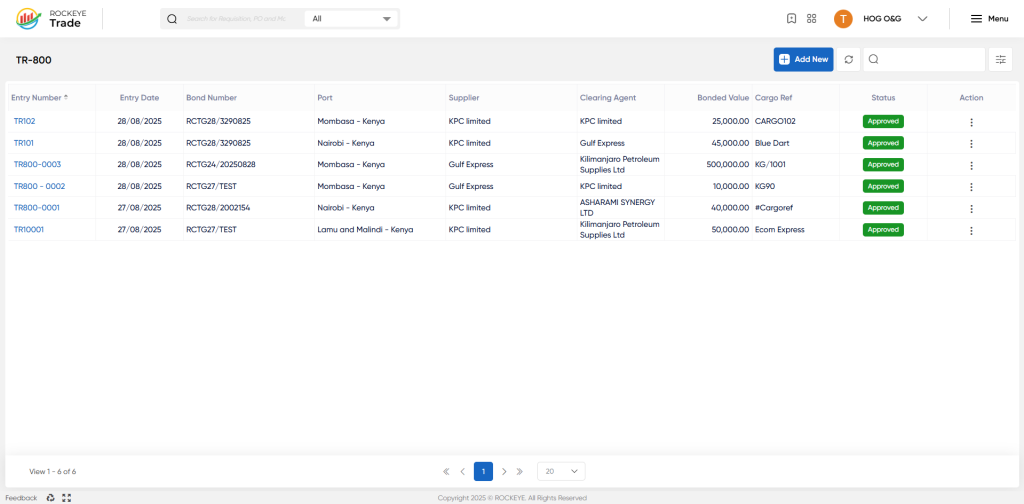
- Navigate to Transactions → Bond & Entry Operations → TR-800
- View and filter existing TR-800 entries
How To Add TR-800
Click Add New to open the TR-800 entry form.
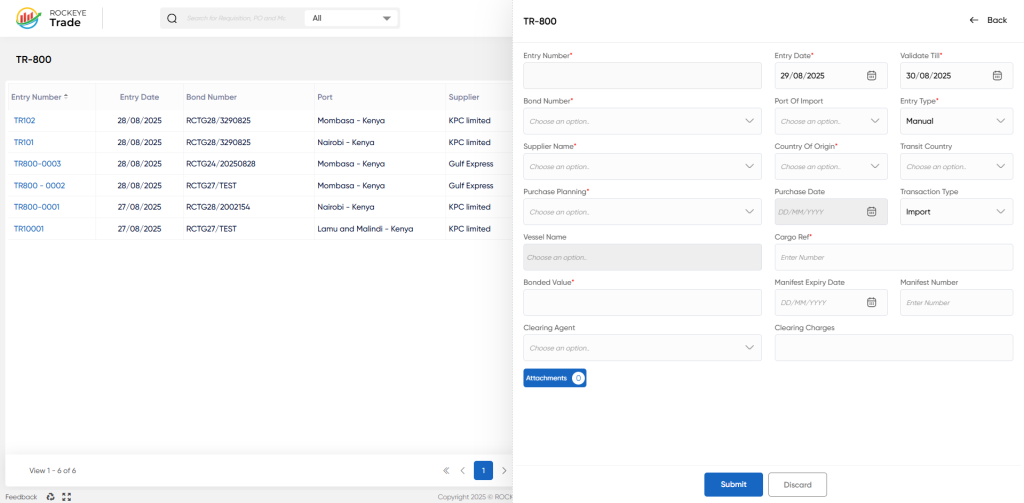
- Entry Number (Auto-generated or manual entry) – Unique identifier for the bonded entry.
- Entry & Validation Dates – Start and expiry dates for bond validity.
- Bond Number – Customs bond registration reference.
- Port of Import – Location where the cargo enters (e.g., Mombasa, Nairobi, Lamu).
- Supplier Name – Oil supply company (e.g., KPC Limited, Gulf Express).
- Country of Origin / Transit Country – Shipment origin and possible transit path.
- Purchase Planning & Purchase Date – Links the entry to an approved purchase plan.
- Transaction Type – Defines Import/Export activity (typically Import for bonded oil).
- Vessel Name – The carrier vessel reference.
- Cargo Reference – Internal or shipping reference for the cargo.
- Bonded Value – Customs-declared bonded value of the cargo.
- Manifest Expiry Date & Number – Details of shipping manifest validity.
- Clearing Agent information – Agency responsible for clearance (e.g., Asharami Synergy Ltd).
- Attachments – Upload shipping or customs documents (optional but recommended).
- After all required details are completed:
- Click Submit to save & send the entry for processing/approval.
- Click Discard if you want to cancel the draft.
- Status changes to Approved/Pending depending on workflow rules.
- Entry appears on the TR-800 Dashboard list.
Listing
On the TR-800 page you’ll see a paginated list of all bonded entries. Columns include:
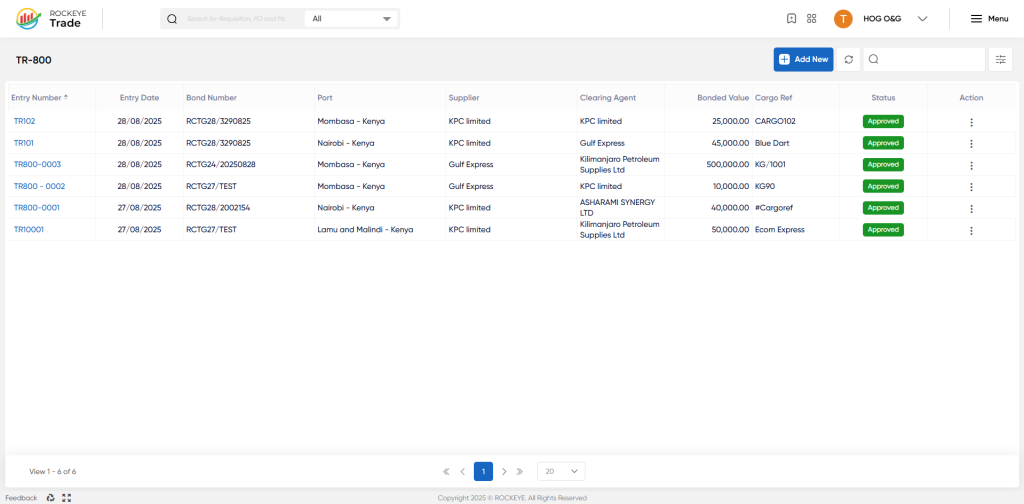
Entry Number Unique TR-800 identifier (e.g. TR800-0001)
Entry Date Date of entry creation
Bond Number Reference to the underlying bond (e.g. RCTG28/3290825)
Port Port of import (e.g. Mombasa – Kenya)
Supplier Supplier name (e.g. KPC Limited)
Clearing Agent Clearing agent handling the entry
Bonded Value Monetary value under bond
Cargo Ref Internal cargo reference (e.g. KG/1001)
Status Workflow state (e.g. Draft, Approved)
Action Menu to Edit, Approve, Print, etc.
Refrence Video Link

