Port Management
Introduction/Purpose
The Port Management module, situated under Transactions > Bond & Entry Operations, is essential for defining and managing all ports of entry and exit used in your trade operations. For businesses dealing with oil or white products, accurate port data is crucial for:
- Customs & Bonded Operations: Facilitating the entry and exit of goods under bond, ensuring compliance with customs regulations.
- Logistics & Shipping: Accurately planning vessel movements, cargo declarations, and optimizing supply chain routes for import and export.
- Documentation: Generating precise shipping documents, bills of lading, and customs declarations that require port information.
- Risk Management: Identifying specific ports for potential risks, delays, or specialized handling requirements for hazardous materials.
- Reporting: Tracking trade volumes, transit times, and compliance by port.
This module ensures that all transit trade movements of oil and white products are accurately recorded and managed within the system.
How To Navigate
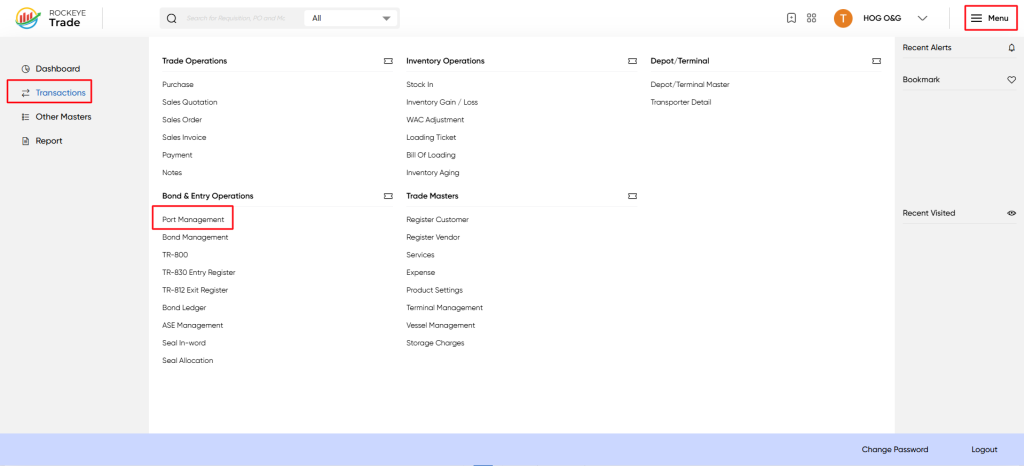
- Click on Transactions in the left-hand navigation menu.
- Navigate to Bond & Entry Operations > Port Management.
Listing
The Port Management interface displays a list of all defined ports. Each entry provides the following details:
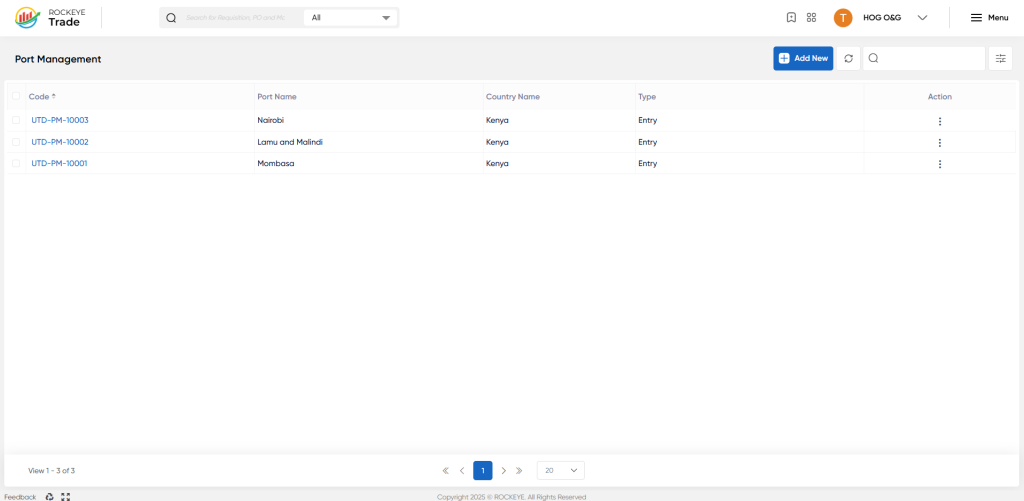
- Code*: A unique system-generated identifier or user-defined code for the port (e.g., UTD-PM-10001).
- Port Name: The official name of the port (e.g., Mombasa, Nairobi, Lamu and Malindi).
- Country Name: The country in which the port is located.
- Type: Specifies whether the port is primarily used for "Entry", "Exit", or "Both" types of operations.
- Action: A dropdown menu (⋮) to perform actions such as View/Edit or Activity Log.
The top of the interface also includes general actions such as Add New, Refresh, Filter, and Search.
How To Add Port Management
To add a new port to the system:
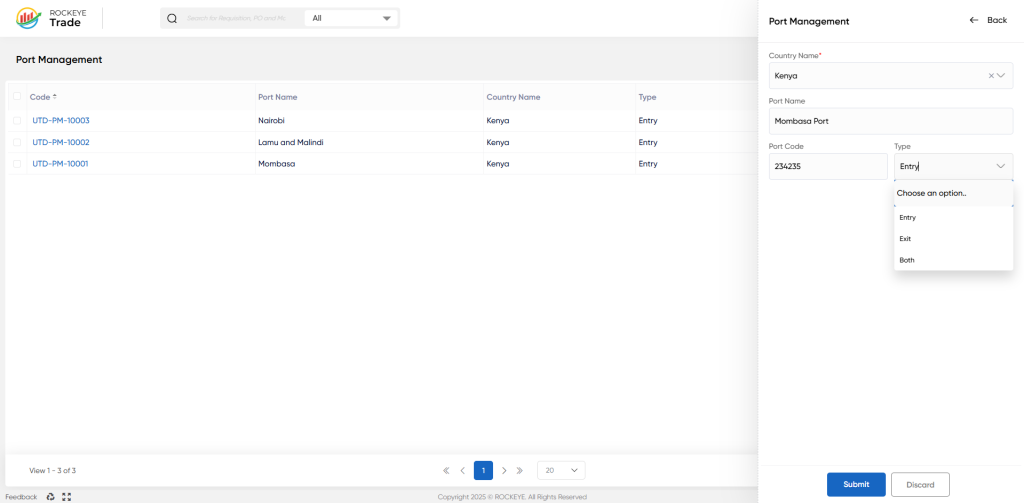
- Click on the Add New button in the top-right corner of the interface.
- A side panel will appear, prompting for details:
- Country Name*: Select the relevant country from the dropdown list where the port is located.
- Port Name*: Enter the official and descriptive name of the port (e.g., "Mombasa Port").
- Port Code*: Enter a unique code for the port. This could be an international port code (e.g., UN/LOCODE) or an internal identification code.
- Type*: Select the operational type for the port from the dropdown:
- Entry: For importing goods into the country.
- Exit: For exporting goods out of the country.
- Both: If the port handles both import and export operations.
- Choose one of the following actions:
- Submit: To save the entry and make it active in the system.
- Discard: To cancel the new entry without saving.
Refrence Video Link

