Country
Introduction/Purpose
The Country module under Other Masters > Geographical Locations in the RockEye Trade system allows users to manage the list of countries. This is particularly important for transactions involving oil or white products, where geographical locations play a crucial role in trade logistics, compliance, and reporting.
How To Navigate
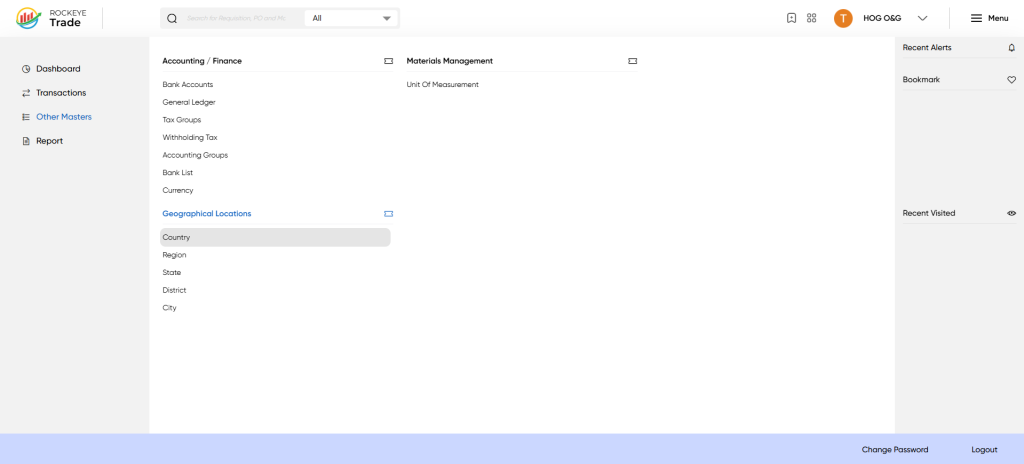
- Click on the Menu icon (☰) in the top-right corner.
- Navigate to Other Masters > Geographical Locations > Country.
Listing
The Country interface displays the following details:
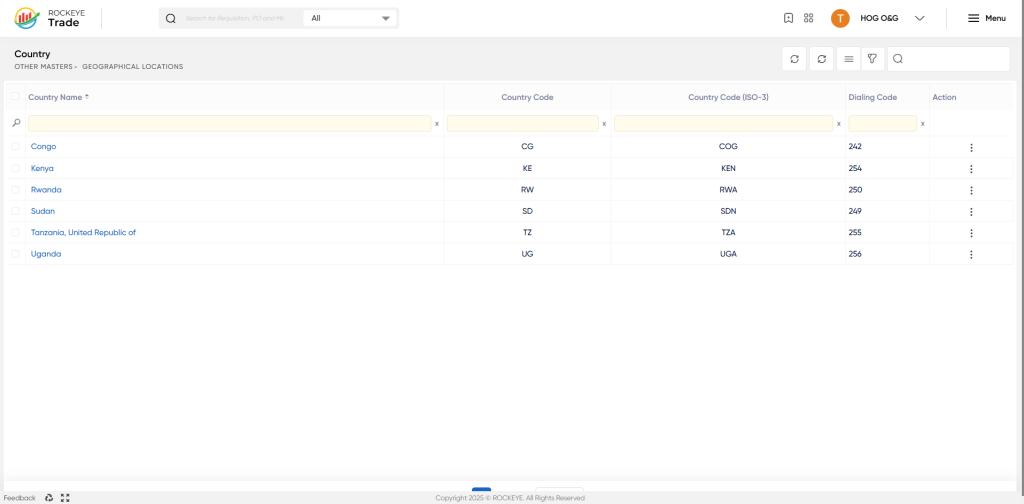
- Country Name: Name of the country (e.g., Kenya, Uganda, Congo).
- Country Code: Two-letter country code (e.g., KE, UG, CG).
- Country Code (ISO-3): Three-letter ISO country code (e.g., KEN, UGA, COG).
- Dialing Code: International dialing code for the country (e.g., 254, 256, 242).
- Action: Options to perform actions such as editing or viewing details.
Editing a Country Entry
To edit an existing country entry:
- Locate the country in the Country list.
- Click on the Action button (⋮) next to the country you want to edit.
- Select Edit from the dropdown menu.
- Modify the necessary details.
- Click Save to update the entry or Cancel to discard changes.

