Currecny
Introduction/Purpose
The Currency module under Other Masters in the Accounting/Finance section allows users to manage the list of currencies used within the RockEye Trade system. This is particularly important for transactions involving oil or white products, where multiple currencies may be used. Users can add, edit, and view currency details, including ISO codes and symbols.
How To Navigate
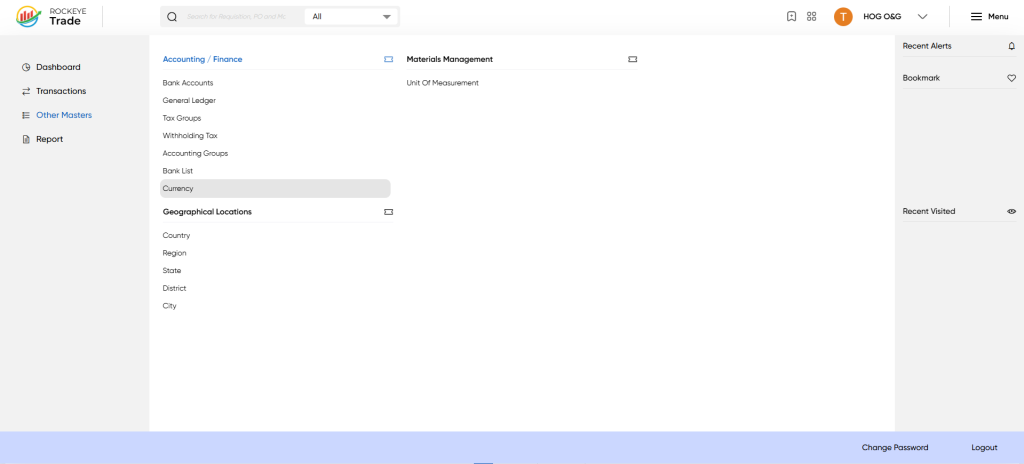
- Click on the Menu icon (☰) in the top-right corner.
- Navigate to Other Masters > Accounting/Finance > Currency.
Listing
The Currency interface displays the following details:
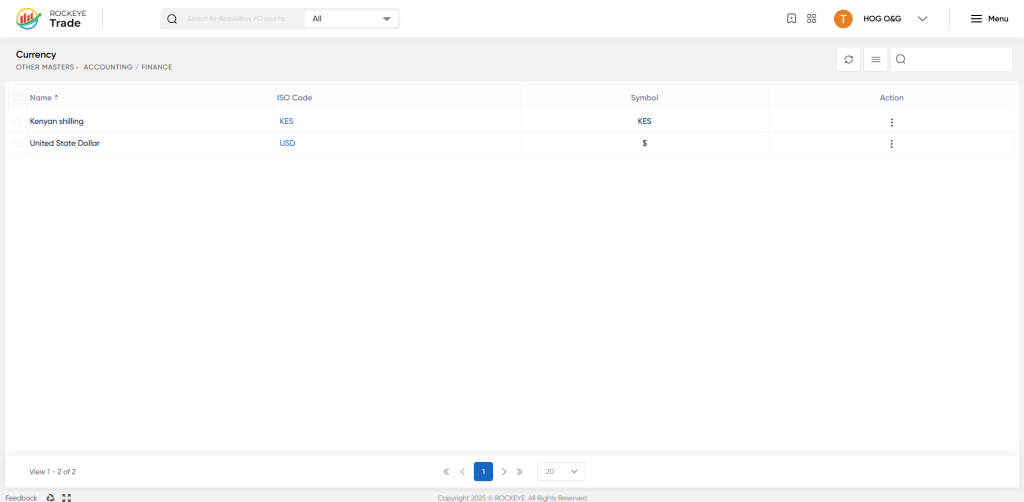
- Name: Name of the currency (e.g., United States Dollar, Kenyan Shilling).
- ISO Code: International Organization for Standardization (ISO) code for the currency (e.g., USD, KES).
- Symbol: Symbol representing the currency (e.g., $, KES).
- Action: Options to perform actions such as editing or viewing details.
Refrence Video Link

