Accounting Group
Introduction/Purpose
Accounting Groups tie products (especially white products like AGO/Diesel, PMS/Gasoline, Jet Fuel) to the correct GL accounts, tax rules, and defaults. They drive automatic postings for purchase, sales, returns, inventory adjustments, and provisional entries.
How To Navigate
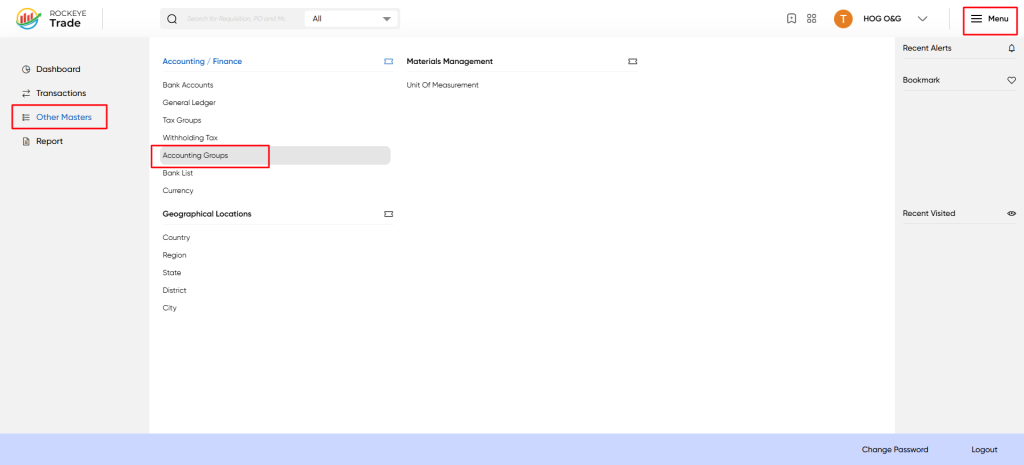
Menu → Other Masters → Accounting Groups.
Listing
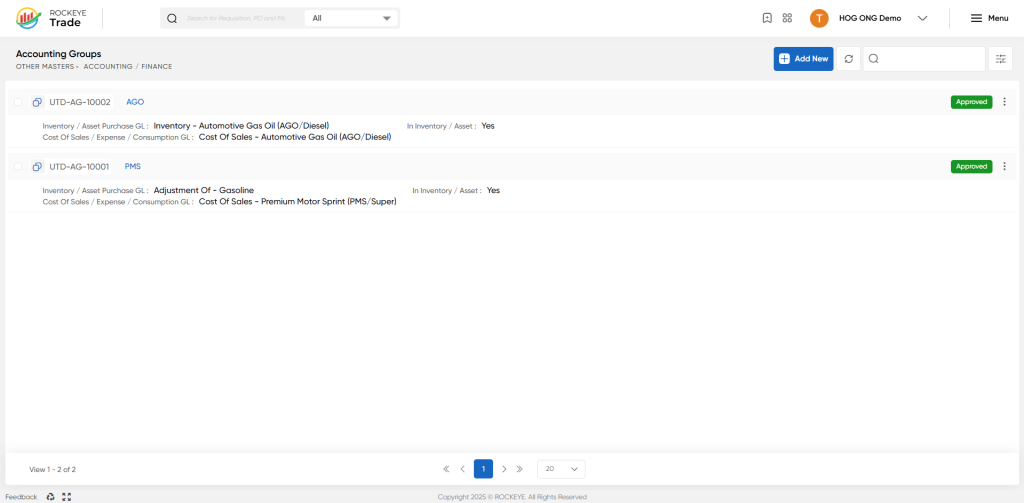
View the list of existing Accounting Groups
The list page shows each Accounting Group code/name and a short summary of Inventory Purchase GL and Cost Of Sales/Expense GL. Approved groups show a green “Approved” label.
How To Add Accounting Group
Click Add New to create a new group, or click an existing group name to open the detail panel.
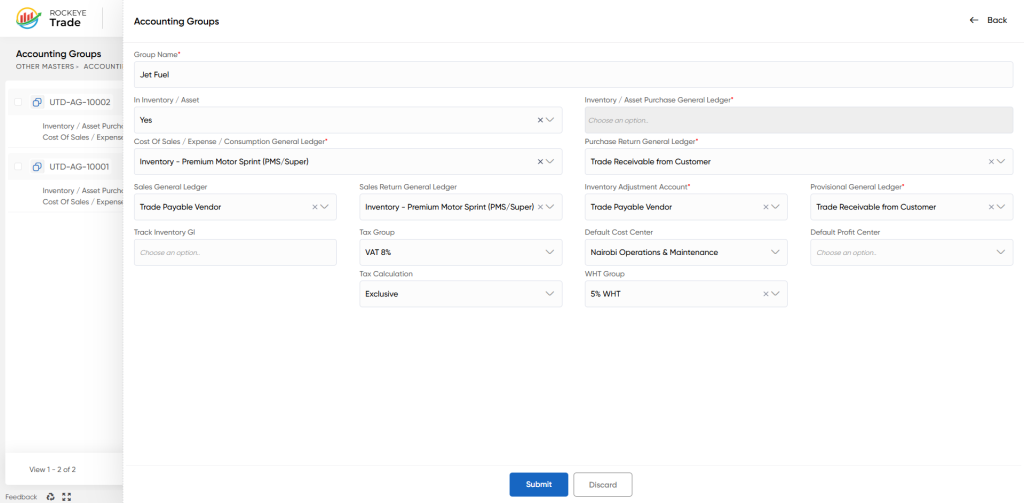
- Group Name
- Descriptive name for the product group (e.g., "AGO", "PMS", "Jet Fuel", or "Jet Fuel - Kerosene").
- In Inventory / Asset (Yes/No)
- If Yes: items in this group are stock/inventory items — purchases post to Inventory GL and are moved to Cost of Sales on consumption/sale.
- If No: items in this group are treated as direct expense items — purchases post directly to Expense/Cost of Sales GL.
- Inventory / Asset Purchase General Ledger (Required when In Inventory/Asset = Yes)
- GL account where stock purchases are posted (Inventory asset GL).
- Cost Of Sales / Expense / Consumption General Ledger (Required)
- GL used when stock is consumed or when purchases are expensed directly (Cost of sales or expense GL).
- Purchase Return General Ledger
- GL used when goods are returned to vendors (reduces inventory or expense accordingly).
- Sales General Ledger
- Revenue GL used for recording sales of items in this group.
- Sales Return General Ledger
- GL used when sales are returned/customers refunded.
- Inventory Adjustment Account
- GL used for posting inventory adjustments (e.g., shrinkage, stock corrections).
- Provisional General Ledger
- GL used for provisional postings (e.g., temporary clearing accounts pending final posting).
- Track Inventory GI
- Optional selection (if the system supports granular goods issue tracking) — choose if you want goods issue/inventory movement tracked for this group.
- Tax Group
- Default tax (VAT/sales tax) group to apply to items in this accounting group (maps to Tax Groups master).
- WHT Group (Withholding Tax)
- Default withholding tax to apply on purchases/payments (maps to Withholding Tax master).
- Default Cost Center / Default Profit Center
- Defaults used when transactions do not supply a cost/profit center at line level.
- Tax Calculation (Exclusive/Inclusive)
- Whether the tax is exclusive (tax added on top of price) or inclusive (tax included in price).
Refrence Video Link

