Purchase Payment Status
Introduction/Purpose
Use this report to track every payable related to a white‑product purchase (e.g., AGO, PMS, Jet A‑1) from request to final settlement. It consolidates product costs and all ancillary charges—freight, premium, LC/bank fees, insurance, port/clearing, inspection, losses—so Finance, Treasury, and Operations share a single source of truth on what is due, what is paid, and what remains outstanding.
How To Navigate
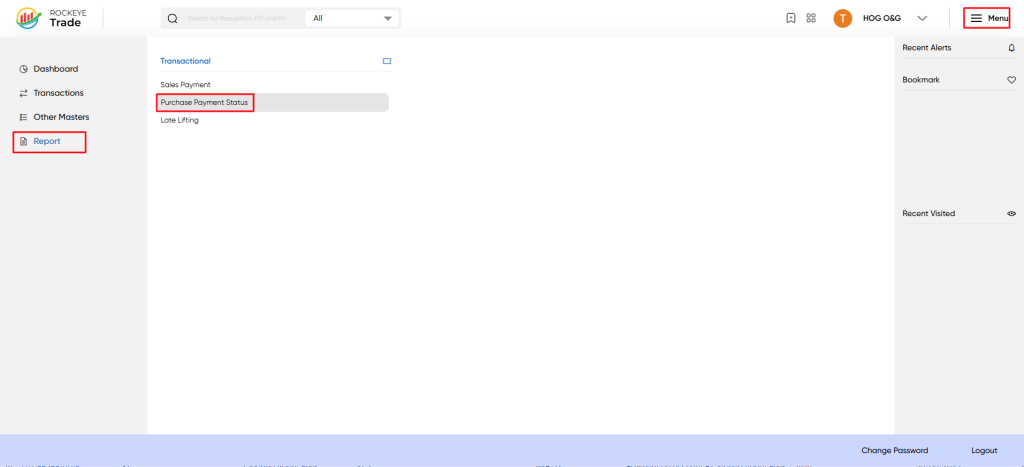
- Click on the "Menu" button located at the top right corner of the ROCKEYE Trade dashboard.
- From the expanded menu, under "Trade Operations," click on "Reports."
- Under the "Reports" sub-menu, click on "Purchase Payment status".
Report Details:
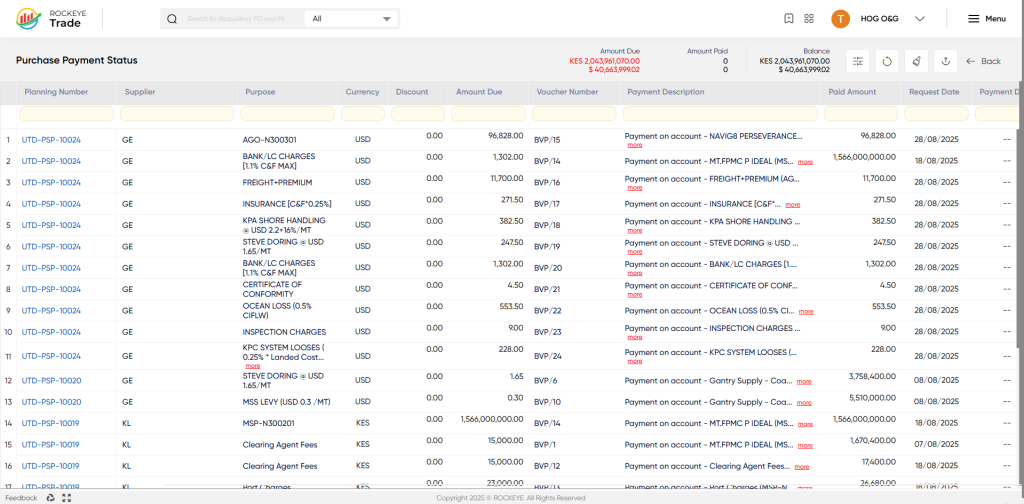
- Planning Number: A unique identifier for the purchase order or contract.
- Supplier: The name of the supplier or vendor providing the oil/white product.
- Purpose: A brief description of the payment purpose, such as "AGO-N300301" or "BANK/LC CHARGES".
- Currency: The currency in which the payment is made (e.g., USD or KES).
- Amount Due: The total amount due to the supplier for the specific payment purpose.
- Voucher Number: A unique identifier for the payment voucher.
- Payment Description: A detailed description of the payment made, including the payment method and any relevant details.
- Paid Amount: The amount paid to the supplier.
- Request Date: The date on which the payment was requested.
- Payment Date: The date on which the payment was made (not visible in the provided screenshot).
How to Interpret the Report:
- The report lists all payments made to suppliers for oil/white product purchases.
- Each row represents a single payment transaction, with details such as the planning number, supplier, purpose, and amount due.
- The "Amount Due" and "Paid Amount" columns help track the payment status, ensuring that payments are accurately recorded and up-to-date.
- The "Payment Description" column provides additional context for each payment, enabling users to understand the payment purpose and method.

