Late Lifting
Introduction/Purpose
Late Lifting refers to a situation where a buyer or consignee fails to lift or remove purchased oil or white products from a storage terminal or facility within the agreed-upon timeframe, resulting in additional costs, demurrage charges, and potential logistical issues.
The Late Lifting report highlights purchases whose received stock has not been fully lifted within the agreed free days at the terminal. It helps Operations and Finance prevent storage penalties, pipeline/terminal charges, and contractual breaches by showing what is overdue, where, and how much is left to lift.
How To Navigate
To access the Way Bill module:
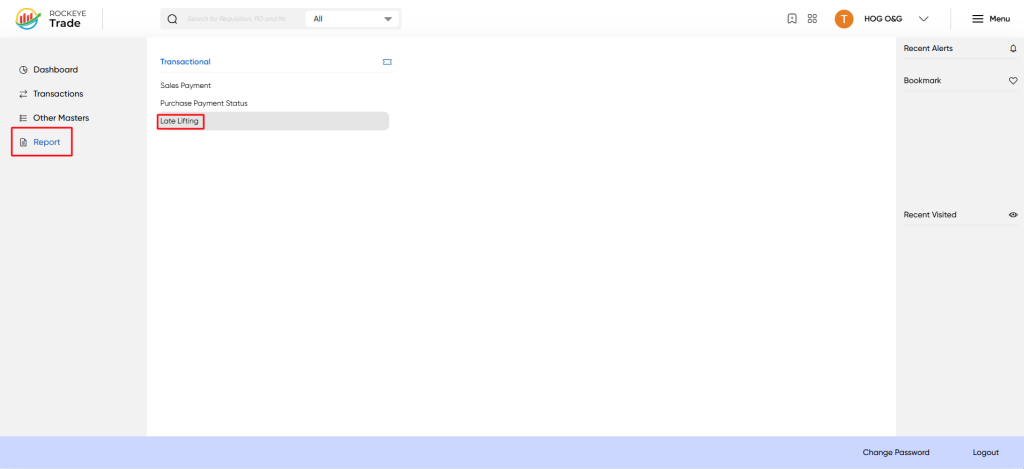
- Click on the "Menu" button located at the top right corner of the ROCKEYE Trade dashboard.
- From the expanded menu, under "Trade Operations," click on "Reports."
- Under the "Reports" sub-menu, click on Late Lifting
Listing
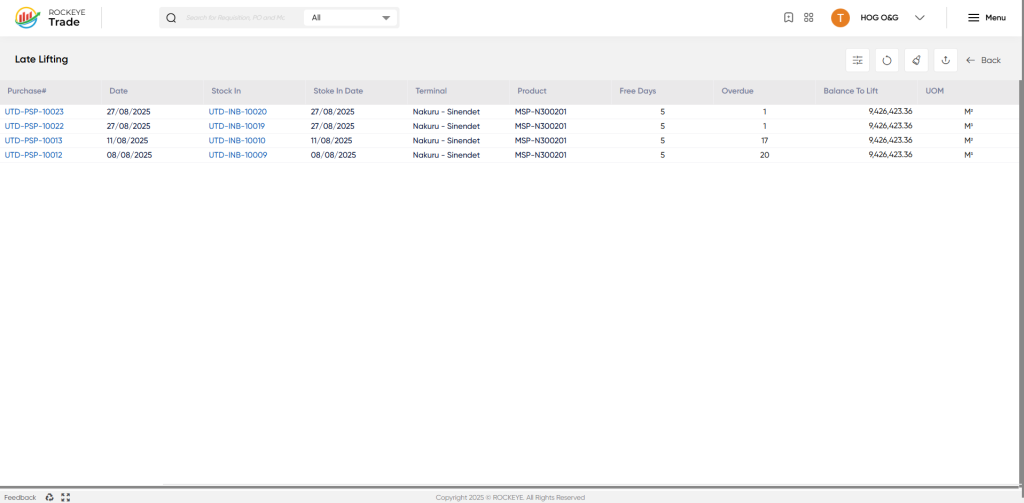
- Purchase: A unique identifier for the purchase order.
- Date: The date of the purchase order.
- Stock In: The stock-in number associated with the purchase order.
- Stock In Date: The date on which the stock was received.
- Terminal: The terminal or location where the product is stored.
- Product: The type of product being stored (e.g., MSP-N300201).
- Free Days: The number of free days allowed for lifting the product.
- Overdue: The number of days the product is overdue for lifting.
- Balance To Lift: The remaining quantity of product to be lifted.
- UOM: The unit of measurement for the product (e.g., M³).
How to Interpret the Report:
- The report lists all purchase orders with late liftings, along with relevant details such as the purchase date, stock-in date, and terminal.
- The "Overdue" column indicates the number of days the product is overdue for lifting, helping users prioritize actions.
- The "Balance To Lift" column shows the remaining quantity of product to be lifted, enabling users to plan and manage lifting schedules.

