Damage/Lost Seal
Introduction/Purpose
The Damage/Lost Seal report is a control and audit tool used to manage and monitor the usage and integrity of physical security seals (or locking tags) used for transport and logistics, typically on trucks or containers. It tracks the life cycle of seals issued in batches to ensure accountability and prevent tampering.
The report helps Operations and Security teams:
- Track Seal Batches: Monitor the total quantity of seals received from a supplier and allocated to a depot.
- Monitor Usage: Record how many seals have been assigned (Allocated) and actually consumed (Used).
- Audit Losses: Highlight and quantify the number of seals that are Damaged/Lost within each batch or prefix, which is essential for inventory reconciliation and identifying security breaches.
How To Navigate
- Click on the “Menu” button located at the top right corner of the dashboard.
- Under “Reports” click on Damage/Lost Seal.
Listing
The Damage/Lost Seal list view displays a ledger of seal batches, their distribution, usage, and loss status across various terminals.
The report structure includes the following components:
- Header Bar: Displays the module title (Damage/Lost Seal) with quick-action icons for Filter, Refresh, Export and Back.
- Data Table: Lists all seal batches, showing their identification, location, usage, and loss metrics.
- The data table presents the following columns, providing detailed information for seal tracking:
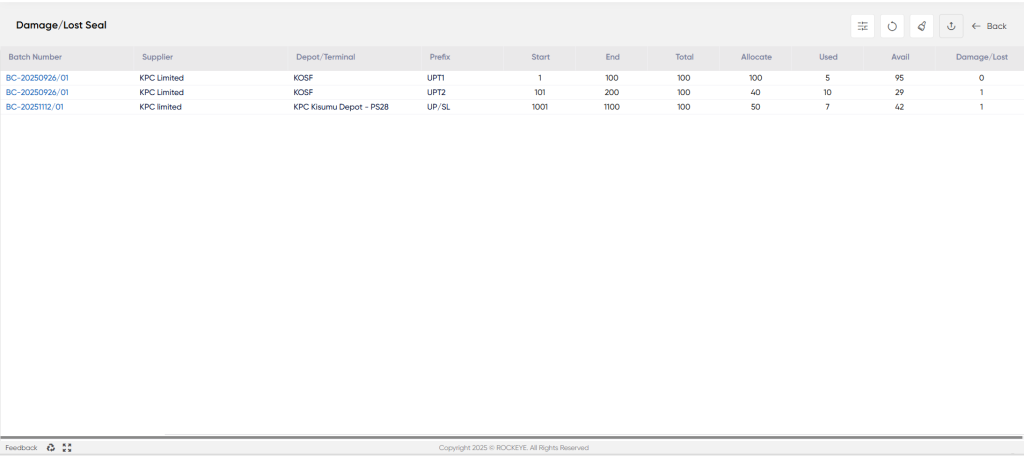
- Batch Number: A unique alphanumeric identifier for the seal batch received from the supplier (e.g., BC-2025092b/01).
- Supplier: The company that provided the batch of seals (e.g., KPC Limited).
- Depot/Terminal: The storage facility or location to which the seal batch was allocated for use (e.g., KOSF, KPC Kisumu Depot - PS2B).
- Prefix: The unique code or identifier used for a specific range of seals within the batch (e.g., UPT1, UPT2, UP/SL).
- Start: The sequential start number of the seal range within the prefix (e.g., 1, 101, 1001).
- End: The sequential end number of the seal range within the prefix (e.g., 100, 200, 1100).
- Total: The total count of seals in that specific range or prefix (e.g., 100 seals).
- Allocate: The number of seals from the total that have been assigned or distributed for operational use (e.g., 100, 40, 50).
- Used: The number of seals from the allocated quantity that have been physically used on transport units.
- Avail (Available): The quantity of seals that are allocated but not yet used (Allocate−Used−Damage/Lost) (e.g., 95, 29, 42).
- Damage/Lost: The critical column quantifying the number of seals from the batch that have been documented as damaged or lost (e.g., 0, 1, 1).
How to Interpret the Report:
The report is interpreted row-by-row to audit the seal consumption and security integrity for each batch:
- The Total and Damage/Lost columns are key for reconciliation; the sum of Used, Avail, and Damage/Lost should equal the Allocate amount for that line item.
- Example: For row 2 (BC-2025092b/01, UPT2): Used (10)+Avail (29)+Damage/Lost (1)=Allocate (40).
- A high number in the Damage/Lost column for a specific depot or prefix requires further investigation to determine if the loss is due to operational error, breakage, or a security issue.
- The Avail column guides operations on how many seals are ready to be issued to transporters from the current stock at the depot.

