Terminal Stock
Introduction/Purpose
The Terminal Stock report provides a real-time, consolidated view of inventory levels for all products stored across various depots and terminals. It serves as the primary tool for monitoring the physical presence, movement, and availability of stock within the logistics network.
The report helps Operations, Sales, and Inventory Management teams:
- Track current inventory: By showing the Closing Stock at each location.
- Monitor stock movement: By capturing recent Received Qty and Dispatched Qty.
- Determine availability: By identifying the Available For Sale quantity after accounting for unlifted customer commitments.
- Ensure supply chain visibility: By confirming where and how much of each product is physically located.
How To Navigate
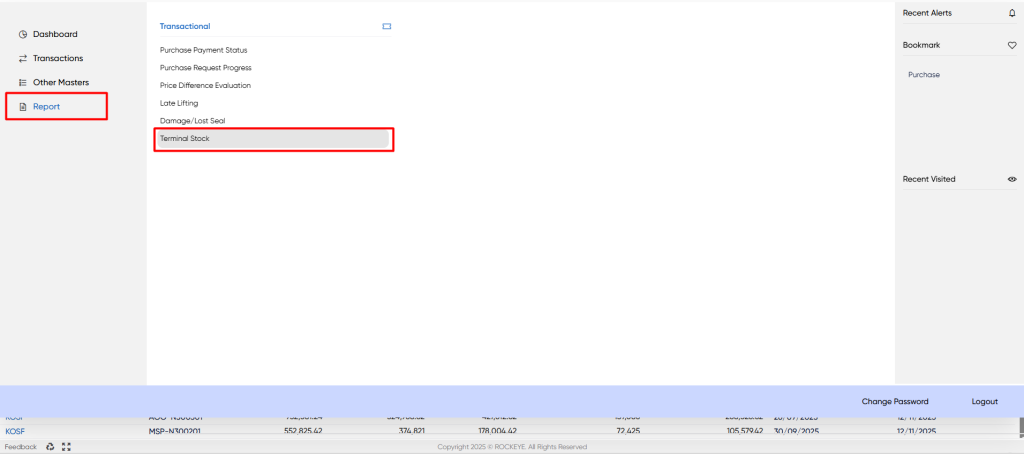
- Click on the “Menu” button located at the top right corner of the dashboard.
- Under the “Reports” sub-menu, click on Terminal Stock.
Listing
The Terminal Stock list view displays the inventory position for every combination of Depot/Terminal and Product.
The report structure includes the following components:
- Header Bar: Displays the module title (Terminal Stock) with quick-action icons for Search, Filter, Refresh,Export and Back.
- Data Table: Lists all terminals and products with their associated stock quantities and dates.
- The data table presents the following columns, providing detailed information for the stock position:
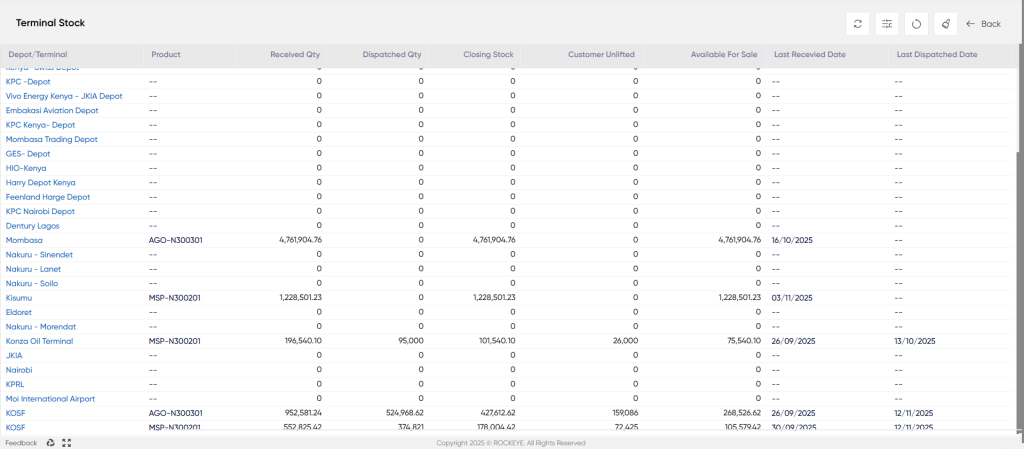
- Depot/Terminal: The name of the storage facility or location (e.g., Mombasa, KOSF, Kisumu).
- Product: The specific product code being stored at that location (e.g., AGO-N300301, MSP-N500201).
- Received Qty: The cumulative quantity of the product received at the terminal within the reporting period (or total current quantity before dispatch).
- Dispatched Qty: The quantity of the product that has been moved out or dispatched from the terminal.
- Closing Stock: The net physical quantity of the product remaining at the terminal ({Received Qty} - {Dispatched Qty} or total on-hand).
- Customer Unlifted: The quantity of the stock that has been sold or allocated to customers but has not yet been physically lifted or picked up from the terminal.
- Available For Sale: The quantity of stock immediately available for new sales or allocation ({Closing Stock} - {Customer Unlifted}).
- Last Received Date: The date of the most recent stock-in transaction at that terminal/product combination (e.g., 16/10/2025).
- Last Dispatched Date: The date of the most recent stock-out transaction from that terminal/product combination (e.g., 12/11/2025).
How to Interpret the Report:
The report is interpreted row-by-row to understand the inventory situation at a specific location:
- The Closing Stock column is key, showing the total physical volume on hand (e.g., KOSF has 427,602.42 units of AGO-N300301).
- The Closing Stock is the total physical quantity of a product currently on hand at a specific terminal, regardless of any commitments (e.g., KOSF has 427,602.42 units of AGO-N300301).
- The Customer Unlifted quantity is the portion of the Closing Stock that has been sold but has not yet been physically picked up by the buyer (e.g., KOSF has 159,086 units committed to customers).
- The Available For Sale quantity is the net stock that is physically present and immediately available for new sales transactions ({Closing Stock} - {Customer Unlifted}) (e.g., KOSF has 268,526.42 units available for sale).
- Rows with all zeros typically represent terminals that hold no stock or have not moved the product during the reporting cycle.

