WAC Summary
Introduction / Purpose
The WAC Summary module captures and monitors product costings and inventory value based on various product transactions (purchases, sales, gains/losses, and adjustments). It uses the Weighted Average Cost (WAC) method to determine a consistent unit cost for inventory valuation and cost of goods movement.
This system ensures accurate financial reporting by tracking the current monetary value of inventory and the average cost per unit after every transaction, thereby maintaining data integrity for costing and inventory reconciliation.
How to Navigate
- From the main dashboard, click the Menu icon in the top-right corner.
- Navigate to the Transaction
- Under Inventory Operations,select WAC Summary
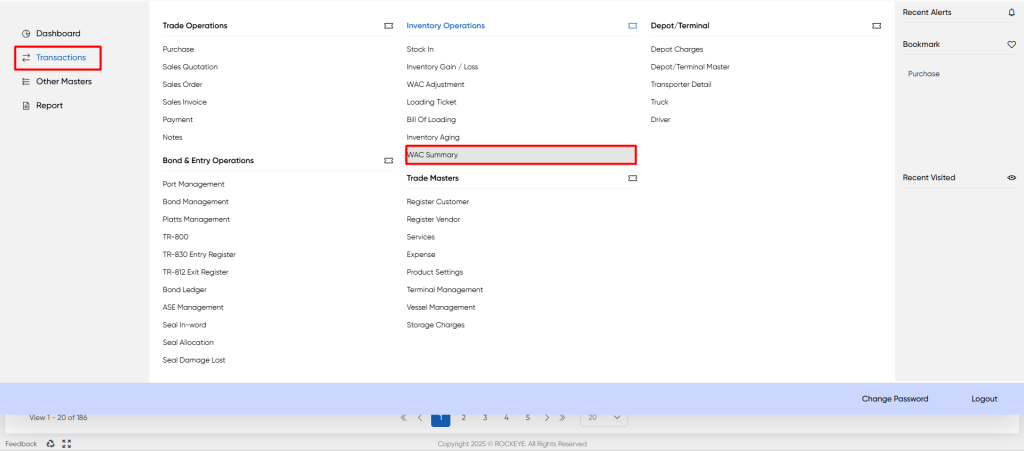
This opens the WAC Summary List View displaying all inventory transactions affecting product cost.
Listing
The WAC Summary List View displays all inventory transactions with their immediate financial and quantitative impact.
It includes the following components:
- Header Bar: Displays the module title (WAC Summary) with quick-action icons for Search, Filter, and Refresh.
- Filter Panel (Shown in image): Allows filtering by criteria such as Date, Terminal, Product, WAC, Quantity, and Txn Type (Loss, WAC, Gain, IN, ALLOCATE).
- Data Table: Lists all transactions, showing key fields such as Date, Txn Type, Product, Quantity, and the resulting WAC.
- Pagination Controls: Located at the bottom to navigate through multiple pages of records (e.g., View 1 - 20 of 186).
- The data table presents the following columns, providing detailed information for each transaction:
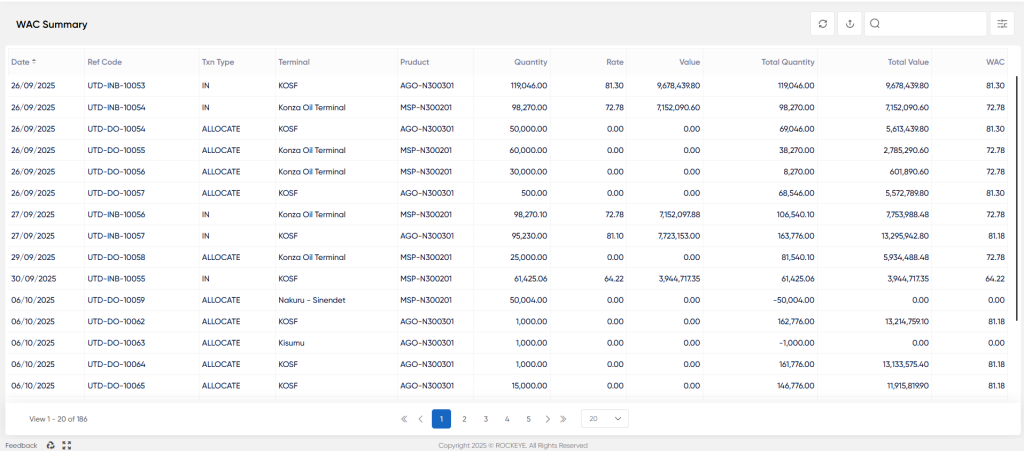
- Date: The date the inventory transaction was recorded.
- Ref Code: A unique alphanumeric identifier for the specific transaction (e.g., UTD-DO-10054).
- Txn Type: The type of inventory movement (e.g., IN for inflow/purchase, ALLOCATE for outflow/sale, LOSS, GAIN, WAC adjustment).
- Terminal: The operational location (depot or terminal) where the movement occurred (e.g., KOSF, Korazo Oil Terminal).
- Product: The unique identifier for the specific product (e.g., AGO-N300301).
- Quantity: The volume or amount of the product involved in the transaction.
- Rate: The unit cost or price of the product for the specific transaction (e.g., purchase price for IN transactions).
- Value: The Inventory Value of the transaction
- Total Quantity: The cumulative inventory quantity after this transaction is processed.
- Total Value: The cumulative monetary value of the inventory after this transaction is processed.
- WAC (Weighted Average Cost): The resulting unit cost of the product after the transaction is recorded, calculated as {Total Value} /{Total Quantity}.
WAC Calculation and Logic
The WAC is the core calculation in this module. It ensures that the cost assigned to both the remaining inventory and the inventory that is moved out (ALLOCATE) reflects the average cost of all units previously purchased.
- IN (Inflow): Transactions with a positive Rate and Value increase both the Total Quantity and Total Value, which results in a new, recalculated WAC.
- ALLOCATE (Outflow): These transactions typically use the existing WAC for costing , reducing the Total Quantity and Total Value by the amount of the movement costed at the previous WAC.
WAC Summary Filtering Options
The filtering options provide users with the ability to narrow down the WAC Summary data based on key transaction attributes, allowing for focused analysis of specific inventory movements or costing changes.
The available filter criteria, as shown in the filter panel, include:
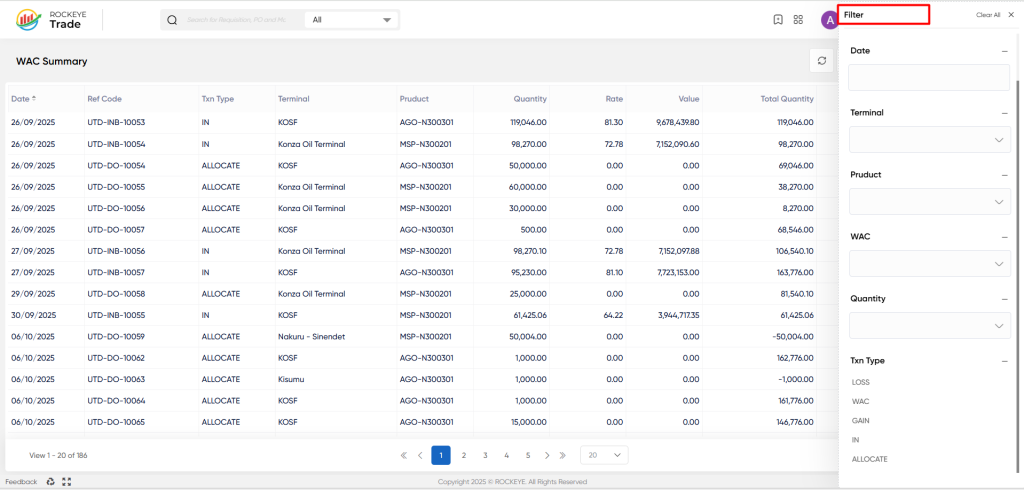
- Date: Filter transactions occurring within a specific date range or on a particular day.
- Terminal: Filter by the Terminal or location where the transaction took place (e.g., KOSF, Korazo Oil Terminal).
- Product: Filter by a specific Product code to view the costing history for only that item (e.g., AGO-N300301).
- WAC (Weighted Average Cost): Filter records based on a specific WAC value or range.
- Quantity: Filter transactions by the volume of product moved in the transaction line item.
- Txn Type (Transaction Type): Filter by the type of inventory event. This is crucial for isolating specific activities:
- LOSS: Transactions recording inventory losses (e.g., spillage).
- WAC: Transactions representing explicit WAC adjustments.
- GAIN: Transactions recording inventory gains (e.g., measurement correction).
- IN: Transactions for inventory inflows (e.g., purchases or receipts).
- ALLOCATE: Transactions for inventory outflows (e.g., sales or dispatches).
Refrence Video Link

