Truck
Introduction / Purpose
The Truck form provides detailed configuration and operational data for each truck linked to a transporter. This information is automatically synced from the Transport Management System (TMS) to ensure data consistency and eliminate manual entry errors.
Each truck record includes information such as the assigned transporter, product carried, registration details, and compartment capacities. Maintaining accurate truck data ensures correct allocation for dispatch, compliance with product loading requirements, and smooth coordination across logistics operations.
How to Navigate
- From the main dashboard, click the Menu icon in the top-right corner.
- Navigate to the Transactions module.
- Under the Depot/Terminal section, select Truck.
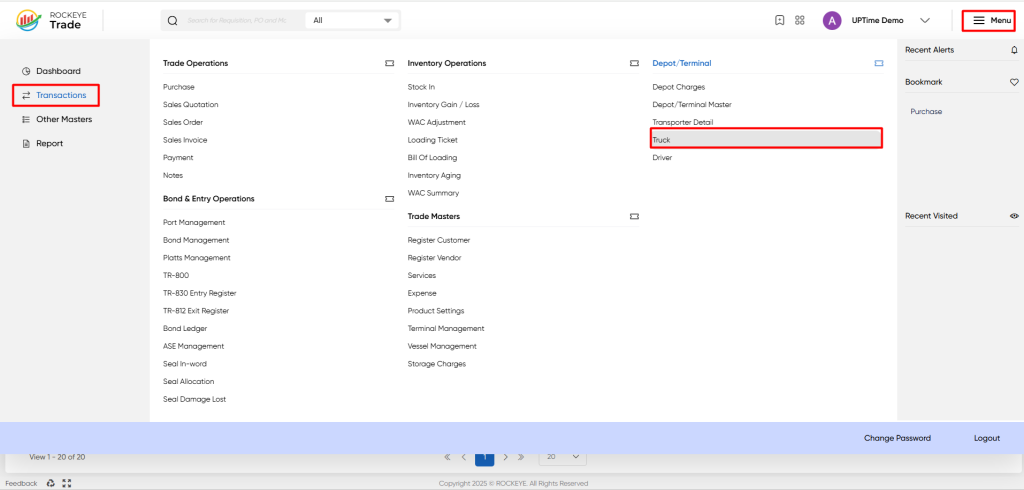
This opens the list view displaying all truck records synced from TMS.
Listing
The Truck List View displays all registered trucks with key operational details.
It includes the following components:
- Header Bar: Displays the module title (Truck) with action icons for search, filter, and refresh.
- Data Table: Lists all trucks synced from TMS, with columns such as Truck Reg No., Transporter, Product, and Total Compartments.
- Pagination Controls: Located at the bottom for browsing multiple pages of truck records.
The data table presents the following columns, providing essential details for each truck:
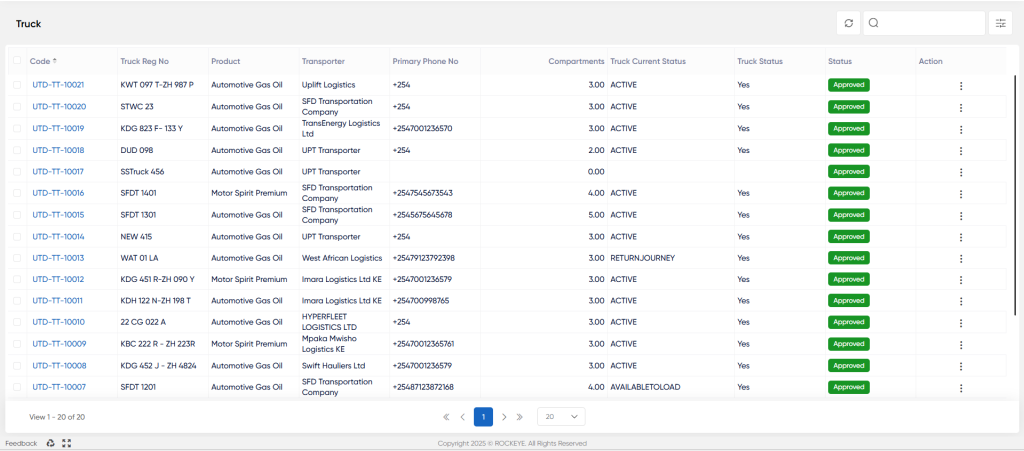
- Code*: A unique alphanumeric identifier assigned to each truck entry (e.g., UTD-TT-10021). This serves as a hyperlink to view or edit the detailed truck record.
- Truck Reg No: The official registration number or plate of the truck (e.g., KWT 097 T-ZH 987 P). This information is automatically synced from the Transport Management System (TMS).
- Product: Indicates the petroleum product the truck is configured to transport (e.g., Automotive Gas Oil, Motor Spirit Premium). The product type is inherited directly from TMS.
- Transporter: The logistics or transport company that owns or operates the truck (e.g., Uplift Logistics, Imara Logistics Ltd KE). This linkage ensures correct transporter assignment for dispatch and compliance tracking.
- Primary Phone No: The primary contact number of the transporter or driver, including the country code (e.g., +2547001236570). This enables quick communication during trip scheduling or dispatch coordination.
- Compartments: Displays the total number of compartments configured for the truck (e.g., 3.00, 4.00). Each compartment represents an independent tank section used to load different grades or volumes of product.
- Truck Current Status: Indicates the operational state of the truck as updated from TMS. Typical statuses include ACTIVE, RETURN JOURNEY, or AVAILABLE TO LOAD.
- Truck Status: A system-generated indicator showing whether the truck record is synced from the Transport Management System (TMS).
- Status: Represents the approval stage of the truck record within the system workflow (e.g., Approved, Pending, Draft). Only trucks marked as Approved are eligible for dispatch allocation.
- Action: Provides quick options such as View, Edit, or Delete depending on user access rights and record status.
Truck Form
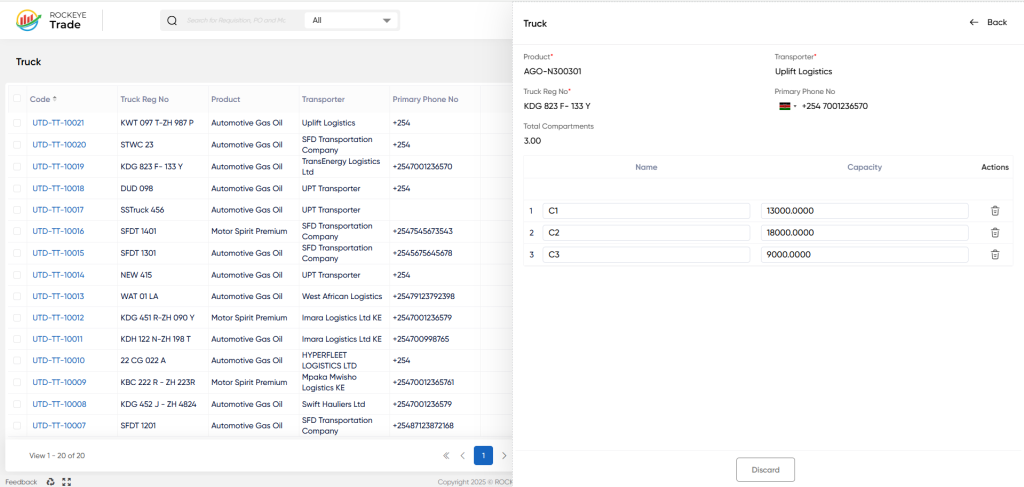
All key truck data is automatically populated from TMS, including:
- Product: The product linked to the truck (e.g., AGO–N300301).
- Transporter: The transporter company assigned to the truck (e.g., Uplift Logistics).
- Truck Reg No: The official registration plate of the truck (e.g., KWT 097 T–ZH 987 P).
- Primary Phone No: The contact number of the transporter or driver, including the country code (e.g., +254).
- Total Compartments: The total number of loading compartments in the truck, automatically calculated based on configuration (e.g., 3.00).
- Compartment & Capacity Configuration: This section displays the detailed compartment breakdown for the truck. Each compartment represents an individual tank segment within the truck used for loading different grades of fuel or to manage load distribution.
- The Name field identifies the compartment (e.g., C1, C2, C3).
- The Capacity field shows the volume each compartment can carry (auto-calculated from TMS).
- The Actions column provides an option to remove or adjust compartments (where editing is allowed).
Integration with TMS
- All truck records, transporter assignments, and capacity data are auto-synced from TMS.
- Any changes made within TMS (e.g., updated registration, capacity modification) automatically reflect in this module.
- Direct manual editing of synced fields is restricted to maintain data integrity.
Refrence Video Link

