Bond Management
Introduction/Purpose
The Bond Management module, found under Transactions > Bond & Entry Operations, is a critical tool for managing various types of customs bonds and guarantees required for the movement and storage of goods. For businesses dealing with oil or white products, accurate bond management is essential for:
- Customs Compliance: Ensuring all imports, exports, and transit of petroleum products adhere to national and international customs regulations without immediate payment of duties and taxes.
- Duty Deferment: Allowing for the movement or storage of goods (e.g., in a bonded warehouse) before duties and taxes are paid, improving cash flow.
- Transit Operations: Managing bonds for products moving through a country (transit bonds) to ensure they exit as declared.
- Warehouse Operations: Tracking bonds for products stored in customs-bonded warehouses (warehouse bonds) until they are cleared for domestic consumption or export.
- Financial Liability: Monitoring the value of goods covered by a bond and the available bond capacity to mitigate financial risk.
- Audit & Reporting: Providing a clear audit trail and reporting capabilities for all bonded activities.
This module provides a centralized platform to track, utilize, and manage the lifecycle of all bonds.
How To Navigate
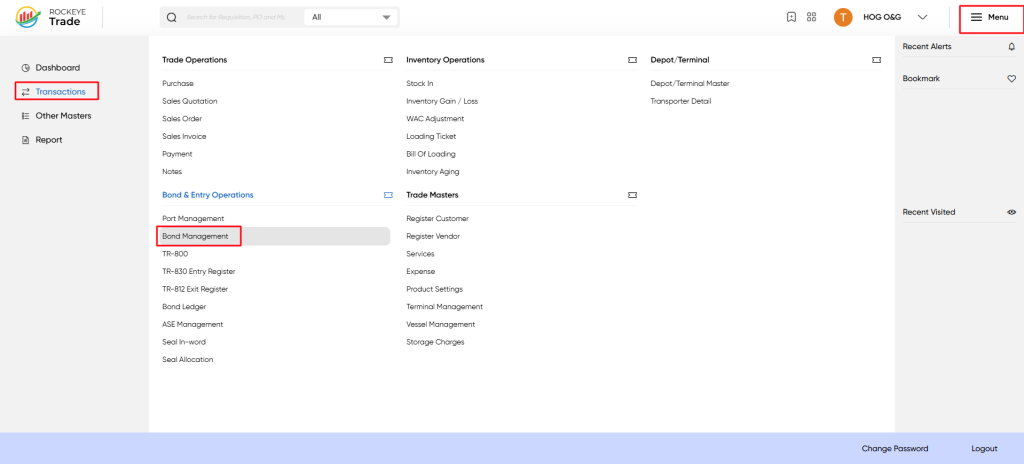
- Click on Transactions in the left-hand navigation menu.
- Navigate to Bond & Entry Operations > Bond Management.
Listing
The Bond Management interface displays a comprehensive list of all defined bonds. Each entry provides the following key details:
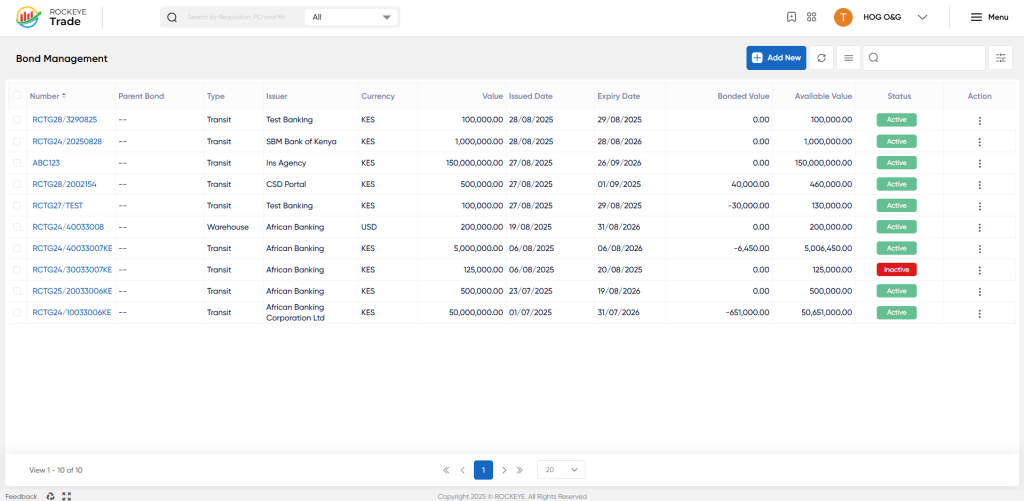
- Number*: The unique identifier for the bond (e.g., RCTG23/3290825).
- Parent Bond: (If applicable) Refers to a master bond under which this bond operates.
- Type: Specifies the purpose of the bond (e.g., Transit, Warehouse).
- Issuer: The entity that issued the bond (e.g., SBM Bank of Kenya, African Banking, Ins Agency).
- Currency: The currency in which the bond value is denominated.
- Value: The total guaranteed amount of the bond.
- Issued Date: The date the bond was issued.
- Expiry Date: The date the bond is set to expire.
- Bonded Value: The portion of the bond's total value that is currently tied up by goods under bond.
- Available Value: The remaining value of the bond that can be utilized for new transactions.
- Status: Indicates the current state of the bond (e.g., Active, Inactive).
- Action: A dropdown menu (⋮) to perform actions such as View/Edit or Activity Log.
The top of the interface also includes general actions such as Add New, Refresh, Filter, and Search.
How To Add Bond Management
To add a new bond to the system:
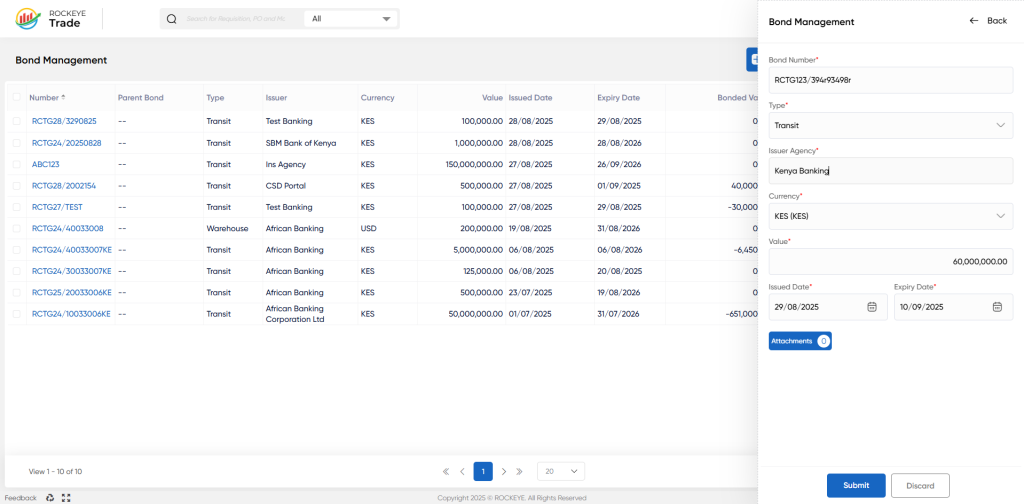
- Click on the Add New button in the top-right corner of the interface.
- A side panel will appear, prompting for bond details:
- Bond Number*: Enter the unique identification number provided by the issuer.
- Type*: Select the appropriate bond type from the dropdown. Common types for oil/white products include:
- Import Bond: Guarantees the payment of duties and taxes for goods imported into the country.
- Transit Bond: Covers goods transported across borders or through a country’s territory (e.g., moving goods from Mombasa to South Sudan).
- Warehouse Bond: Secures duties and taxes for goods stored in bonded warehouses under customs control until they are released for local consumption or export.
- (Other types may exist depending on local regulations and system configuration.)
- Issuer Agency*: Select the financial institution or insurance company that issued the bond.
- Currency*: Select the currency in which the bond's value is specified.
- Value*: Enter the total monetary value guaranteed by the bond.
- Issued Date*: Select the date the bond was issued.
- Expiry Date*: Select the date on which the bond will expire.
- Attachments: Click to upload supporting documents, such as the official bond certificate or guarantee letter.
- (Optional fields like Parent Bond, Remarks, or specific conditions may be available.)
- Choose one of the following actions:
- Submit: To save the new bond entry and make it active (or send for approval if a workflow is configured).
- Discard: To cancel the new entry without saving.
Refrence Video Link

