WAC Adjustment
Introduction/Purpose
The WAC Adjustment feature allows users to update the Weighted Average Cost (WAC) of oil or white products in inventory. This adjustment ensures that the inventory valuation reflects the most accurate and current cost data, which is critical for financial reporting and inventory management.
How to Navigate
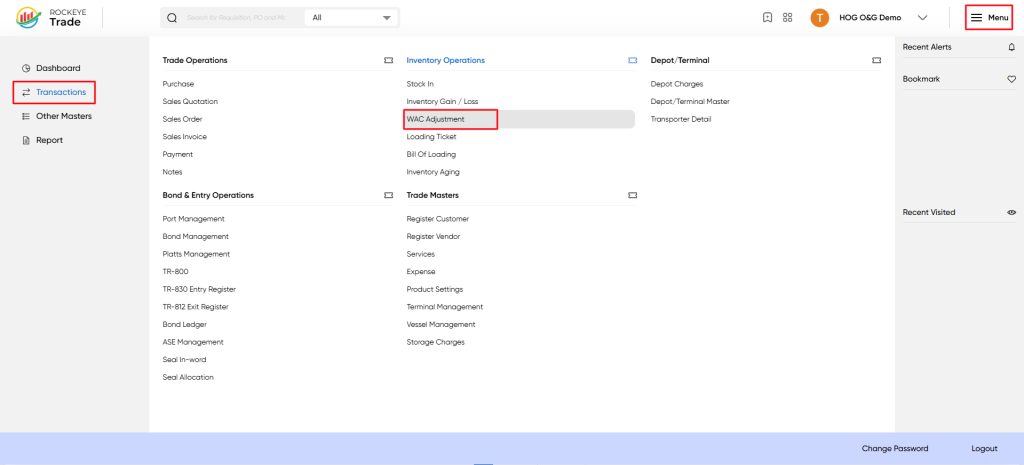
To access the WAC Adjustment screen:
- Click the Menu icon at the top-right corner of the screen.
- Select Transactions from the left-hand menu.
- Under Inventory Operations, click WAC Adjustment.
Listing
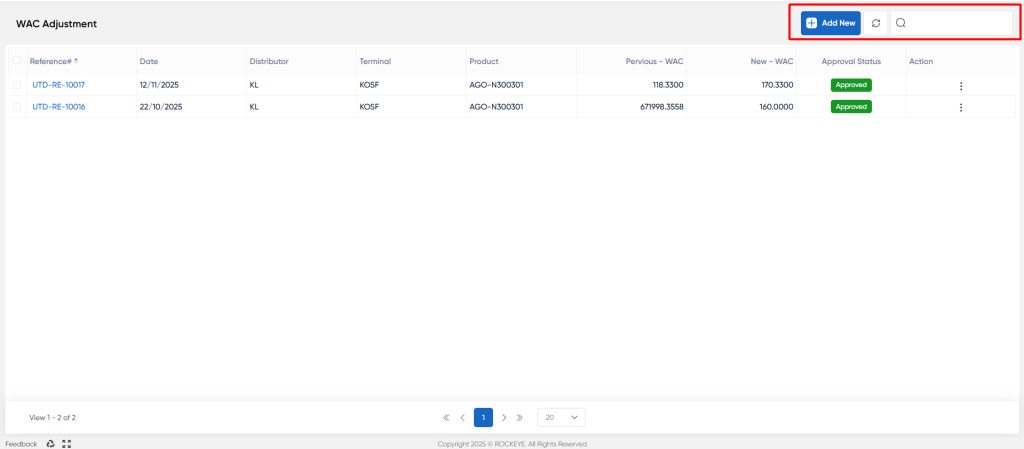
The list view displays all WAC adjustment records with the following columns:
- Reference#: Unique reference number for the WAC adjustment.
- Date: Date when the adjustment was made.
- Distributor: Distributor associated with the product.
- Terminal: Terminal or depot where the product is stored.
- Product: Product code and description.
- Previous: - WAC The WAC value before adjustment.
- New - WAC: The updated WAC value after adjustment.
- Approval Status: Status of the adjustment (e.g., Approved).
- Action: Options to view, edit, or delete the record.
Recording & Updates
To add a new WAC adjustment:
- Click the Add New button.
- Fill in the required fields in the form:
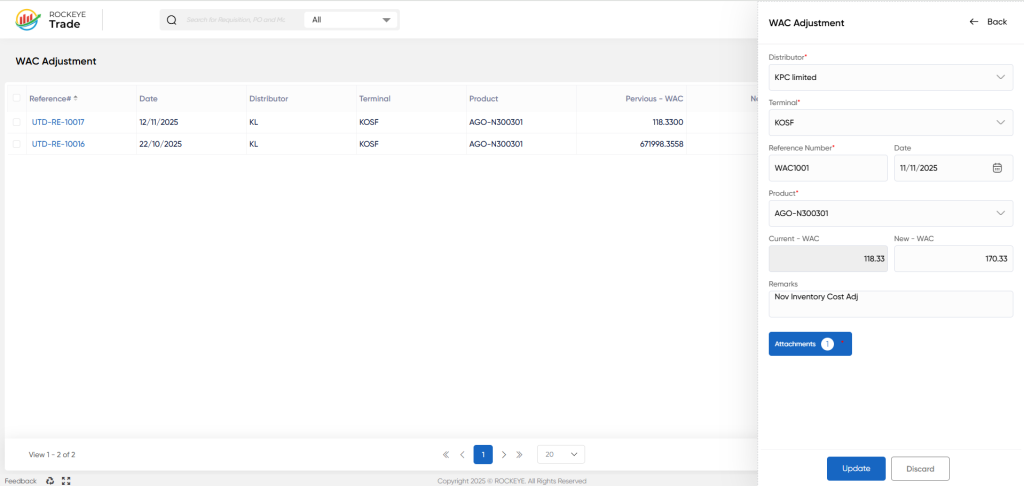
- Distributor: Select the distributor from the dropdown list.
- Terminal: Select the terminal or depot.
- Reference Number: Enter a unique reference number for tracking.
- Date: Select the date of the adjustment.
- Product: Select the product for which WAC is being adjusted.
- Current - WAC: Displays the current WAC value (read-only).
- New - WAC: Enter the new WAC value to update.
- Remarks: Optional notes or comments regarding the adjustment.
- Attachments: Upload any supporting documents (optional).
Click Submit to save the adjustment or Discard to cancel.
Viewing and Editing a WAC Adjustment
- Click on the Reference# link in the list to view details.
- Modify fields as necessary.
- Click Update to save changes or Discard to cancel.
Approval Status
- Draft: The adjustment is saved but not yet approved.
- Approved: The adjustment has been reviewed and approved, updating the inventory valuation accordingly.
Refrence Video Link

