State
Introduction/Purpose
The State module, located under Other Masters > Geographical Locations, is used to define and manage sub-national administrative divisions (states, provinces, or equivalent) within countries. For businesses involved in oil or white product trade, accurate state data is crucial for:
- Logistics & Distribution: Planning efficient delivery routes and understanding regional transportation networks.
- Taxation & Compliance: Adhering to state-specific taxes, duties, and regulatory requirements (e.g., fuel quality standards, environmental permits).
- Sales & Marketing: Segmenting markets, analyzing regional demand, and establishing local sales territories.
- Inventory Management: Tracking stock levels at state-level depots or distribution centers.
- Reporting: Generating detailed reports on operations, sales, and compliance by state.
How To Navigate
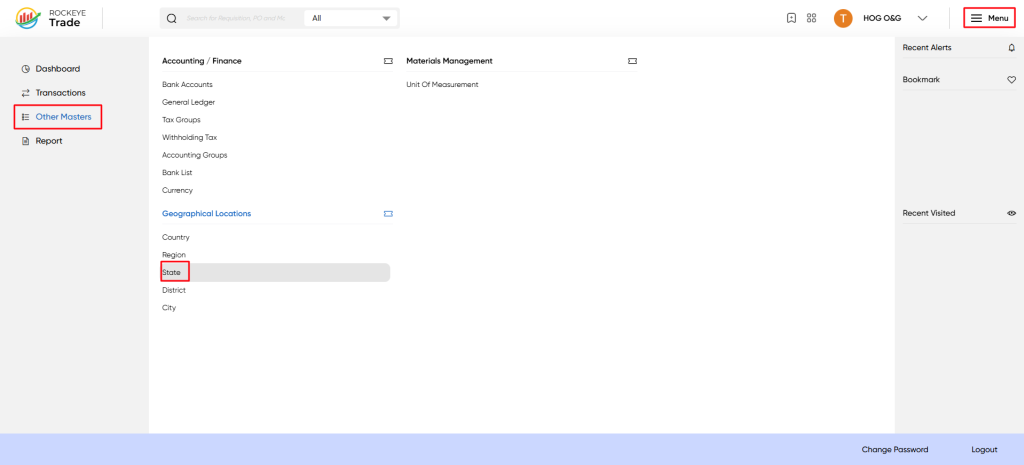
- Click on the Menu icon (☰) in the top-right corner.
- Navigate to Other Masters > Geographical Locations > State.
Listing
- In the new entry form, provide the required details:
- State Name*: Enter the full, official name of the state.
- State Code: Enter a unique short code for the state.
- Country Name: Select the appropriate country from the dropdown list. This step is crucial for establishing the correct geographical hierarchy.
To Edit State
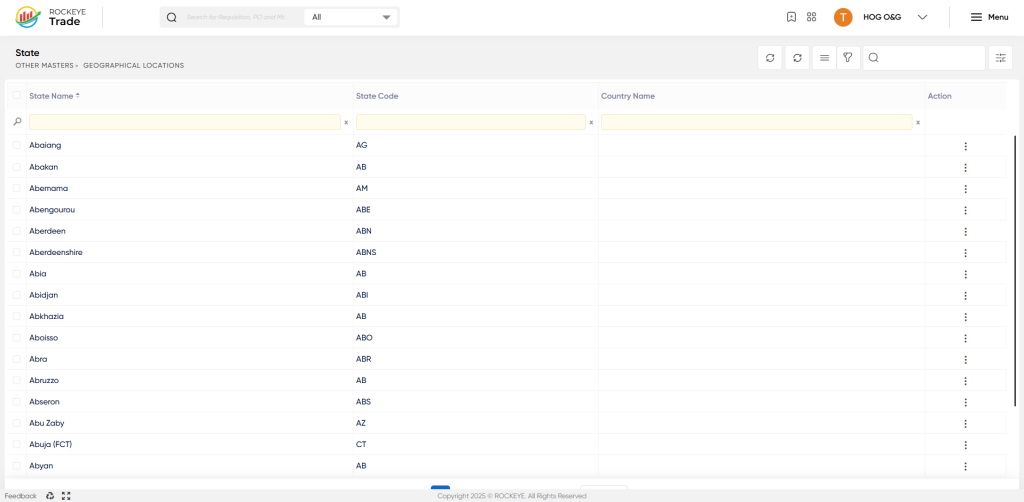
To modify an existing state's details:
- Locate the desired state in the State list, using the search or filter options if necessary.
- Click on the Action button (⋮) next to the state you wish to edit.
- Select View / Edit from the dropdown menu.
- Make the necessary changes to the state's details (e.g., correcting a name, updating a code).
- Click Save to apply the updates or Discard to cancel any changes.

