Tanks Monitoring
Introduction / Purpose
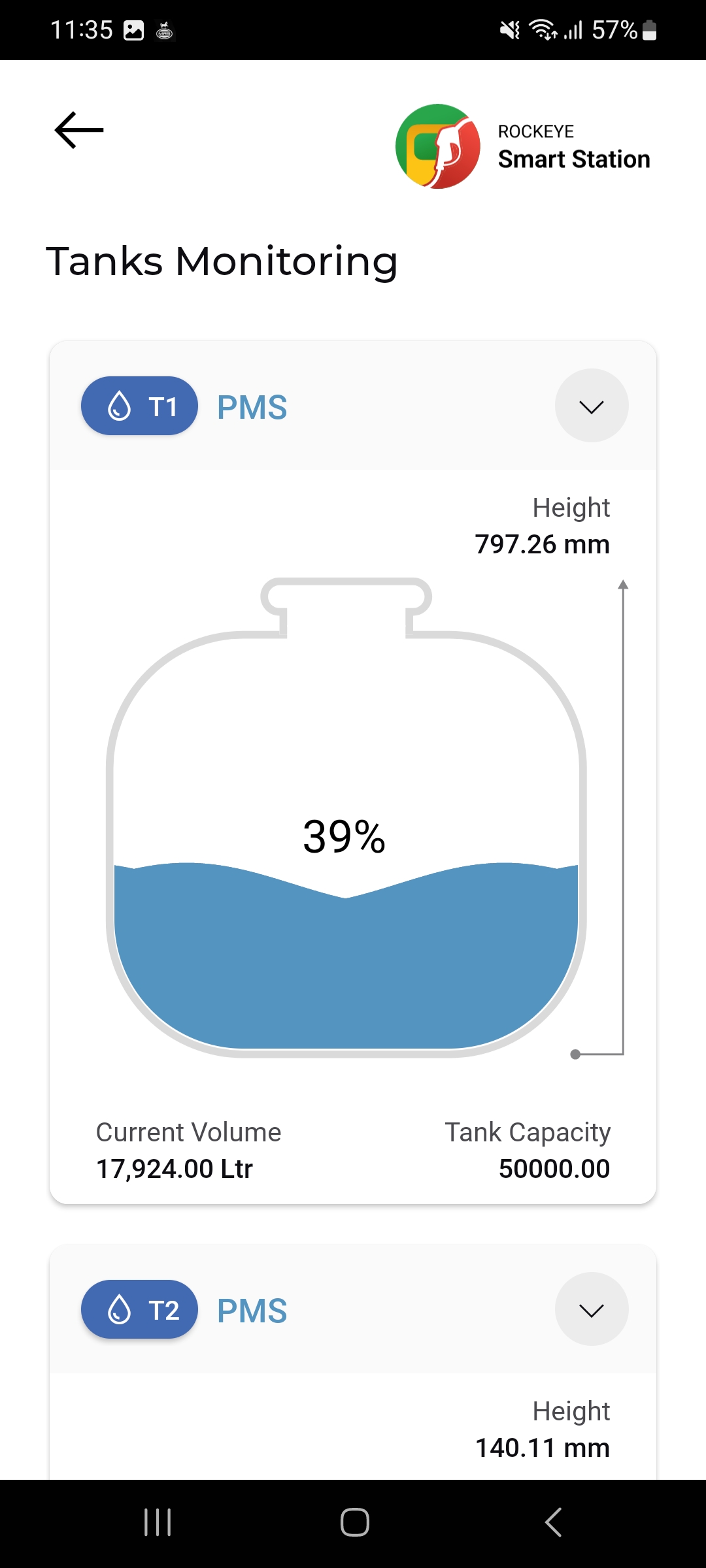
Tanks Monitoring gives a live, visual gauge view of each storage tank's fill level, height reading, current volume, and total capacity. It is a real-time monitoring screen, distinct from Tank Meter Reading , which is used to log formal periodic readings.
How to Navigate
- From Home, tap Tanks Monitoring .
- The Tanks Monitoring list opens, showing one card per tank.
- Tap the (dropdown) icon on a tank card to expand or collapse its gauge detail.
Tank Monitoring Card Details
Each tank card shows:
- Tank Code & Product
- Chevron (expand/collapse) icon: Top-right of the card; toggles the gauge detail view open or closed.
- Height: The current measured product height in the tank.
- Fill-level gauge: A graphical tank illustration filled to the current stock percentage .
- Current Volume: The live stock volume in the tank.
- Tank Capacity: The total rated capacity of the tank .
Other Applicable Actions
- Expand or collapse individual tank cards via the chevron icon to focus on specific tanks.
Note: Tanks Monitoring is a read-only, live-status screen — no add or edit actions are available here.

