Pump Monitoring
Introduction / Purpose
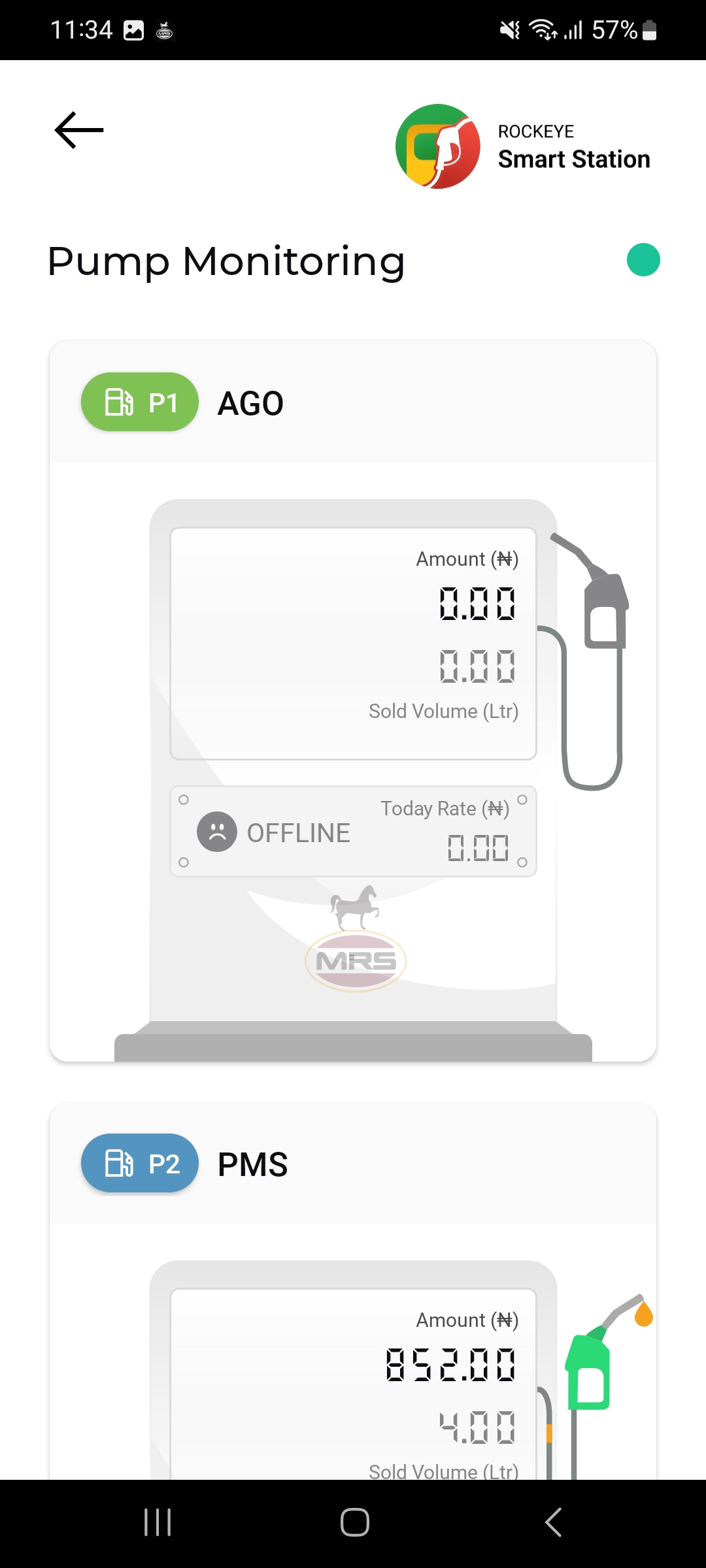
Pump Monitoring gives a live, real-time view of every nozzle at the station — the value and volume of the transaction currently in progress at that pump, today's applied rate, and whether the pump's controller is online and communicating with the app.
How to Navigate
- From Home, tap Pump Monitoring (or the equivalent Menu entry).
- The Pump Monitoring list opens, showing each pump as a card, labeled with its pump code and product.
Pump Monitoring Card Details
Each pump card shows:
- Pump Code & Product
- Connection status indicator: A green dot in the screen header shows the overall live-sync status of the monitored pumps.
- Amount (₦): The live transaction value at the pump
- Sold Volume (Ltr): The live dispensed volume for the transaction in progress
- Online/Offline badge: Shows OFFLINE with a warning face icon when the pump controller has lost communication with the app; otherwise the pump reports normally.
- Today Rate (₦): The unit selling price currently applied at that pump for the day
Other Applicable Actions
- Watch for the OFFLINE badge to identify pumps that need attention or reconnection.
Note: Pump Monitoring is a read-only, live-status screen — no add or edit actions are available here.

