Companies
Introduction
Company Management helps organize and maintain all business account details in a centralized system, including company profiles, contacts, addresses, and associated activities. It enables users to track interactions, manage relationships, and link companies with leads, opportunities, and campaigns.
This module ensures better visibility of client data, improves collaboration, and supports effective account-based sales and communication strategies.
The Company Management module is a central repository for all organizations (clients, prospects, partners, and vendors). It allows users to store, view, update, and manage detailed company profiles, associated contacts, documents, activities, and social profiles.
This module is tightly integrated with Opportunity Management and Campaign Management. Every opportunity is linked to a company record.
How To Navigate
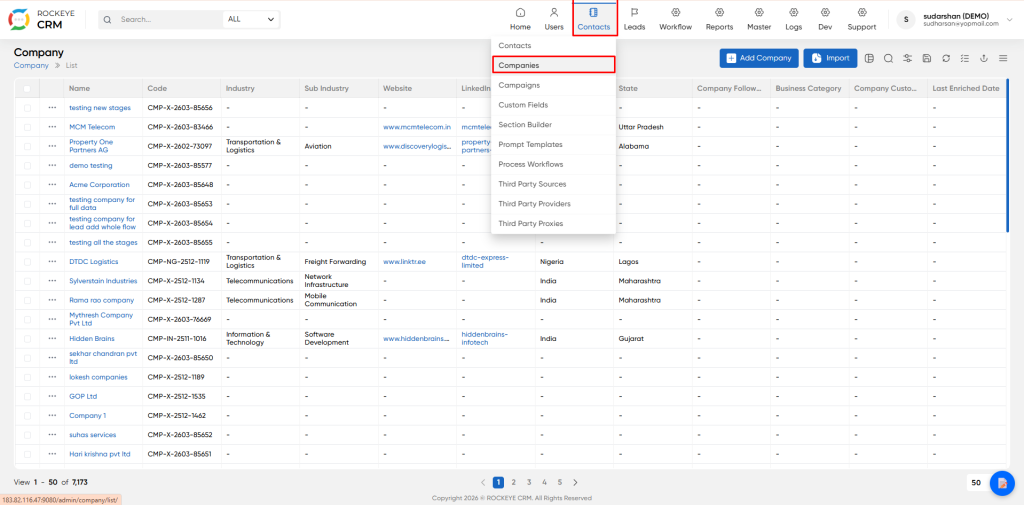
- Click on Contact in the top navigation menu.
- Select the companies from the dropdown
- You will land on the Company List View by default.
How To Add Company
- Click the Add Company button
- The Add Company form will open as a side panel or full form on the right side.
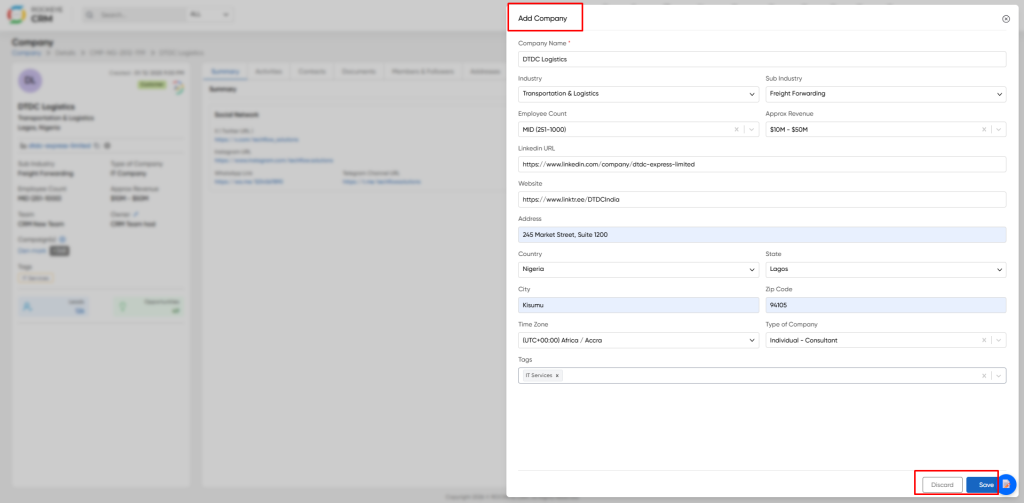
- Company Name Full legal or trading name of the organization
- Industry Primary industry category
- Sub Industry More specific segment of the industry
- Employees Count Approximate number of employees in the company
- HQ ZIP Code Zip code of the company headquarters
- Website Official website URL
- LinkedIn URL Company LinkedIn profile URL
- Twitter URL Company Twitter/X profile (if available)
- Facebook URL Company Facebook page URL (if available)
- Country Country where the company is located
- State: State / Province
- City City name
- Zip Code Postal / ZIP code of the address
- Street Full street address, building name, suite number
- Discard – Closes the form without saving.
- Save – Saves the company record and opens the Company Detail View with all tabs.
Company Tabs
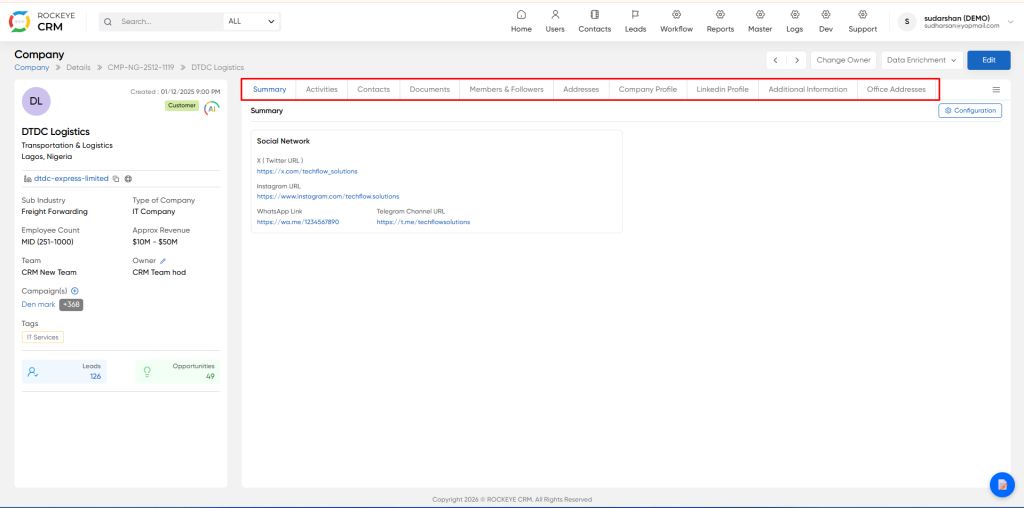
- Summary Tab: Default landing tab. Stores general company information, social media profiles, and public contact channels. This tab layout is fully user configurable.
- Activities: Complete immutable audit trail of every single action, edit, update and interaction ever performed on this company record. This log can never be edited, modified or deleted by any user including system administrators. Users may add new manual notes.
- Contacts: Full directory of all individual contacts at this organization present in the CRM. Shows job title, seniority level and full contact details. Designated primary points of contact are explicitly flagged.
- Documents: Central secure repository for all account related documents, proposals, case studies, corporate materials and requirements. Filter by document category, upload new files.
- Members & Followers: List of internal CRM users that are actively assigned to, or subscribed to receive automatic updates for this account.
- Addresses: Full list of all operating office locations for this organization.
- Company Profile: Extended firmographic data, business description, technology stack and competitor information.
- LinkedIn: Profile Automatically synced data and activity feed imported directly from LinkedIn.
- Additional Information: Internal only notes, account risk flags and custom user defined fields.
- Office Addresses: Structured verified physical address information.
Action Buttons
- Arrows Quickly navigate to previous / next company record in your list
- Change Owner Permanently transfer ownership and responsibility for this account
- Data Enrichment Run on-demand automated 3rd party lookup to append missing company information
- Edit Modify company profile information
Listing
This is the default landing screen, shows all company records visible to your permission level.
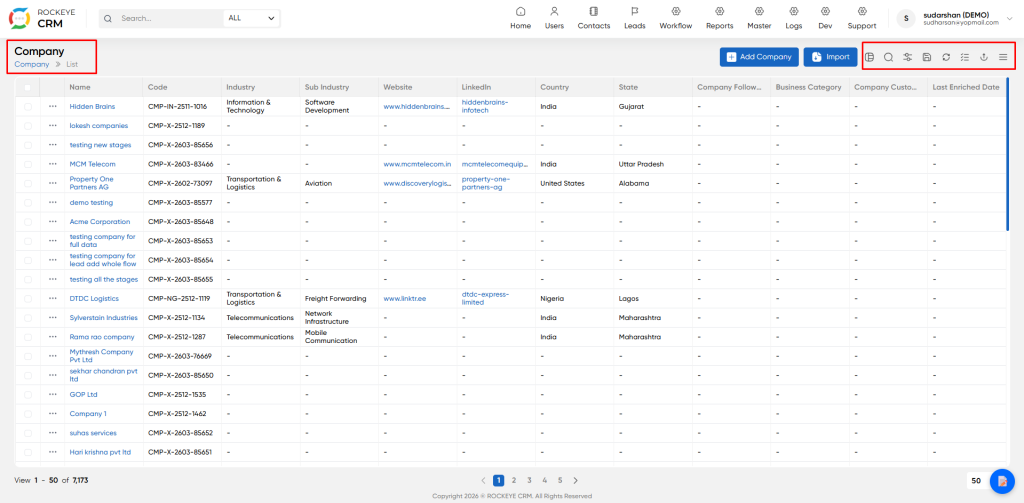
- Import: Bulk batch import multiple company records via spreadsheet upload
- Delete: Permanently erase selected records. Admin only action. This action cannot be undone.
- Search: Advanced filter and search the full company database by any field
- Save: View Save your current filters and column layout as a reusable personal custom view
- Refresh: Manually reload the list to show the latest updates
- Toggel button: Add, remove or reorder columns displayed. This only affects your own personal view.
- Export: Download the full filtered list to CSV / Excel file

