Stock Transfer Loading Ticket
1.0 Purpose
The main purpose of this process is to transfer the product from one terminal to another terminal to serve the product quickly to the dealers.
1.1 Who can perform this?
- Supply Manager
- Stock Transfer Manager
- Aviation Stock Officer
- Managing Director
1.2 Different Applications Involved in Process
- Portal Web
1.3 Navigation Path
Loading Tickets > Program Stock Transfer LT
1.4 Program Stock Transfer LT
Stock transfer manager/Aviation stock officer can program the stock transfer loading ticket to transfer the product from one terminal to another terminal
In program stock transfer LT page, user need to select the Product owner, source terminal and the destination terminal.
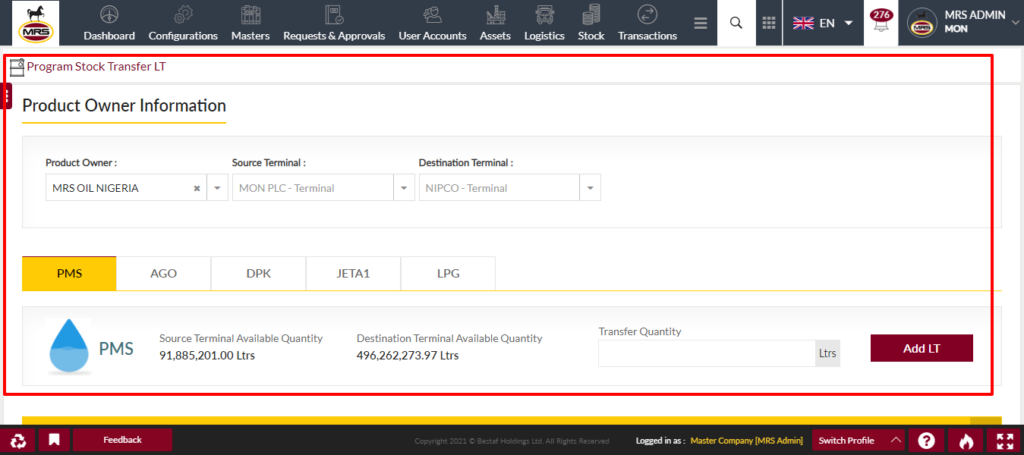
| Page/Screen | Program Stock Transfer LT |
| Application | Portal Web |
| Role | Stock Transfer Manager, Aviation Stock Officer, Supply Manager, Managing Director |
When user select the source terminal then system shows the available products at the terminal and the products which are allowed to transfer from that terminal only.
The setting to allow whether the product is transferrable or not is available under the update product page terminals tab.
System show the available quantity at the source terminal and when user selects the destination terminal then system shows the destination terminal available quantity also.
In case of aviation stock officer, that user can program loading ticket for the JETA1 product only.
While programming the loading ticket user need to provide the total transfer quantity and required attachments and the remarks.
Once user program the loading tickets then those are required to process as similar to white product order processing.
After programming the loading ticket following stock transactions will be performed
Once the order is placed then the following stock transactions will be performed.
1. LT quantity will be debited from the SAS[Supplier/Company Available Stock] account.
2. LT quantity will be credited into the SSS[Supplier/Company Sold Stock] account.
3. LT quantity will be debited from the SOAS[Supplier/Company Overall Available Stock] account.
4. LT quantity will be credited into the SOSS[Supplier/Company Overall Sold Stock] account.
Example:
LT Qty - 33,000 Ltrs
| Account Type | Transaction Type | Quantity |
| SAS | Debit | 33,000 |
| SOAS | Debit | 33,000 |
| SSS | Credit | 33,000 |
| SOSS | Credit | 33,000 |
1.5 Dispatch Stock Transfer LT
Once LT is waybilled and reaches the destination terminal then depot superintendent perform the dispatch by selecting the dealers/delivery requests from the dispatch popup.
After selecting the station/delivery request then user can submit the dispatch popup then system will generate the new order and LT against that stock transfer loading ticket.
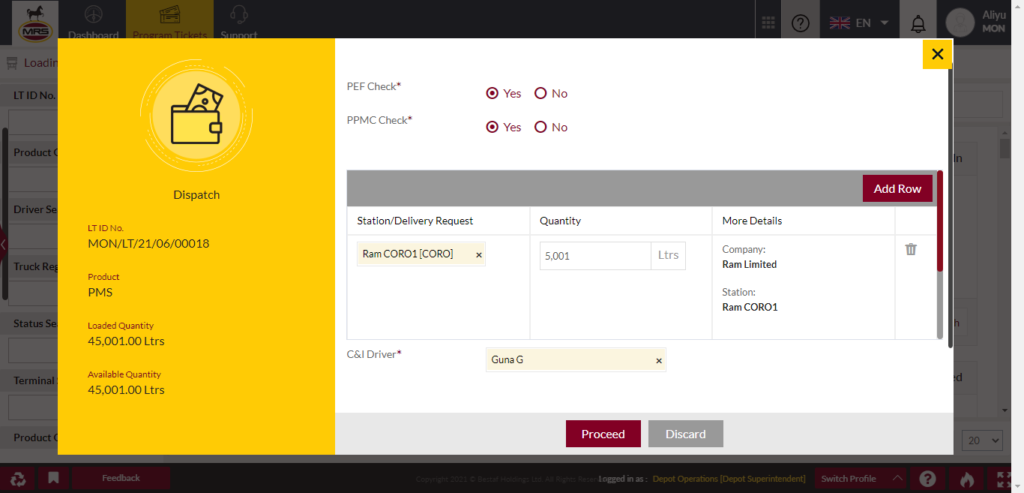
| Page/Screen | Loading Tickets |
| Application | Portal Web |
| Role | Depot Superintendent |
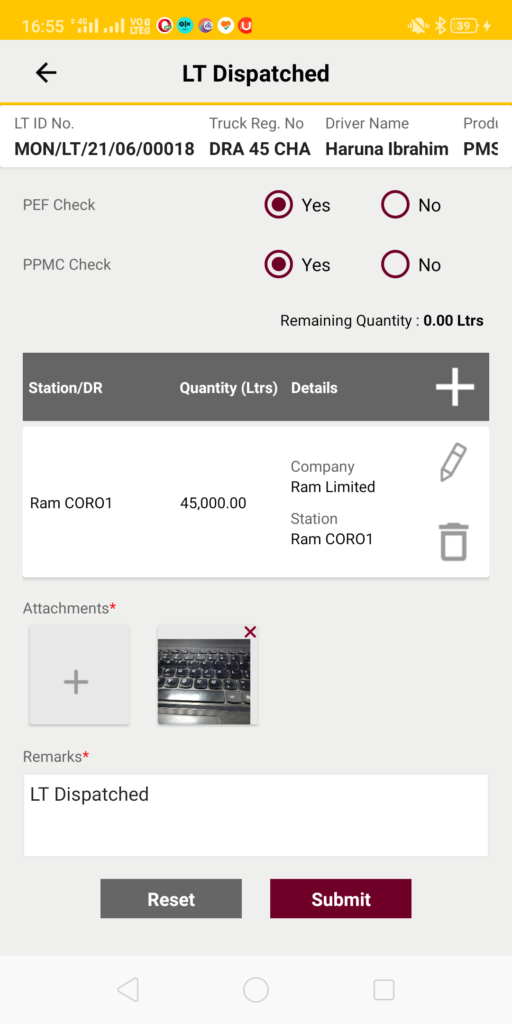
| Page/Screen | LT Dispatch |
| Application | Portal Web |
| Role | Depot Superintendent |

