-
Processes
- Add Delivery Site
- Dealer Products & Generic Products
- Delivery Request Delivery Process
- Fuel Request Delivery Process
- In Tank Transfer
- Internal Product Request Process
- Invoice Payment Process
- LT Dispute Closure
- Lubricant Products Order Processing
- OTHER SUPPLIER PRODUCT ORDER PROCESSING
- Packaging Buyback Process
- PPMC Demand Notice
- Pre-Paid Orders Update Price and Cancellation
- Product Downgrade
- Reward Points Earning and Redemption
- Security Deposit and Trade Deposit Setup
- Set Credit Line
- Short Term Credit Request Process
- Station Evaluation Report Submission
- Station Sales Closure
- Stock Allocation and Its Closure
- Stock Transfer Loading Ticket
- Supplier Stock Credit(Quick Throughput)
- Throughput Transactions
- User Creation from Central System
- White Product Orders Processing
- Show Remaining Articles (11) Collapse Articles
-
Stock
-
User Accounts
- All Companies
- All Users
- Archived Companies
- Archived Users
- Business Consultants
- COCO Dealer
- CORO Dealer
- Customer Care Managers
- Dealers
- Retailer
- RORO Dealer
- Send Custom Email
- Staff Users
- Transporters
- Vessel Master
- Show Remaining Articles (1) Collapse Articles
-
Configurations
- Customer Reward Configuration
- Daily Sales & Payment Settings
- Email Advertisements
- Email Settings
- Laytime Settings
- Loading Suspension
- LT Quantity Settings
- Order Quantity Settings
- Order Validity Settings
- Packaging Buyback eFuel Reward
- Packaging Buyback Reward
- Portal Setting
- Product Delivery Estimations
- Pump Attendant Reward Configuration
- Retail Station Evaluation Questions
- Rewards Expiry Alert Configuration
- SMS Settings
- SMS Templates
- Throughput Discharge Status
- TSI Settings
- Show Remaining Articles (5) Collapse Articles
-
Masters
- Airports
- Aviation Terminals
- Bank Account
- Banks
- Brand Master
- C&I Site Generators
- Delivery Sites
- Document Category Master
- Final Destinations
- Fuel Terminals
- Lubes Offices
- Packaging Material Master
- Packaging Unit Master
- Products Master
- Tank Providers
- Technical Units
- Truck Make
- Truck Parks
- Truck Sizes
- Warehouses
- Zones
- Show Remaining Articles (6) Collapse Articles
-
Requests & Approvals
-
Assets
-
Transactions
- Daily Sales
- Delivery Requests
- Generator Usage
- Orders
- Place C&I Lubes Order
- Place C&I Order
- Place COCO Order
- Place CORO Order
- Place Independent Dealer Order
- Place Order
- Place Retailer Order
- Place RORO Order
- Recent Payments
- Retail Station / Shop Sales
- Site Usage
- Throughput Transactions
- Show Remaining Articles (1) Collapse Articles
-
Logistics
-
Finance
-
Loading Tickets
- Bowser LTs
- Edit LT
- Fuel Requests
- Loading Tickets
- Program Bowser LT
- Program C&I LT
- Program COCO LT
- Program CORO LT
- Program Independent Dealer LT
- Program Multi-Destination COCO LT
- Program Multi-Destination CORO & COCO LT
- Program Multi-Destination CORO LT
- Program RORO LT
- Program Stock Transfer LT
- Request Fuel
- Unprocessed LTs
- Upcoming LTs
- Show Remaining Articles (2) Collapse Articles
-
Calendar
-
Dashboard
-
Basic Guide
- Articles coming soon
User Creation from Central System
1.0 Purpose
The main purpose of this process is to create an user from the central system to access the Customer Portal
1.1 Who can perform this?
- Central Login Admin
1.2 Navigation Path
Users > User Management
1.3 Add User
Central system admin can add the users from the central system user management module. From user management module by clicking on the Add New button user navigates to the Add User page.
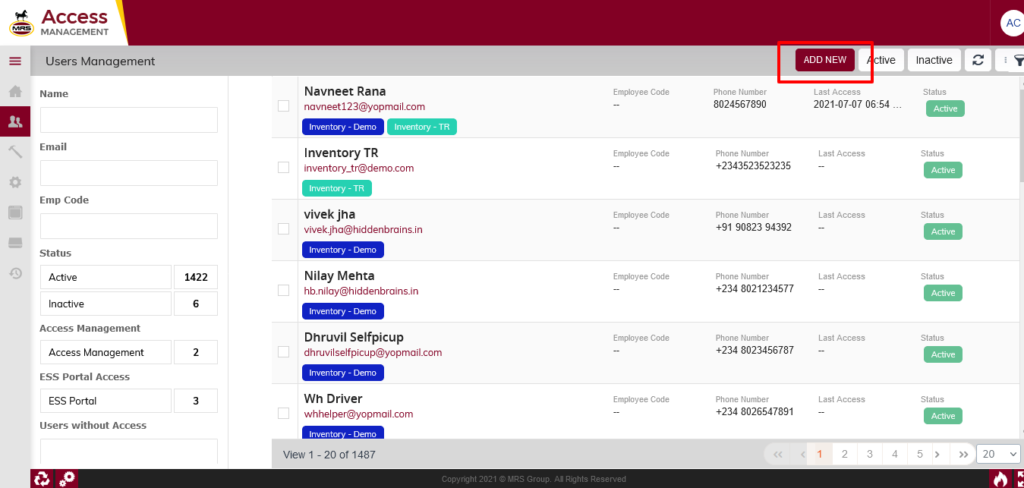
| Page/Screen | User Management Listing |
| Application | Central System |
| Role | Admin |
In add user page, user need to provide the details as follows:
1. Name
2. Mobile Number
3. Email
4. Password
In add user page, If user selects the application access as “Customer Portal” then user can be created for that system only. After selecting the application access then user need to provide the details as follows
1. Company
2. Company Profile
3. Company Role
4. Site / Location
5. State
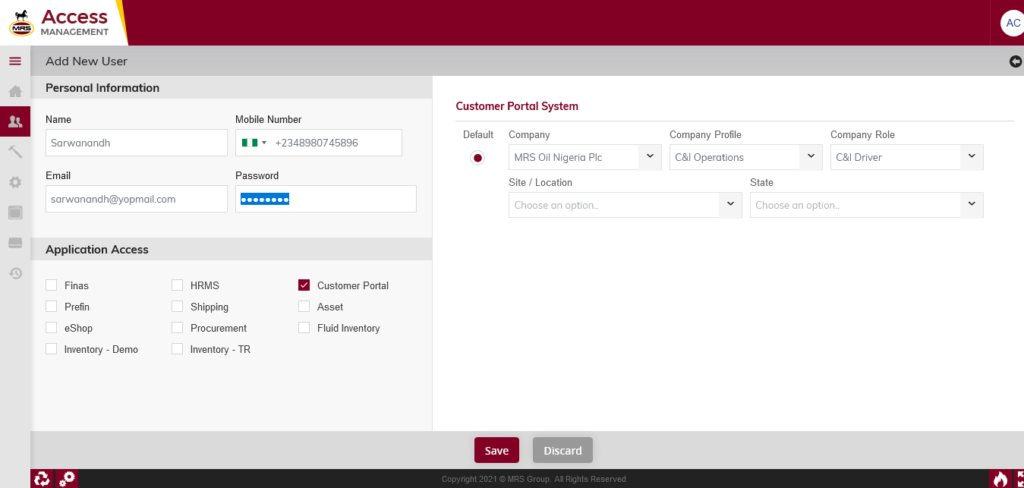
| Page/Screen | Add User |
| Application | Central System |
| Role | Admin |
Once user created from the central login system then that user can login from the respective accessible system using the staff login.