ROCKEYE Logo
Knowledge Base Home

Item Category

Production Management MasterItem Management Item Category
  • Production Management
    • Basic Guide
      • Entity Module Mapping
      • System Workflow Diagram
    • Home
      • Dashboard
        • Dashboard
    • Master
      • Company
        • Company Email Setting 
        • Item Owner 
        • Zone Master 
        •  Company Master 
      • Currencies
        • Currency Conversion Master 
        • Currency Master 
      • Item Management
        • Accounting Group 
        • Item 
        • Item Category
        • Brand Master
        • Manufacturer
      • Item Unit
        • Package Type
        • Item UOM
      • Masters
        • Department Master
        • Location Master
      • Process Management
        • Quality Check Template
        • Audit Parameters
        • Audit Test Method
        • Expense Master
        • Machine Master
        • Process Template
        • Process Master
    • Production
      • Manufacturing
        • Material Request
        • Bills of Materials
        • Production Out-Bound
        • Production Batches
        • Production Orders
      • Stock Management
        • Plant Stock 
        • Consumption Log 
        • Stock Management
    • Users
      • Users & Staff Management
        • Users
        • Staff
        • Customer
    • Warehouse
      • Plant Management
        • Plant Storage Location
        • Location Master
        • Warehouse
        • Plant Storage Capacity
        • Plant

Item Category

Purpose:

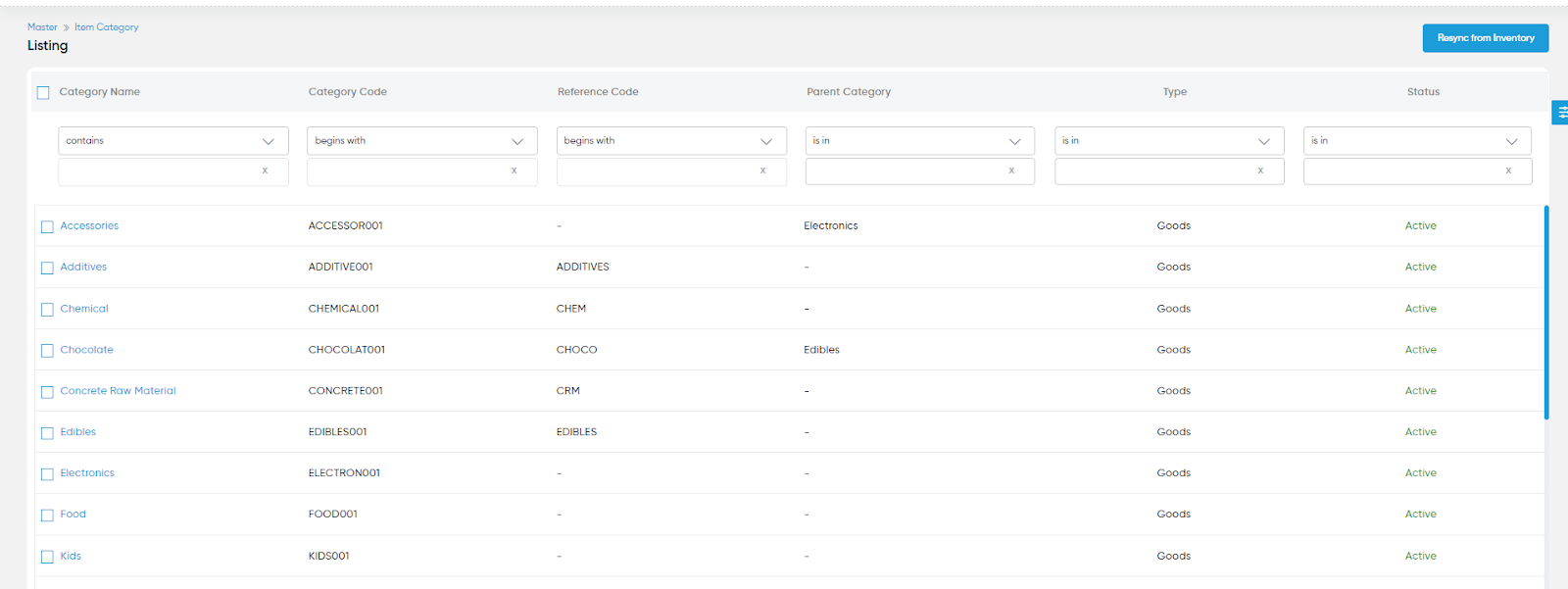
This data is synced from the inventory and warehouse. The main purpose of this module is to enable the user to view and manage the item category on the system. 

Navigation Path:

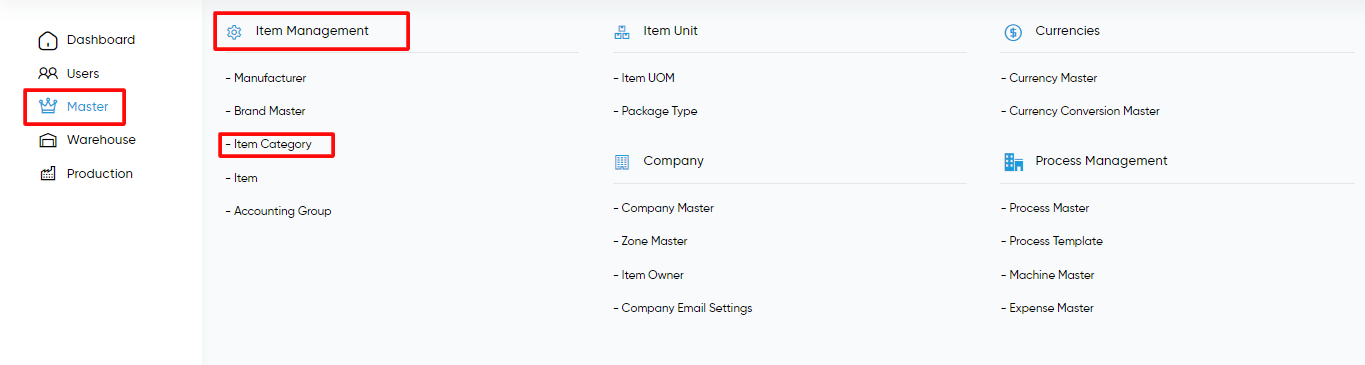
Master > Item Management > item Category 
Listing Screen:

View the listing screen of item categories synced from inventory and warehouse. If the user wants to resync the data then the user can click on the resync from the inventory button.
Refrence video Link

https://www.youtube.com/watch?v=oKt5wKsPqoU
In This Article
  • Overview
Play Watch Video Tutorials FAQ FAQ's
ROCKEYE Footer Logo

Offering a seamless integration experience with an array of essential business systems.

ROCKEYE ERP Dubai Office
Dubai, UAE

01, Unit 2201, 22nd Floor,
Metropolis Tower, Business Bay

ROCKEYE ERP Lagos Nigeria Office
Lagos, Nigeria

17875 Von Karman Avenue Irvine,
California 92614

ROCKEYE ERP Malaysia Office
Malaysia

1-17-1 Menara Bangkok Bank, No.
105, Jln Ampang, Kuala Lumpur

© 2026 — Copyright All rights reserved.

Powered by Hidden Brains