Dashbaord
Introduction
This guide explains how to send an SOS alert and manage your Circle of Care within the SOS mobile app.
From the Citizen dashboard, you can trigger an SOS, see the countdown/time to send, and manage who gets notified via your Circle of Care.
- Upon logging in, you will be directed to the main dashboard. This displays your current location and a prominent SOS button
- Tap the SOS button to initiate an emergency alert. A timer will begin counting down

- Once the timer reaches zero, an SOS alert will be sent to your Circle of Care.
Managing Your Circle of Care:
Your Circle of Care consists of trusted contacts who will be notified when you send an SOS alert. Accessing Your Circle of Care: From the main dashboard, tap View My Circle of Care.
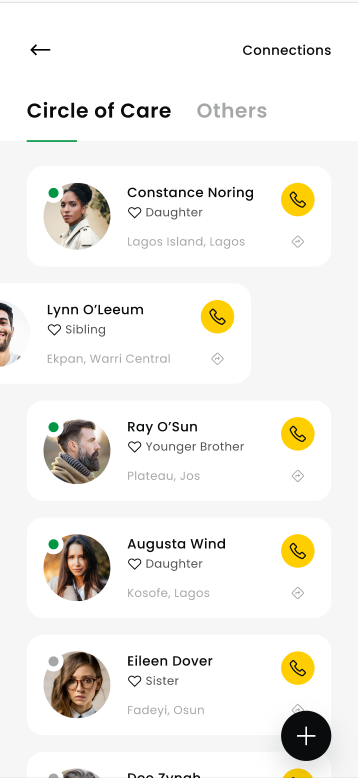
Circle of Care List View: This screen displays your Circle of Care contacts, categorized as “Circle of Care” and “Others”. Each contact shows their name, relationship to you, location, and options to contact them.
Keep at least 3–5 trusted people in Circle of Care.
Verify phone numbers regularly.
Ensure location permissions are on so your alert includes accurate location.
Contacting Members/Others
Tap the phone icon next to a contact’s name to directly call them. Tap the location icon to view their location (if shared).
