Transport Management
Dashboard:
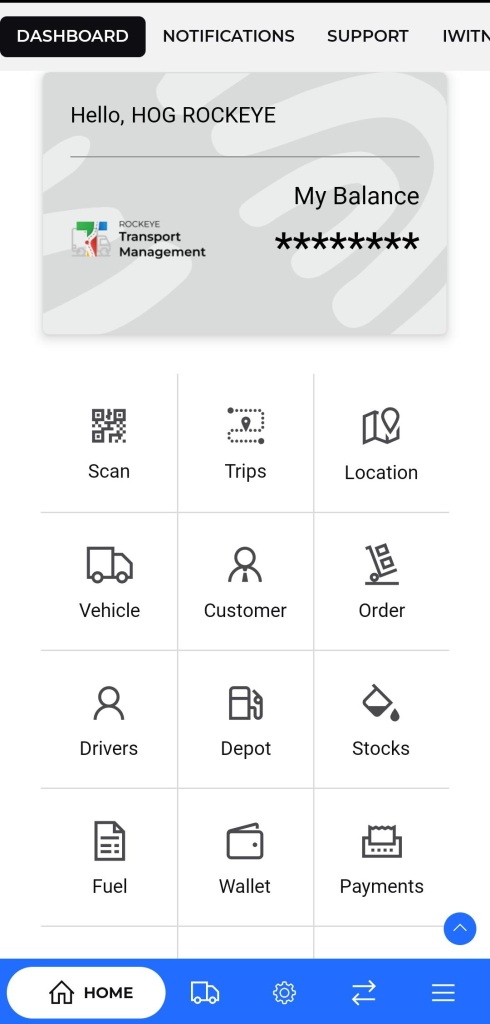
The Dashboard serves as the central hub of the application, providing transporters with a personalized overview of their transportation operations. Key features include:
- Personalized Greeting: Displays a friendly greeting with the transporter’s name.
- My Balance: Shows the transporter’s current balance or credit within the system.
- Quick Access Icons: Provides one-tap access to frequently used features as below:
- Scan : Opens the device camera to scan QR codes or barcodes, typically used to validate trip assignments, vehicle IDs, delivery orders, or driver heck-ins
- Trips : Provides direct access to view, manage, assign, and update all trips from draft, scheduled, and ongoing to completed. Enables control over the transport lifecycle
- Location : Displays real-time and historical GPS tracking of vehicles and drivers. Useful for monitoring routes, delays, and delivery confirmations.
- Vehicle : Shows a comprehensive list of registered fleet vehicles. Allows users to add, edit, or view maintenance, availability, and assignment status
- Customer : Grants access to customer database. Shows contact info, order history, and associated trips. Supports customer-specific tracking and reporting.
- Order : Manages transport orders related to goods movement. Displays order details like quantity, origin, destination, and customer.
- Drivers : Lists all drivers under the transporter. Includes license details, assignment history, vehicle allocations, and availability status.
- Depot : View details of fuel depots or loading hubs. Includes depot locations, stock status, and usage history for operational planning.
- Stocks : Displays current stock levels of materials (e.g., fuel, product inventory) available at depots. Useful for coordinating loads and deliveries.
- Fuel : Manage fuel vouchers, usage reports, refuelling transactions, and depot records. Helps in tracking fuel costs and allocation per trip or vehicle.
- Wallet : Shows the digital wallet associated with your transport account. Track top-ups, deductions, and balance linked to trips or services.
- Payment : Displays a list of all incoming and outgoing transactions, settlements with clients or partners, and allows generation of payment reports.
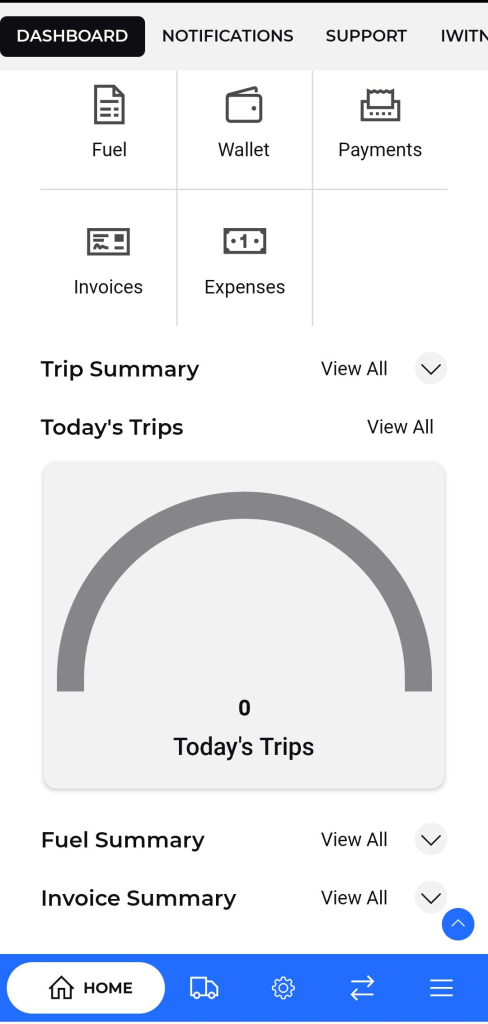
- Invoices : Lists created or received invoices for orders, driver reimbursements, or service charges. View payment status related to each invoice.
- Expenses : Enables recording and review of trip- or business-related expenses such as fuel, repairs, tolls. Useful for budgeting and reporting.
Some of the Key Sections include:
- Trip Summary: Provides an overview of today’s trips, including the number of trips and a graphical representation of trip progress. Click on View all to access a detailed list of all trips, including past, current, and upcoming trips.
- Fuel Summary: Offers a summary of fuel-related information, such as fuel consumption and costs.
- Invoice Summary: Provides a summary of invoicing-related information, including outstanding invoices and payment status.