Transport Management
Manage Location
Purpose :
This section of the Transport Management System mobile application allows you to manage and view details of all operational locations, such as fuel depots and weighing locations.
Navigation
Manage > Locations
Viewing the Locations List
The locations list provides a summary of all registered locations in the system.
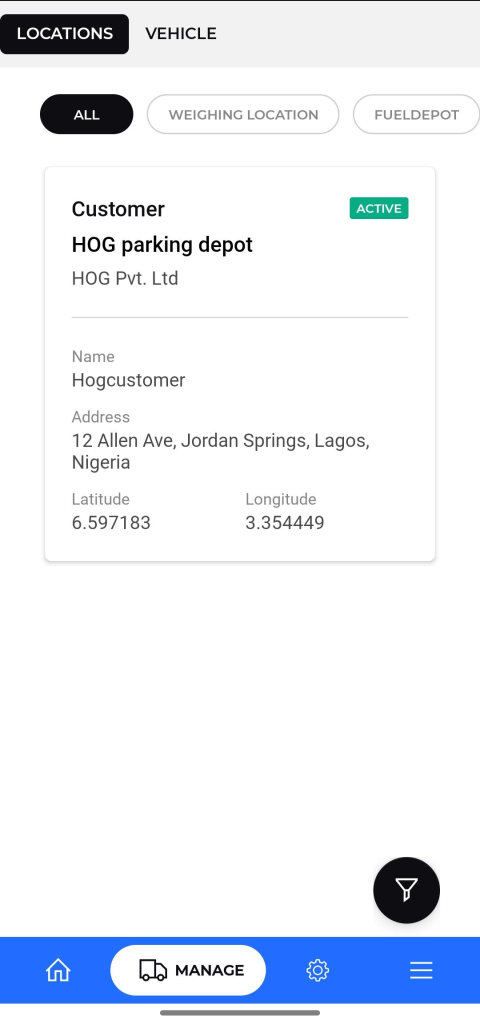
- Filters: You can filter the list to view specific types of locations using the buttons at the top:
- ALL: Displays all different registered locations.
- WEIGHING LOCATION: Shows only locations designated for weighing.
- FUELDEPOT: Shows only fuel depot locations.
- Safety Check : Displays locations where mandatory vehicle safety inspections or pre-trip checks are performed.
- Parking Depot : Lists all designated parking depots. This is useful for finding secure locations for overnight stops or vehicle staging.
- Loading Depot : Shows only locations where goods are loaded onto vehicles
- Checking Location : Displays official checkpoints along a route, such as customs, police stops, or internal company inspection points.
- Delivery Location : Lists all locations where goods are unloaded and delivered to the customer.
- Location Information: Each card in the list displays key details:
- Name: The name of the location .
- Type: The category of the location (e.g., “Global,” “Customer”).
- Status: The current status of the location.
- Address: The full address is displayed.
- Coordinates: The latitude and longitude of the location.
Tapping on any location from the list will open a detailed view of its information.
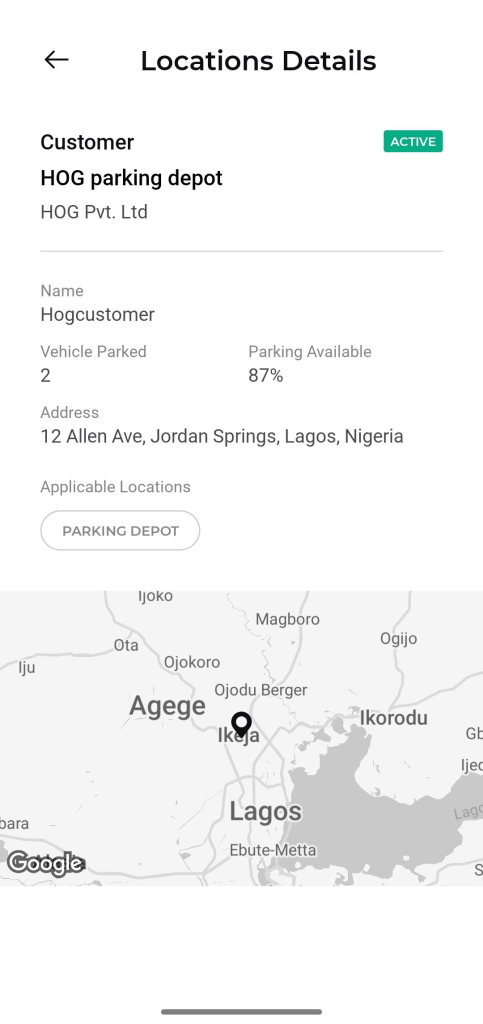
- Location Name and Type: The main heading displays the location type (e.g., “Global”) and name (e.g., “Lagos Fuel Depot”).
- Status: The current status of the location is clearly visible.
- Capacity Information:
- Vehicle Parked: The current number of vehicles at the location.
- Parking Available: The percentage of available parking space.
- Address: The full address of the location.
- Applicable Locations: The tags or categories assigned to this location.
- Map View: A visual representation of the location’s position on a map.