Transport Management
Dashboard:
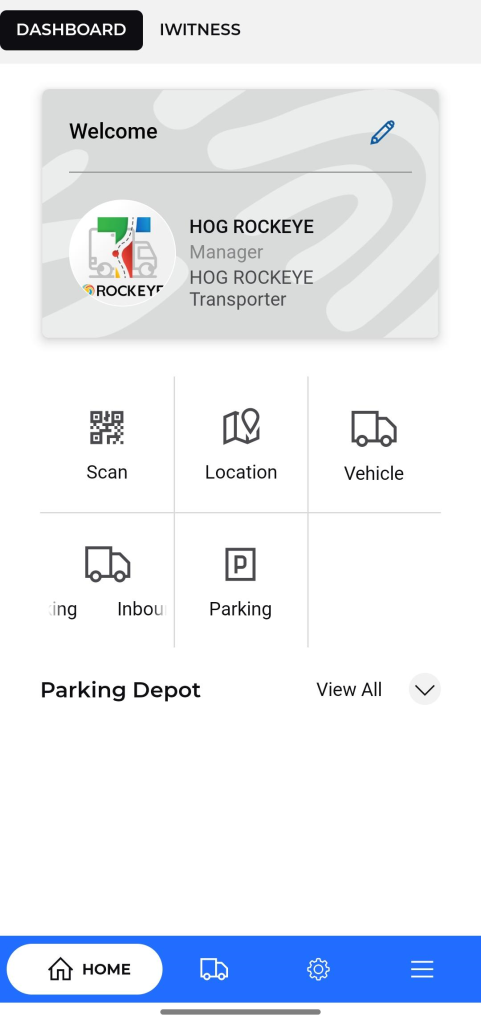
The Dashboard serves as the central hub of the application, providing transporters with a personalized overview of their transportation operations. Key features include:
- Displays the Parking Manager Supeprofile information including name, role, company.
- Quick Access Icons: Provides one-tap access to frequently used features as below:
- Scan : Opens the device camera to scan QR codes or barcodes, typically used to validate trip assignments, vehicle IDs, delivery orders, or driver heck-ins
- Location : Displays real-time and historical GPS tracking of vehicles and drivers. Useful for monitoring routes, delays, and delivery confirmations.
- Vehicle : Shows a comprehensive list of registered fleet vehicles. Allows users to add, edit, or view maintenance, availability, and assignment status
- Inbound at Parking : Records and manages the arrival of vehicles into the parking area, capturing details such as entry time, vehicle registration number, and driver information.
- Parking : Provides an overview of all parking areas, available slots, and current vehicle occupancy, along with the ability to log new parking entries and manage existing ones.
Allows the user to update their personal and application-related details.
Available Fields:
- Language: Select preferred application language.
- First Name & Last Name: Modify the user’s name.
- Email: Update registered email address.
- Phone Number: Change contact number.
- Company Name: Edit the name of the associated company.
- Change Password: Option to reset or change the current password.
- Enable Application PIN: Toggle button to activate or deactivate the application PIN for added security.
Action Button:
- Update:
- Saves and applies the changes made to the profile information.
Depot : View details of fuel depots or loading hubs. Includes depot locations.
- Includes a top navigation bar to switch between:
- Dashboard
- IWitness (for incident reporting)
- Features a bottom navigation bar with :
- Home: Access to the dashboard.
- Manage : Access to the Location and Vehicle Management.
- Trips: Navigate to trip management.
- Menu: Access additional settings or features.