Transport Management
Navigation Menu
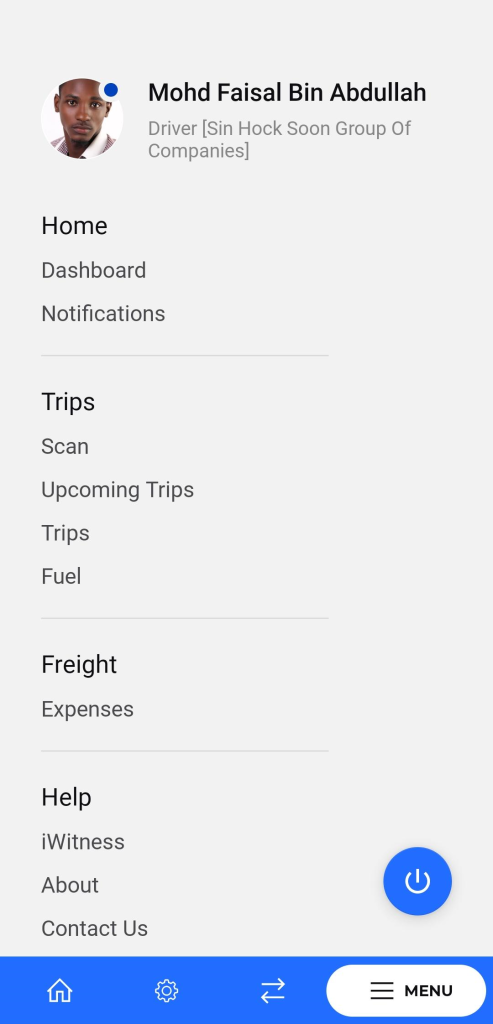
Purpose: To provide easy access to various features and functionalities of the application for drivers.
Navigation: Accessible by tapping the “MENU” button at the bottom right of the screen.
Description:
- Profile Section:
- Displays the user’s profile picture, name, and company affiliation.
- Home Section:
- Dashboard: Access the main dashboard for an overview of key information.
- Notifications: View and manage notifications.
- Trips Section:
- Scan: Access the scan feature for trips.
- Upcoming Trips: View and manage upcoming trips.
- Trips: Access the main trips section.
- Fuel: Manage fuel-related information and tasks.
- Freight Section:
- Freight: Access freight-related information and tasks.
- Expenses: Manage and track trip expenses.
- Help Section:
- iWitness: Access the iWitness feature for reporting and documentation.
- About: View information about the application.
- Contact Us: Access contact information and support options.
- Logout Button: Tap the power icon to log out of the application.