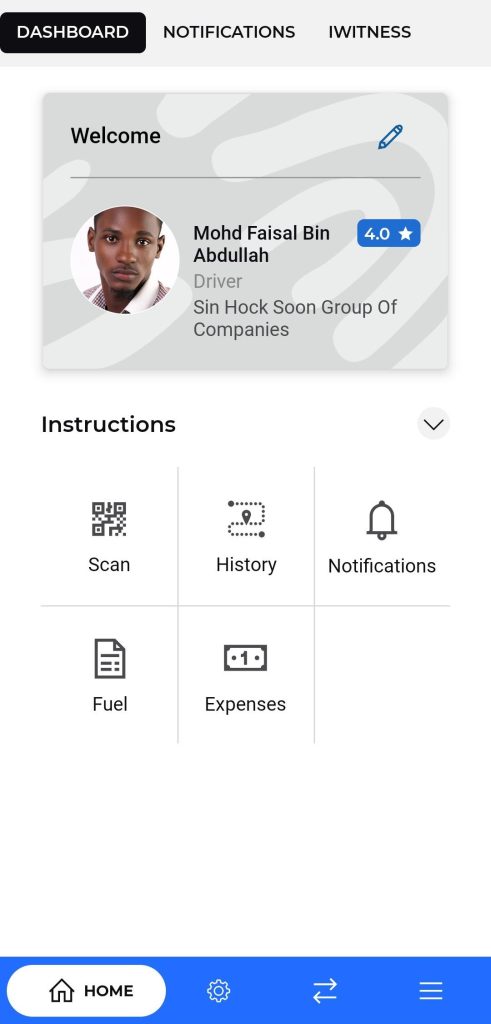
Dashboard Screen
Once the Delivery is dispatched the delivery person will be responsible for further action and process
Purpose:
To provide drivers with a summary of their profile and quick access to essential features.
Navigation:
The top navigation bar allows switching between the Dashboard, Notifications, and IWitness sections. The bottom navigation bar provides access to the home screen, trip management, data synchronization, and additional options.
Description:
- Displays the driver’s profile information including name, role, company, and rating.
- Offers quick action tiles such as:
- Scan: For scanning QR codes or documents.
- History: To view previous trips or activities.
- Notifications: To check important alerts and messages.
- Fuel: To manage fuel entries.
- Expenses: To log and track expense records.
Allows the user to update their personal and application-related details.
Available Fields:
- Language: Select preferred application language.
- First Name & Last Name: Modify the user’s name.
- Email: Update registered email address.
- Phone Number: Change contact number.
- Company Name: Edit the name of the associated company.
- Change Password: Option to reset or change the current password.
- Enable Application PIN: Toggle button to activate or deactivate the application PIN for added security.
Action Button:
- Update:
- Saves and applies the changes made to the profile information.
- Includes a top navigation bar to switch between:
- Dashboard
- Notifications
- IWitness (for incident reporting)
- Features a bottom navigation bar with :
- Home: Access to the dashboard.
- Trips: Navigate to trip management.
- Freight : Display all the Freight Related Information.
- Menu: Access additional settings or features.
Trip History List
Purpose:
To help drivers view and track the list of previously created trips along with their key details.
Navigation:
Accessed by tapping the History tile from the dashboard or through the trip section in the bottom navigation bar.
Description:
Displays a scrollable list of all trips with trip ID, route information, date, and trip status.
Each trip entry provides a summary and can be tapped to open detailed information.
Displays full trip details such as:
- Trip ID and date
- Transporter name and vehicle number
- Waybill number and other transport documents
- Route and destination information
- Provides options to edit trip data, upload documents, or add photos using IWitness.
- Includes action buttons for scanning and syncing, and may also allow drivers to mark trips as completed.
Helps drivers quickly access records of past deliveries or journeys for reference or reporting