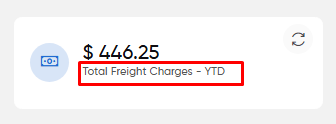
Users can view a statistical overview of the total freight charges for all completed trips in the year-to-date (YTD) period. This widget, accessible from the finance section, provides insight into the overall payable freight charges associated with each trip.
A refresh icon allows users to update the "Total Freight Charges - YTD" graph, ensuring access to the most up-to-date financial data.
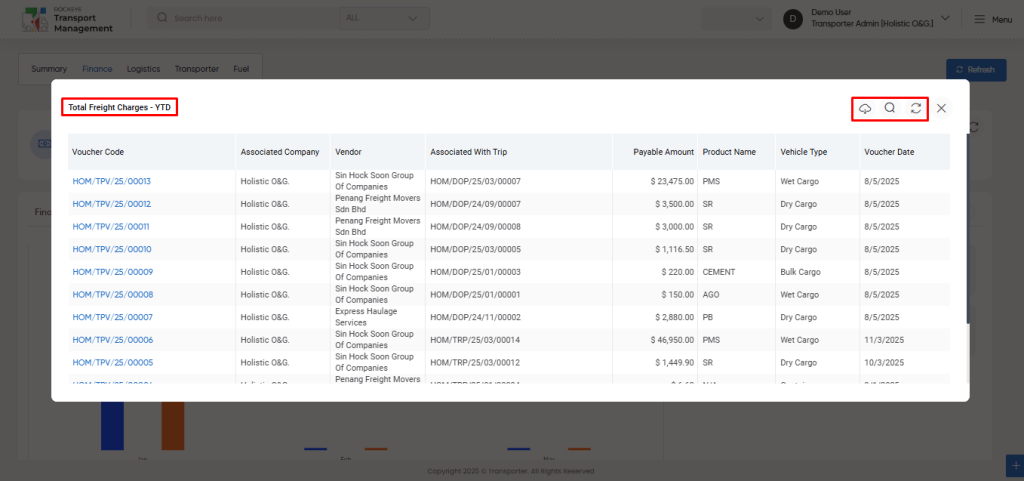
User will be able to view the total freight charges- YTD data with the following
Voucher Code
Associated Company
Vendor
Associated with trip
Payable amount
Product name
Vehicle type
Voucher date
Users can click on the widget to view all freight rate details and export the data in CSV or PDF format using the export icon.
A search and refresh function is available for easy access to specific freight rate information.
In - Transit Freight Charges - YTD :
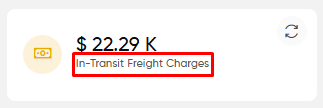
Users can view a statistical overview of the freight charges for trips that are currently in progress, referred to as "In-Transit Freight Charges."
This widget, accessible from the finance section, provides insight into the estimated freight charges for trips that have not yet been completed.
A refresh icon allows users to update the "In-Transit Freight Charges" graph, ensuring access to the most current financial data for trips still in progress.
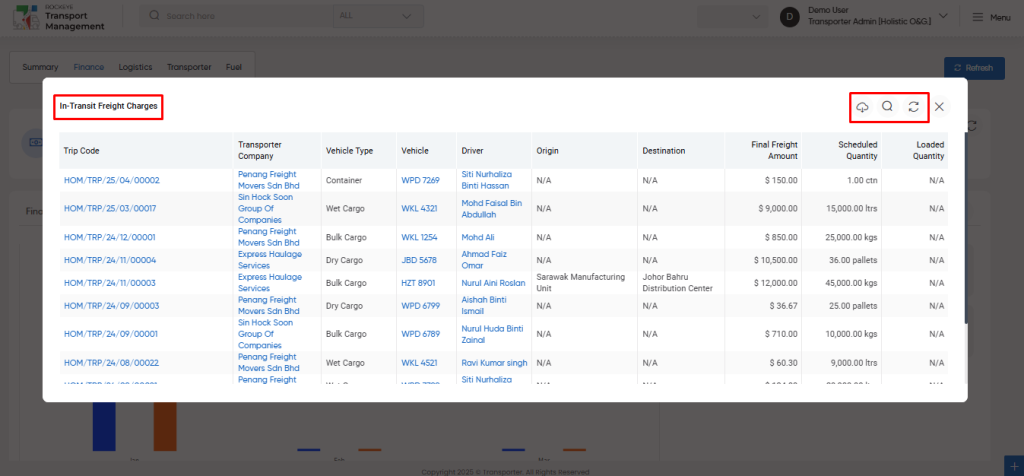
User will be able to view the In - Transit Freight Charges data with the following
Trip Code
Transporter Company
Vehicle type
Vehicle
Driver
Origin
Destination
Final Freight amount
Scheduled quantity
Loaded quantity
Users can click on the widget to view all “In-Transit freight rate” details and export the data in CSV or PDF format using the export icon.
A search and refresh function is available for easy access to specific “In-Transit freight rate” information.
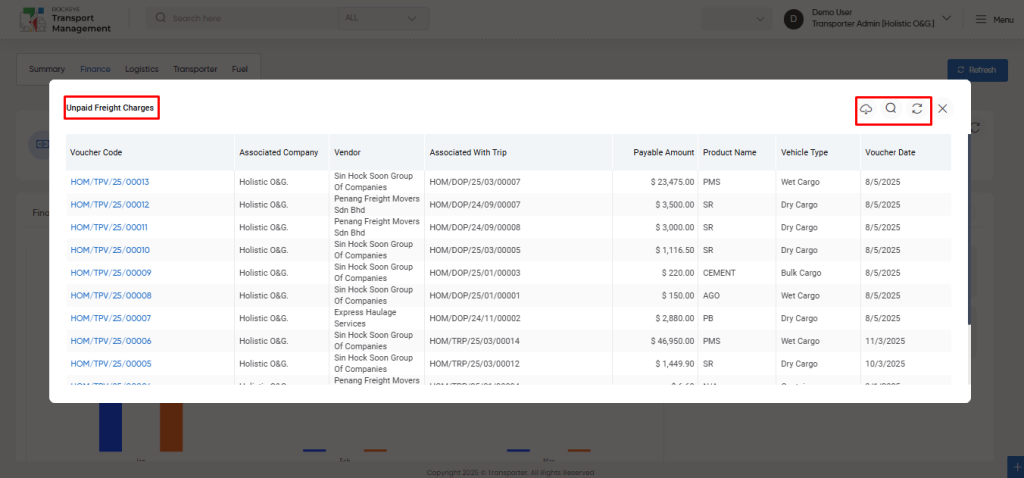
Unpaid Freight Charges :
Users can view a statistical overview of unpaid freight charges associated with completed trips.
This widget, accessible from the finance section, provides insight into the total amounts that remain unpaid.
A refresh icon allows users to update the "Unpaid Freight Charges" data, ensuring access to the most current financial information regarding outstanding payments.
User will be able to view the unpaid Freight Charges data with the following
Voucher Code
Associated Company
Vendor
Associated with Trip
Payable Amount
Product Name
Vehicle Type
Voucher Date
Users can click on the widget to view all “unpaid freight rate” details and export the data in CSV or PDF format using the export icon.
A search and refresh function is available for easy access to specific “unpaid freight rate” information.
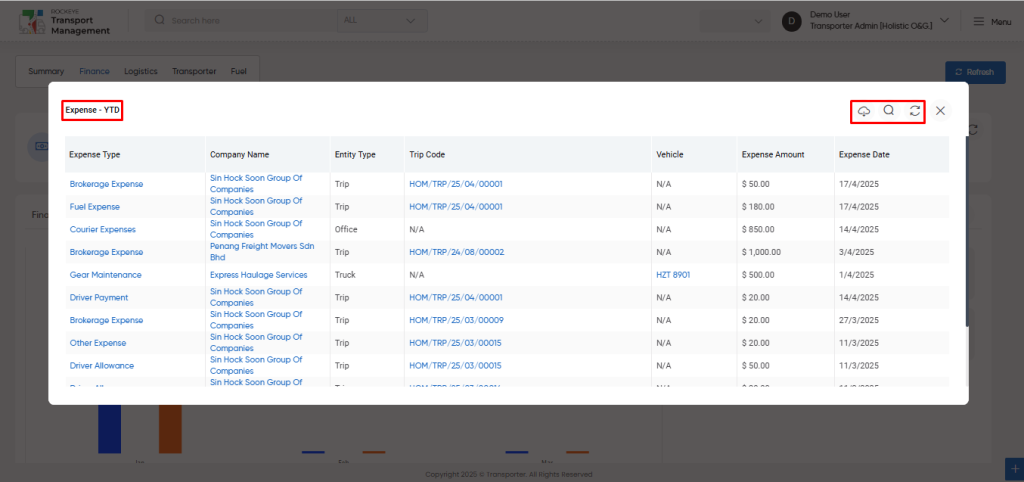
Expense - YTD :
Users can view a statistical overview of all expenses incurred year-to-date (YTD). This widget, accessible from the finance section, provides insight into the total expenses associated with various trips and operations.
A refresh icon allows users to update the "Expenses - YTD" data, ensuring access to the most current financial information.
User will be able to view the expense - ytd data with the following
Expense Type
Company Name
Entity Type
Trip Code
Vehicle
Expense Amount
Expense Date
Users can click on the widget to view all “Expense - YTD” details and export the data in CSV or PDF format using the export icon.
A search and refresh function is available for easy access to specific “Expense - YTD” information.
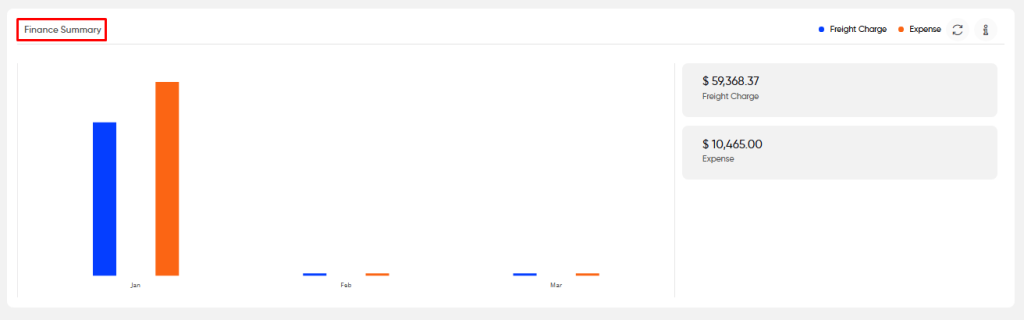
Finance Summary:
Users can view a graphical overview of the complete financial summary, including freight charges and expenses incurred year-to-date (YTD).
This widget provides a month-wise breakdown of total freight charges and expenses, offering insight into the organization's financial performance.
By hovering over an eye icon, users can access a title or brief explanation of the displayed data.
Additionally, hovering the cursor over the graph reveals specific values for each month, allowing for a more detailed analysis.
Users can view the total financial summary of the freight charge and the expenses till current date.
A refresh icon is available to update the "Finance Summary" graph, ensuring users have access to the most recent financial data.
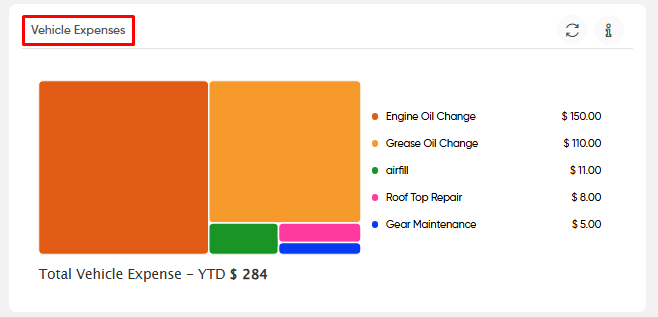
Vehicle Expenses :
Users can view a graphical representation of various vehicle expenses incurred by transporters.
This widget provides insights into total expense values categorized by types, such as grease, oil, tyre punctures, minor repairs, and more.
Users can also see the overall total vehicle expenses year-to-date (YTD).
By hovering over an eye icon, users can access a title or brief explanation of the displayed data.
Additionally, hovering the cursor over the graph reveals specific values for each vehicle expense type, facilitating a more detailed analysis.
A refresh icon is available to update the "Vehicle Expenses" graph, ensuring users have access to the most current financial data.
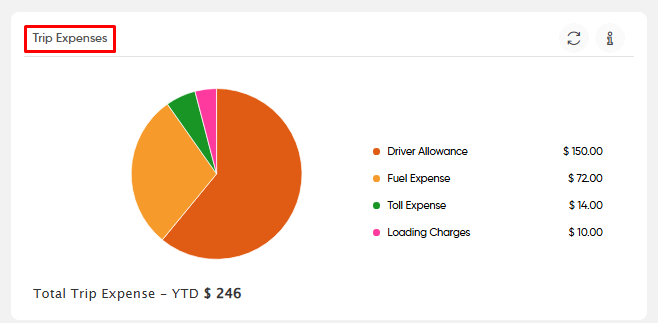
Trip Expenses :
Users can view a graphical representation of various trip expenses incurred by transporters.
This widget provides insights into total expense values categorized by types, such as fuel expenses, driver payment, loading charges, and more.
Users can also see the overall total trip expenses year-to-date (YTD).
By hovering over an eye icon, users can access a title or brief explanation of the displayed data.
Additionally, hovering the cursor over the graph reveals specific values for each trip expense type, facilitating a more detailed analysis.
A refresh icon is available to update the "Trip Expenses" graph, ensuring users have access to the most current financial data.
Office Expenses :
Users can view a graphical representation of various office expenses incurred by transporters.
This widget provides insights into total expense values categorized by types, such as stationary expenses, electricity, labour, and more.
Users can also see the overall total office expenses year-to-date (YTD).
By hovering over an eye icon, users can access a title or brief explanation of the displayed data.
Additionally, hovering the cursor over the graph reveals specific values for each office expense type, facilitating a more detailed analysis.
A refresh icon is available to update the "Office Expenses" graph, ensuring users have access to the most current financial data.
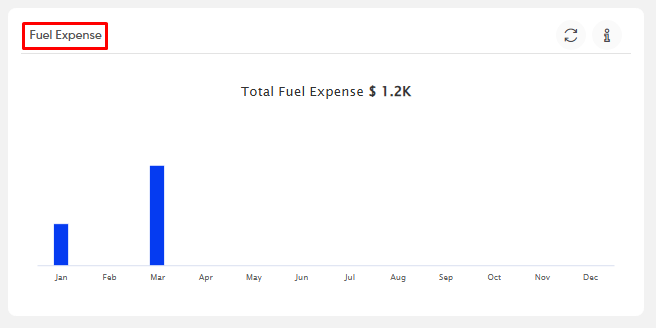
Fuel Expenses :
Users can view a graphical representation of various fuel expenses incurred by transporters.
This widget provides insights into total fuel expense categorized by month wise.
Users can also see the overall total fuel expenses year-to-date (YTD).
By hovering over an eye icon, users can access a title or brief explanation of the displayed data.
Additionally, hovering the cursor over the graph reveals specific values for each fuel expense within a specific month, facilitating a more detailed analysis.
A refresh icon is available to update the "Fuel Expenses" graph, ensuring users have access to the most current financial data.
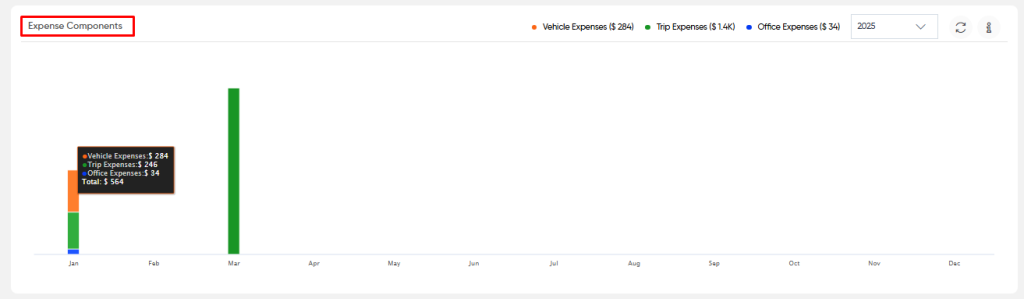
Expense Components:
Users can view a graphical representation of various expense components incurred by transporters.
This widget provides insights into month-wise expense categories, including vehicle expenses, trip expenses, and office expenses.
Users can also see the overall total expense components categorized by vehicle, trip, and office for the year-to-date (YTD).
By selecting a specific year from the dropdown menu, users can visualize expense component data for each month, categorized by expense type.
Hovering over an eye icon allows users to access a title or brief explanation of the displayed data.
Additionally, hovering the cursor over the graph reveals specific values for each expense category within a specific month, facilitating a more detailed analysis.
A refresh icon is available to update the "Expense Components" graph, ensuring users have access to the most current financial data.
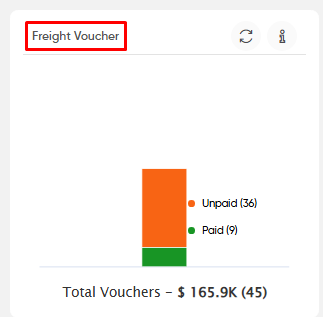
Freight Voucher :
Users can view a graphical representation of the payment status (paid/unpaid) of freight vouchers.
This widget provides insights into the overall total value and the count of vouchers.
By hovering over an eye icon, users can access a title or brief explanation of the displayed data.
Additionally, hovering the cursor over the graph reveals specific values for both unpaid and paid freight vouchers, enabling a more detailed analysis.
A refresh icon is available to update the "Freight Vouchers" graph, ensuring users have access to the most current financial data.
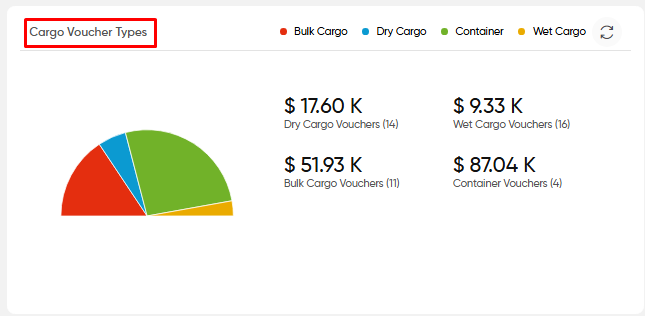
Cargo Voucher Types :
Users can view a graphical representation of the monetary value of various cargo voucher types.
This widget provides insights into the values associated with vouchers for specific cargo types used in trips.
By hovering the cursor over the graph, users can see specific values for the amount related to each cargo type.
A refresh icon is also available to update the "Cargo Voucher Types" graph, ensuring users have access to the most current financial data.
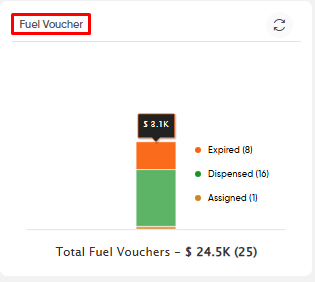
Fuel Voucher :
Users can view a graphical representation of the voucher status (Dispensed / Expired ) of fuel vouchers.
This widget provides insights into the overall total value and the count of fuel vouchers.
By hovering the cursor over the graph reveals specific values for both dispensed and expired fuel vouchers, enabling a more detailed analysis.
A refresh icon is available to update the "Fuel Vouchers" graph, ensuring users have access to the most current financial data.
Consumed Fuel Expense - YTD:
Users can view the statistical value of the total consumed fuel expenses for the year-to-date (YTD).
This widget provides insights into the overall expenditure on fuel consumption, allowing users to track fuel expenses effectively throughout the year.
A refresh icon is available to update the "Consumed Fuel Expense - YTD" graph, ensuring users have access to the most current financial data.
Users can view the statistical count of completed trips year-to-date (YTD) alongside the total value of delivered product prices during the same period.\
This widget provides a comprehensive overview of both the number of trips completed and the associated revenue from delivered products.
A refresh icon is available to update the "Completed Trips - YTD & Delivered Product Price - YTD" graph, ensuring users have access to the most current financial data.
Top 5 commercially viable transporters :
Users can view the statistical value associated with the top five commercially viable transporters.
This widget provides insights into the overall financial contributions of these transporters, as well as their payment statuses, including paid, unpaid, partially paid, and pending for their trips.
Users can click on a specific transporter to access detailed information regarding their payment status.
A refresh icon is available to update the "Top 5 Commercially Viable Transporters" graph, ensuring users have access to the most current financial data.







 Watch Video Tutorials
 FAQ's
FAQ's